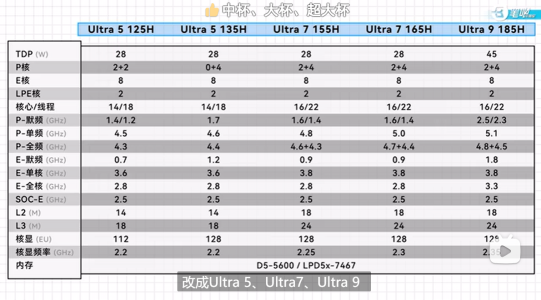
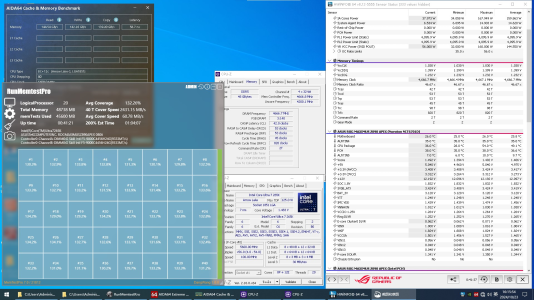
Discussion Intel Meteor, Arrow, Lunar & Panther Lakes + WCL Discussion Threads

Page 739 - Seeking answers? Join the AnandTech community: where nearly half-a-million members share solutions and discuss the latest tech.

Tigerick

Senior member
Apr 1, 2022
941
857
106
Wildcat Lake (WCL) Specs

Intel Wildcat Lake (WCL) is upcoming mobile SoC replacing Raptor Lake-U. WCL consists of 2 tiles: compute tile and PCD tile. It is true single die consists of CPU, GPU and NPU that is fabbed by 18-A process. Last time I checked, PCD tile is fabbed by TSMC N6 process. They are connected through UCIe, not D2D; a first from Intel. Expecting launching in Q1 2026.
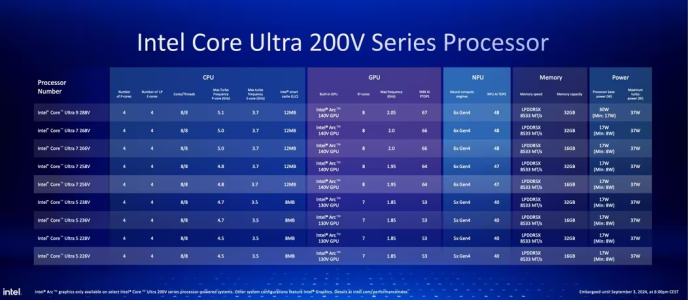
Intel Raptor Lake UIntel Wildcat Lake 15W?Intel Lunar LakeIntel Panther Lake 4+0+4
Launch DateQ1-2024Q2-2026Q3-2024Q1-2026
ModelIntel 150UIntel Core 7Core Ultra 7 268VCore Ultra 7 365
Dies2223
NodeIntel 7 + ?Intel 18-A + TSMC N6TSMC N3B + N6Intel 18-A + Intel 3 + TSMC N6
CPU2 P-core + 8 E-cores2 P-core + 4 LP E-cores4 P-core + 4 LP E-cores4 P-core + 4 LP E-cores
Threads12688
Max Clock5.4 GHz?5 GHz4.8 GHz
L3 Cache12 MB12 MB12 MB
TDP15 - 55 W15 W ?17 - 37 W25 - 55 W
Memory128-bit LPDDR5-520064-bit LPDDR5128-bit LPDDR5x-8533128-bit LPDDR5x-7467
Size96 GB32 GB128 GB
Bandwidth136 GB/s
GPUIntel GraphicsIntel GraphicsArc 140VIntel Graphics
RTNoNoYESYES
EU / Xe96 EU2 Xe8 Xe4 Xe
Max Clock1.3 GHz?2 GHz2.5 GHz
NPUGNA 3.018 TOPS48 TOPS49 TOPS


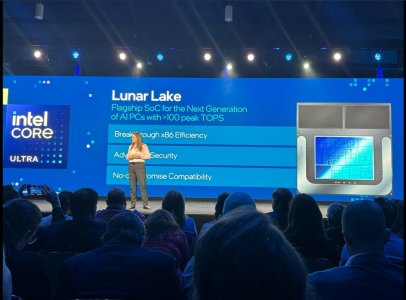
PPT1.jpg
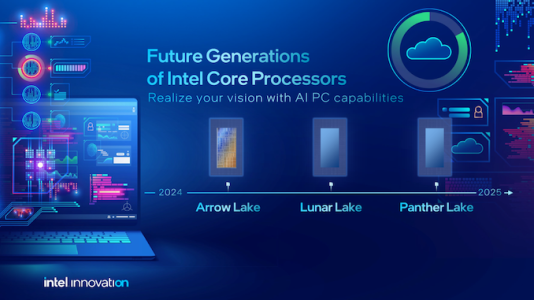
PPT2.jpg
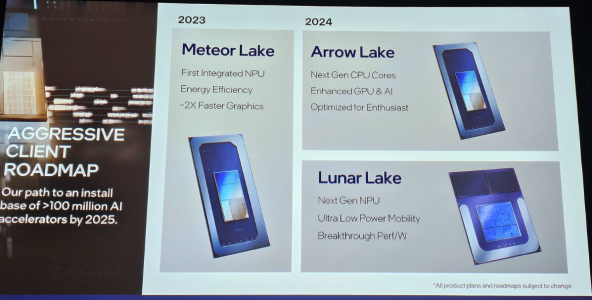
PPT3.jpg


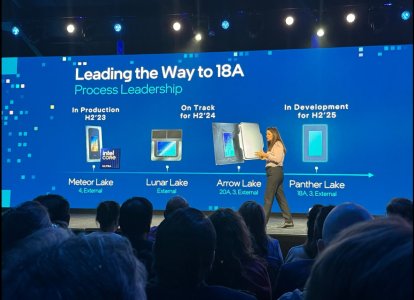
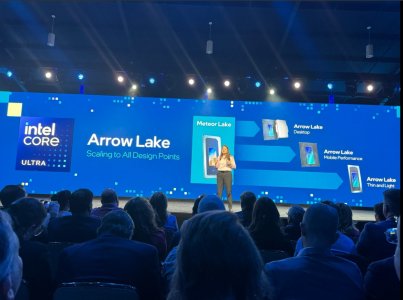
As Hot Chips 34 starting this week, Intel will unveil technical information of upcoming Meteor Lake (MTL) and Arrow Lake (ARL), new generation platform after Raptor Lake. Both MTL and ARL represent new direction which Intel will move to multiple chiplets and combine as one SoC platform.

MTL also represents new compute tile that based on Intel 4 process which is based on EUV lithography, a first from Intel. Intel expects to ship MTL mobile SoC in 2023.

ARL will come after MTL so Intel should be shipping it in 2024, that is what Intel roadmap is telling us. ARL compute tile will be manufactured by Intel 20A process, a first from Intel to use GAA transistors called RibbonFET.


LNL-MX.png
 

Attachments

  • PantherLake.png
    PantherLake.png
    283.5 KB · Views: 24,043
  • LNL.png
    LNL.png
    881.8 KB · Views: 25,531
  • INTEL-CORE-100-ULTRA-METEOR-LAKE-OFFCIAL-SLIDE-2.jpg
    INTEL-CORE-100-ULTRA-METEOR-LAKE-OFFCIAL-SLIDE-2.jpg
    181.4 KB · Views: 72,439
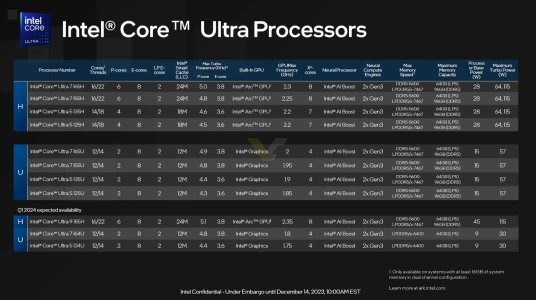
  • Clockspeed.png
    Clockspeed.png
    611.8 KB · Views: 72,326
Last edited:

JustViewing

Senior member
Aug 17, 2022
271
476
106
I've never used Parallels but I used VMware for years to run a Windows VM under Linux and it worked great. No problems with "stuttering" and setting up shares to have stuff stored outside the VM is built in. It is not remotely as bad an experience are you are trying to imply.
I guess you used x64 Guest OS on x64Host OS. For the most part this will run at native/near native speed (it is virtualization, not emulation). However it is not same when you run x64 OS on top of ARM OS, where x64 instructions need to be translated to ARM instructions.
 
  • Like
Reactions: SiliconFly

511

Diamond Member
Jul 12, 2024
5,424
4,844
106
It seems like you're excited that the N3 for tGPU rumor is finally being debunked. Many people believed it as fact, but it's now being clarified. It's a relief to put the misinformation to rest.
After 2 years 🤣
 

Thunder 57

Diamond Member
Aug 19, 2007
4,250
7,049
136
I'd wait for independent verification. Even the Intel slide says single digit gain in a geomean of 35 games. Performances fixs have been claimed before and never seem to work out.

It reminds me of Bulldozer. "That damn Windows scheduler! It'll be patched and then Windows 8 will fix it once and for all!". Never amounted to anything really.

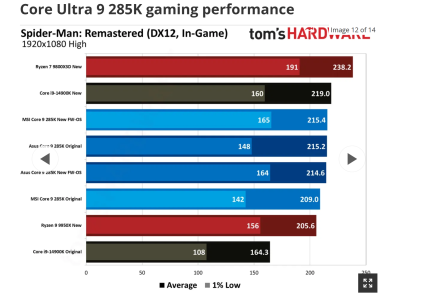
And just like I suspected it (the BIOS updating performance) appears to be crap:


DAPUNISHER

Super Moderator CPU Forum Mod and Elite Member
Super Moderator
Aug 22, 2001
32,391
33,333
146
How is it possible that a processor on Ancient node is slapping everything except for Gaming Optimized X3D Chips 🤣 and it gains free performance
Look at the difference in Spiderman for raptor, that's a massive jump.

Screenshot 2025-01-18 095324.png

If that extends to the i5, it would be a big boone to battle mage in the worst case overhead scenario.
 
  • Like
Reactions: Tlh97 and pcp7

DAPUNISHER

Super Moderator CPU Forum Mod and Elite Member
Super Moderator
Aug 22, 2001
32,391
33,333
146
Even more fun, if it extends to Alder Lake I'm going to laugh in 12700K :smilingimp:
That would help capture sales for gaming builds with battle mage too. Already isolated examples of Gandalf doing better with an Intel CPU in gaming.
 

Doug S

Diamond Member
Feb 8, 2020
3,820
6,755
136
I guess you used x64 Guest OS on x64Host OS. For the most part this will run at native/near native speed (it is virtualization, not emulation). However it is not same when you run x64 OS on top of ARM OS, where x64 instructions need to be translated to ARM instructions.

But my point once again is that NO ONE is going to do that. It is completely moronic to want to run an x86 OS on an ARM host. Almost no one needs to do that.

If you want to run x86 Windows applications on your M4 Mac you're going to boot ARM Windows and let Windows handle the x86->ARM translation. And plenty of people have been doing that on ARM Macs with great success.
 

OneEng2

Golden Member
Sep 19, 2022
1,001
1,200
106
I thought it was clear I was talking about the Apple M series and not literal decades ago. Apple moved 10% of the client PC market onto ARM with that decision. That's a 10% TAM shrink for one of Intel's most important segments.

The x86 doom and gloom is really obvious when you look at trends and trajectories. I'm not going to put a firm timeline or prediction on dates - but I do think it's clear that x86 will not be the dominate ISA in client and server within my lifetime. If the client PC segment becomes majority ARM, then that severely raises costs for x86 development for server and increasingly motivates a transition to ARM.

This will be a multi-decade long transition. It won't be immediate. It won't be soon. But it's literally playing out right now.
Nvidia will bring more of their server solutions over to ARM. Their partnership with MediaTek is only the beginning.

The whole point of this doom-and-gloom is to point out that Intel (and AMD) need to focus on alternatives to x86 - and they are. dGPUs and for Intel, also their Fabs.
Ok, been out for a bit at CES, then recovering from my sore feet and back!

My bad. Old Apple used Power not ARM. I recall clearly the discussion at the time being very similar to the current ARM will destroy x86.

It didn't.

Apples success is not due to ARM. It is due to Apple moving the goal post to mobile for a great deal of user cases.

Current ARM generation is superior to x86 in mobile for typically mobile use cases... Due to power efficient design enhancement over the life of mobile phones.

x86 has evolved to handle work station and DC loads.

Can ARM be made to complete with x86? Sure, eventually.

Can the OS and apps evolve to utilize ARM ? Eventually, but less likely.

As for poor ARL, it looks like it is seriously shamed the most by its own cousin RPL!

JUST WOW!
 

perry mason

Junior Member
Oct 29, 2024
10
26
51
But my point once again is that NO ONE is going to do that. It is completely moronic to want to run an x86 OS on an ARM host. Almost no one needs to do that.

If you want to run x86 Windows applications on your M4 Mac you're going to boot ARM Windows and let Windows handle the x86->ARM translation. And plenty of people have been doing that on ARM Macs with great success.
Thank you for this. For all clarity to those who are less familiar with Macs, Qualcomms and Win 11, these are business and productivity machines for a different market than gaming, although you can do some awesome gaming anyway depending your tastes and willingness to tinker. Some more points to clarify the confusion:

—Win 11 ARM runs at virtually native speeds on M-Series Macs. It even has a very decent metal 3d acceleration driver. If you set to retina at full screen, you can pretend you have a Surface.

—A large amount of popular apps have native ARM versions on Windows 11 ARM. The x86 ones still generally run very well too (outside of edge specialized cases).

—You do need lots of RAM. But people buy the M4 Pros and Maxes with 48, 64, and 128GB fairly often.

—The #1 caveat to Win 11 ARM on Macs for isn’t compatibility or performance, but cost. M3 and M4 Pros and Maxes start in the $3k’s if you want lots of RAM. My M4 Max was decked out at mid-5k. And, Parallels will cost $110 a year. But if you use it for work and personal productivity, it’s obviously a manageable annual cost.

Those downsides aside, if you actually wanted a comparable Windows laptop…good luck. Right now, they will *not* be meaningfully cheaper. You won’t find forever renewing annual warranties with HP or Dell business, just 3 year plans. And pay extra for the phone service unlike AppleCare.

If you go Windows and deck out a 185h top of the line business system, it’s just slower (with less RAM), and if you do an HX “Workstation” with Nvidia, well now it’s hardly a board room ready laptop anymore. Loud, hot, heavy, silly charger, and poor battery life. Best bets seem like Asus Pro-Arts but it’s hit and miss and those don’t get serviced like an HP or Dell.

I’m personally excited for the Arrow Lake mobile H processors and Strix Halo to see how close they get to the M4 Pro experience. These could finally start narrowing the gap for power users. And desktop-master-race bros will start to understand why so many folks are laptop only now.

And now my personal experience. I acquired a new business HP Ommibook with a 165h Meteor Lake and 32gb RAM. Nice laptop and despite all the criticism of Meteor Lake, these laptops finally have better thermals and generally quiet fan speeds. Feels more Mac-like, ironically.

But I also have a M4 Max with 128gb RAM. It’s obviously much faster overall. For Windows through Parallels, the apps are also faster if ARM native, and they feel no slower than Meteor Lake if it’s using x86 translation. But I’ve run no benchmarks.

The usual caveat regarding ARM Windows compatibility is less an issue because the Parallels drivers pass through to native Mac hardware. So no printing/display etc issues that sometimes crop up on Qualcomm. Also, you have the Mac ecosystem to find apps.

But nevertheless, overall, you use these Mac solutions so you can access a handful of key Windows Apps or the one-off oddball tool programmed in 2007. If you are deep in an intensive Windows environment with VMs of its own, etc, then Macs typically won’t be sufficient.
 

poke01

Diamond Member
Mar 8, 2022
4,818
6,144
106
Very funny. Even if we're running Windows-on-ARM on a MacBook, virtualization doesn't come free. The performance penalty is still there. On top of that, if you run a x64 app in WoA, it has to translate and that too doesn't come free. The penalty is here too. On top of that we're now running 2 OSs simultaneously now, which is weird for most average consumers. Like I said, running x86 apps in a Mac or ARM is just not for regular people.
99.99% people are not running windows x86 apps on a MacBook Pro. It’s a niche of a niche. Those who want x86 software get a windows x86 computer.
 
Last edited:

Doug S

Diamond Member
Feb 8, 2020
3,820
6,755
136
Very funny. Even if we're running Windows-on-ARM on a MacBook, virtualization doesn't come free. The performance penalty is still there. On top of that, if you run a x64 app in WoA, it has to translate and that too doesn't come free. The penalty is here too. On top of that we're now running 2 OSs simultaneously now, which is weird for most average consumers. Like I said, running x86 apps in a Mac or ARM is just not for regular people.

There are virtualization setups that hide all the gory details. You are running a VM but other than needing more RAM for it you the typical clueless consumer doesn't know. The application just appears in a window under your host OS GUI and looks like any other app other than the menus looking weird.
 
  • Like
Reactions: Thibsie

Thibsie

Golden Member
Apr 25, 2017
1,178
1,391
136
There are virtualization setups that hide all the gory details. You are running a VM but other than needing more RAM for it you the typical clueless consumer doesn't know. The application just appears in a window under your host OS GUI and looks like any other app other than the menus looking weird.
Parallels does that on mac.
 

Doug S

Diamond Member
Feb 8, 2020
3,820
6,755
136
VMware workstation has the same features. Loved it initially, but later started to feel it's effect. Even dragging a window across the screen shows some kinda lag and is no where near responsive as native. I think it overlays the app window on a DirectX display surface or something similar. It used to lose sync & they couldn't fix it even after many years. In the beginning, I thought VMs were the way to go (for office use). Only late realized thats not gonna work the way I thought it would.

Well I'll just put an asterisk by all my personal experience running VMs in that I was always booting Linux on my laptop and running a Windows VM on it. I'd do that for my consulting work because often clients will want to ship you a laptop with their corporate Windows install on it for access to their email, networks and so forth. I'd do a P2V off that laptop to copy it into a Windows VM so that I could run it on my (better, larger screen) laptop along my with own Linux environment.

For that use - even though I spent most of my workday inside the Windows VM - it worked great. Maybe it doesn't work as well with Windows as a host. For multiple reasons, I can't say I'd be surprised if that was the case.

The only time I used the ability with VMware to run an app running in a VM in its own Window was on my Linux desktop. I owned a sports bar as an investment for years and I needed to run Quickbooks - I didn't do the books but I wanted to see them of course. I don't recall the performance of dragging the window around, I think most of the time I probably maximized it anyway.
 
  • Like
Reactions: SiliconFly

perry mason

Junior Member
Oct 29, 2024
10
26
51
Very funny. Even if we're running Windows-on-ARM on a MacBook, virtualization doesn't come free. The performance penalty is still there. On top of that, if you run a x64 app in WoA, it has to translate and that too doesn't come free. The penalty is here too. On top of that we're now running 2 OSs simultaneously now, which is weird for most average consumers. Like I said, running x86 apps in a Mac or ARM is just not for regular people.
Tell me you’ve never used an ARM Mac with Parallels without telling me you’ve never used an ARM Mac with Parallels. The performance penalty for native ARM apps on Windows 11 is minimal overall. You can dedicate 8-10 cores and 64gb RAM. For business productivity, the experience will be superior to most business laptops.

The emulated x86 apps also work surprisingly well. Most of the time you won’t notice. All this nonsense about laggy windows is a Windows issue for VMs in Windows. I’ve never seen that using Parallels on Mac, even when it was Intel based.

I’m not an “average consumer”, nor are you. I’m a productive power user. There are a lot of people like that. Parallels is one of the most popular programs for professionals with Macs. So I’m not speaking to some lower end of the market where people buy $600 laptops. Those aren't very interesting and definitely aren’t the focus of a subforum on CPU advances.
 

mvprod123

Senior member
Jun 22, 2024
541
584
96
Apparently, you have no basis for comparison. "Surprisingly well", "most of the time", "won’t notice" are all subjective. I have tried running x64 VMs on x64 CPUs and here are my findings. It lags. Even simple stuff like browsing is slower. Last I measured it was ~30% slower than native. Thats the x64->x64 virtualization overhead. And when you're running WoA VM on MacOS, the ARM->ARM->x64 virtualization+translation overhead is more than that of direct x64->x64.

I've run some dev tools on VMs and realized it's not as smooth and/or as responsive as native. Native rocks. So, saying ridiculous stuff like it's as good as native it pure bs. For people who don't have a choice except to run x64 apps in a VM, it's a decent solution. Nothing more. Virtualization isn't magic. Nothing beats native. I learnt it the hard way.

Really?:)