• We’re currently investigating an issue related to the forum theme and styling that is impacting page layout and visual formatting. The problem has been identified, and we are actively working on a resolution. There is no impact to user data or functionality, this is strictly a front-end display issue. We’ll post an update once the fix has been deployed. Thanks for your patience while we get this sorted.

News Intel GPUs - we've given up on B770, where's Celestial already

Page 128 - Seeking answers? Join the AnandTech community: where nearly half-a-million members share solutions and discuss the latest tech.
Please note: If the driver has been installed under OS, please DO NOT shutting down or restart immediately after booting, because Intel graphics driver might access the flash memory of graphics cards when entering OS.
I read that too. What is the worst case scenario for doing it? Brick the card? Fail to boot to windows?
 
Yeah, it sounds like Intel put BIOS updates into the regular windows side software, that occur secretly in the background.
OMG. Who is making these decisions???

Where did Intel get these bright engineers from? The local farmer's market???
This is called innovation, guys. No one thought of it before (because it is dumb).

Just because you -can- do something doesn't always make a it a good idea. Silent VBIOS updates? Just who thought that a good idea?

Sounds like they just rounded up the local circus monkeys and set them to work. There is just no excuse.
 
Where did Intel get these bright engineers from? The local farmer's market???

Engineers: The bios isn't good yet we will need to make updates after launch
Management: How does that work?
Engineering: User has to donwload it manually and install it
Management: unacceptable. must be automatic
Engineers: That is not possible and potentially dangerous
Management: Figure it out, that is what we pay you for
Engineers: We could do it when windows loads. But...
Management: Excellent. See? it is possible, do it.
 
This Intel A380 by asus is a GREAT encoding video card for AV1. I compressed a 24gb (The Matrix 2hrs and 17min) Ripped from Bluray to 1.85gb without any noticable loss in quality of the video. My CPU is 4770K on MSI Z97a. I used Handbrake (Nightly) AV1 (Intel QSV) on Constant Quality (ICQ) of 22. It encoded the whole video in 55 minutes while drawing less than 20Watts (according to GPUZ) and total video bitrate was 1938kbps. This brings new life to my 4770K LOL. Great job Intel!

Update: Closely comparing the video from the original and as far as I can tell, there is no loss in quality.. Impressive but how did Intel even do this?
 
Last edited:
Unless there is real evidence it's best to not spread FUD like this.

Well, my comment was not phrased as proven fact.

And, it was based on comments from Asrock saying that the software accesses the flash memory on the card after Windows finishes loading. And to NOT REBOOT right after loading windows. The flash memory on the card is where the BIOS is stored. And if interrupting this process by rebooting right after logging in to windows can kill the card, its kind of a big deal.

Now if Intel comes out and says this is not the case, awesome. Consumers don't have to worry about a windows update that reboots the system twice killing their GPU.
 
Some bugs I noticed are Intel Graphics Command Center won't open until I enable IGPU of 4770k. Vulkan on Doom Eternal works great with Ray Tracing but when exiting, the whole screen flickered back and forth and became unusable. Enabling CMAA in the Graphics Command Center seems to have fixed it. Using IGPU connected display takes a 10-15% hit on framerate but watching 8K youtube videos on it works fine.

These bugs might be related to Resizable BAR the I can't enable with my motherboard but overall, this card is the best for AV1 encoding even with the resablebar issue.
 
Some bugs I noticed are Intel Graphics Command Center won't open until I enable IGPU of 4770k. Vulkan on Doom Eternal works great with Ray Tracing but when exiting, the whole screen flickered back and forth and became unusable. Enabling CMAA in the Graphics Command Center seems to have fixed it. Using IGPU connected display takes a 10-15% hit on framerate but watching 8K youtube videos on it works fine.
Maybe you could start a separate ARC dGPU thread and relate your usage experiences there. It would be helpful as a kind of a place for all ARC owners to get together and help us get a good picture of what owning an Intel dGPU entails.
 
Which display are you using for the comparison? I don't think you will be able to tell much difference with anything less than 65 inches of screen real estate.

I'm using a 24 inch but I am pretty close to the screen while comparing. AV1 is the best encoder out there for low bitrates, x264 265 etc does not even come close on this low of a bitrate. Those become blocky on low bitrates unlike AV1.
 
Last edited:
I'm using a 24 inch but I am pretty close to the screen while comparing. AV1 is the best encoder out there for low bitrates, x264 265 etc does not even come close on this low of a bitrate. Those become blocky on low bitrates unlike AV1.
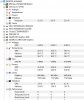
How does the CPU and GPU utilization look when playing that 1.85GB movie in VLC, or whatever media player you use? Can you share task manager screenshots showing both with the movie running?
 
Sure, here you
How does the CPU and GPU utilization look when playing that 1.85GB movie in VLC, or whatever media player you use? Can you share task manager screenshots showing both with the movie running?

I used the Movies & TV app from Windows 10 (with AV1 decoder installed). Here is a pic using HWMonitor
 

Attachments

  • a380.JPG
    a380.JPG
    65.2 KB · Views: 25
  • taskmanager.JPG
    taskmanager.JPG
    30.4 KB · Views: 25
Last edited:
Back
Top