
• We’re currently investigating an issue related to the forum theme and styling that is impacting page layout and visual formatting. The problem has been identified, and we are actively working on a resolution. There is no impact to user data or functionality, this is strictly a front-end display issue. We’ll post an update once the fix has been deployed. Thanks for your patience while we get this sorted.

I never knew aero was such a vram and performance hog on games

toyota

Lifer
http://hardforum.com/showthread.php?t=1692163

I did my own testing in GTA 4 and others are welcome to try it yourself in any game and post results.

for GTA 4, I ran two different benchmarks in two different locations.

aero enabled
Min, Max, Avg
29, 96, 59.719

aero disabled
Min, Max, Avg
43, 109, 69.977

about 17% faster with aero off


aero enabled
Min, Max, Avg
28, 90, 48.372

aero disabled
Min, Max, Avg
40, 93, 62.825

about 30% faster with aero off


and it used 200-300mb less vram with aero disabled.

EDIT: screens

aero enabled


gif hosting

aero disabled
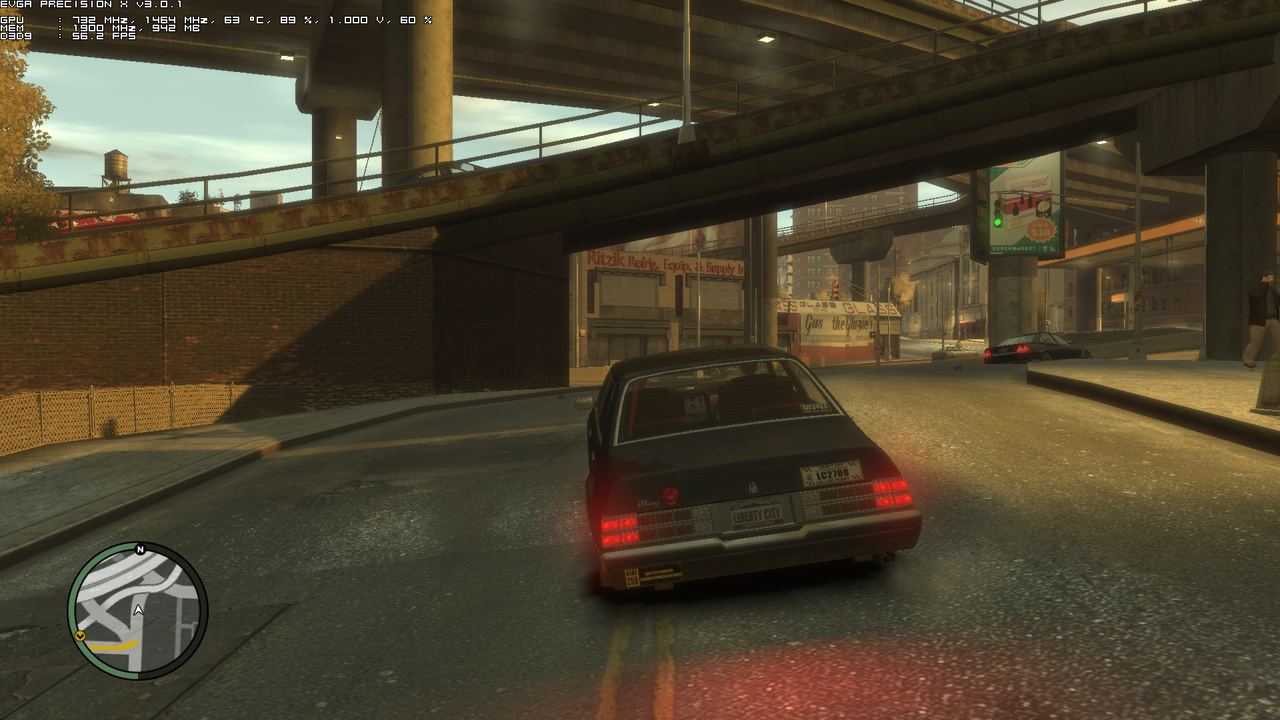
image host


EDIT 2: so bottom line is it was all vram related in GTA 4 even though I was not even using within 100mb of my available vram with aero on. so dont expect performance increase if you have plenty of vram. if you are anywhere close to borderline with vram though then turning off aero will help in a vram hungry game like GTA 4 though
 
Last edited:
I tried Crysis with Aero disabled, no difference in FPS. Exactly the same FPS, not even 1 FPS difference or so.

the answer is simple, he was vram limited
 
Last edited:
I tried Crysis with Aero disabled, no difference in FPS. Exactly the same FPS, not even 1 FPS difference or so.

the answer is simple, he was vram limited
no I was not vram limited at all. I never even used all of my vram with aero enabled. and screenshots added too.

I am not saying all games will be faster. the only reason I tested this game is because someone else said they had a big performance increase with aero off.
 
Last edited:
a game booster software that does the same thing but i only notice like a 4 to 5 fps difference on certain games too didnt change for cod 4 but slight fps changed on nba 2k12
 
Last edited:
wasnt trying to spam just sayin sorry if it upset you just agreeing with you on aero next time i leave the name out my bad still new
 
did anybody try the superman mod on gta 4 couldnt get it to work modded all the cars but could change niko into superman saw it on youtube figured i give it a try
 
GTA4 uses alot of VRAM, especially if you have the details sliders all the way to the right.
even with aero enabled I still never came within 100mb of my max available though where I was testing at. there still could be something to that though becuase I just tested Alan Wake and Batman AA and they were both only 1 fps faster with aero off.

we need someone with 2gb of vram to test GTA 4. maybe I will buy a gtx670 just so I can do that. or maybe not...
 
You don't have to disable Aero all the time - right-click on the application shortcut, properties > compatibility: 'disable desktop composition'. You can disable visual themes as well, it might help.

Normally a modern game disables Aero automatically when it starts, I thought, though admittedly when I've alt-tabbed out of Starcraft 2 lately, there doesn't seem to be a delay in redrawing the desktop UI Aero-style.
 
yeah I thought aero was supposed to be disabled automatically too. every game I have looked at though, except those that dynamically use vram like Crysis 2, is using much less vram with aero disabled.

it would be a pain to make a shortcut for all the Steam games wouldn't it?
 
You don't have to disable Aero all the time - right-click on the application shortcut, properties > compatibility: 'disable desktop composition'. You can disable visual themes as well, it might help.

Normally a modern game disables Aero automatically when it starts, I thought, though admittedly when I've alt-tabbed out of Starcraft 2 lately, there doesn't seem to be a delay in redrawing the desktop UI Aero-style.
This isn't true.
 
And they are having. Just like you. More vram probably just increases the FPS if you are falling short. But disabling aero is one of the solutions in your case.

yeah I went back and played at 1280 with lowered settings and not going over 750mb of vram with aero and 550 without aero and got basically identical overall framerates with or without aero on.

so bottom line is it was vram related even though I was not even not even using within 100mb of my max vram.
 
Last edited:
An interesting question is what would happen if we run sli/xfire?Unless the game is very demanding technically there should be very little effect on FPS.
 
Back
Top