• We’re currently investigating an issue related to the forum theme and styling that is impacting page layout and visual formatting. The problem has been identified, and we are actively working on a resolution. There is no impact to user data or functionality, this is strictly a front-end display issue. We’ll post an update once the fix has been deployed. Thanks for your patience while we get this sorted.

Question HP Support Assistant

IGBT

Lifer
I replaced the HD in my HP laptop. It's running fine with a clean install of Win 10. Is there any reason to download HP Support Assistant?? The original HD drive came with a preload that included HP Support Assistant.
 
are there any proprietary chip set(s) that HP has the drivers for?? "Detection Verification" in the device manager has a yellow triangle with a ! in it...
 
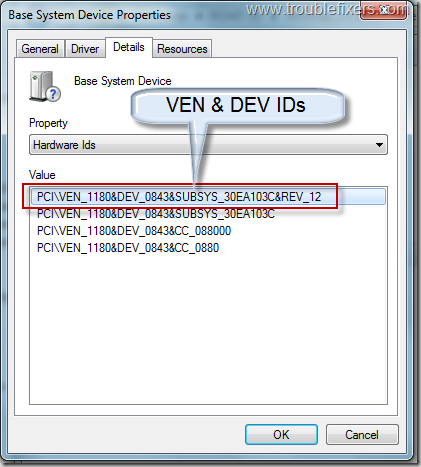
Look for Vendor & Device or PID and then Google it

devicedriverdetails_thumb.png


Even popular Intel's components / devices driver not necessarily will be installed automatically.

In most cases is that it does not affect the system at all even if you just ignore it.
 
Last edited:
Well, never seen those devices before. You need to right click on the devices and find out what their vendor id & device id are.

You can also install HP Assistant to update the drivers first, then uninstall the Assistant if you think its absolutely not needed any more.
 
Last edited:
Well, never seen those devices before. You need to right click on the devices and find out what their vendor id & device id are.

You can also install HP Assistant to update the drivers first, then uninstall the Assistant if you think its absolutely not needed any more.
I installed the HP assistant so I'll play around with it and see what happens..
 
You could also do nothing. I'm missing firmware for my chipset in debian. I could get the firmware, but it's non-free. I'm not missing any functionality I want, so I ignore the messages when I update the kernel, and my install stays fully libre.
 
Back
Top