
-
We’re currently investigating an issue related to the forum theme and styling that is impacting page layout and visual formatting. The problem has been identified, and we are actively working on a resolution. There is no impact to user data or functionality, this is strictly a front-end display issue. We’ll post an update once the fix has been deployed. Thanks for your patience while we get this sorted.
You are using an out of date browser. It may not display this or other websites correctly.
You should upgrade or use an alternative browser.
You should upgrade or use an alternative browser.
Question How do I enable and set up RAID with this mobo?
Page 4 - Seeking answers? Join the AnandTech community: where nearly half-a-million members share solutions and discuss the latest tech.
Tech Junky
Diamond Member
Well, it's because the disks are being bonded by the UEFI >> OS needs a way to talk to the pseudo HW device created by the board / RST.I ended up installing the Asus-provided drivers, and it works now.
It's kind of like Windows can't see EXT3/4 partitions from Linux but the opposite works just fine to view Windows partitions w/o any security prompts.
Or NAT on your router. W/O it you wouldn't get outside of your LAN.
igor_kavinski
Lifer
And now just to worry you a bit, monitor your CPU/IMC voltages for a while in HWiNFO during workloads or while idle to see what the max voltages being pumped into your CPU are. Just to be on the safe side coz ASUS has been guilty of killing a few CPUs lately 😀

Turbonium
Platinum Member
And now just to worry you a bit, monitor your CPU/IMC voltages for a while in HWiNFO during workloads or while idle to see what the max voltages being pumped into your CPU are. Just to be on the safe side coz ASUS has been guilty of killing a few CPUs lately 😀
In all seriousness, do you think it would be an issue with my board? It's corporate-tier, and I'm not even currently running the memory at anywhere near Raptor Lake speeds (4800 MHz at the moment).
igor_kavinski
Lifer
Their enthusiast boards had their best monkeys doing the UEFI coding and they might have passed their knowledge onto the lesser UEFI monkey coders there. Personally, I would just double check the voltages for additional peace of mind.In all seriousness, do you think it would be an issue with my board? It's corporate-tier, and I'm not even currently running the memory at anywhere near Raptor Lake speeds (4800 MHz at the moment).
Turbonium
Platinum Member
Their enthusiast boards had their best monkeys doing the UEFI coding and they might have passed their knowledge onto the lesser UEFI monkey coders there. Personally, I would just double check the voltages for additional peace of mind.
Do I need HWMonitor Pro to check things properly?
EDIT: nm, the regular version seems to be just fine, though I think it's limited in some way, correct?
Last edited:
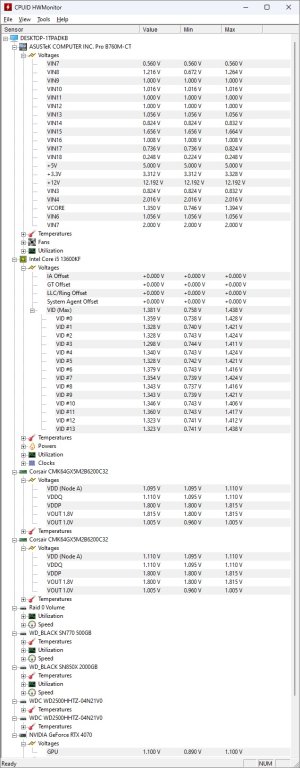
igor_kavinski
Lifer
Yes. Just check the max voltage value over a period of running different workloads.I'm keeping tabs on CPU voltages mainly, right?
For reference:
5 Minute Overclock: Intel Core i5-13600K to 6100 MHz - 5 Minute Overclock
We’re overclocking the Core i5-13600K CPU up to 6100 MHz in 5 minutes or less using the ASUS ROG Strix Z790-A Gaming WiFi D4 motherboard
5minuteoverclock.com
Core voltage should not exceed 1.475V
VCC_SA (system agent) should be max 1.3V
VCC_IMC (VDDQ?) max 1.45V
igor_kavinski
Lifer
The voltages check out. You seem to be within the safe zone 🙂
Turbonium
Platinum Member
Core voltage should not exceed 1.475V
VCC_SA (system agent) should be max 1.3V
VCC_IMC (VDDQ?) max 1.45V
I'm not seeing these labels in the HWMonitor menu for CPU voltages specifically.
igor_kavinski
Lifer
What about a 100% CPU utilization workload? Do you have any of those that you need to do?
Turbonium
Platinum Member
What about a 100% CPU utilization workload? Do you have any of those that you need to do?
I'm unsure as to what to use as a test workload.
Also: I started a thread in CPU forum, you should probably post there.
igor_kavinski
Lifer
VID are the CPU core voltages.I'm not seeing these labels in the HWMonitor menu for CPU voltages specifically.
VDDQ is there too.
System Agent voltage I can't see but I don't see why that would be boosted considering everything else is within normal range.
Tech Junky
Diamond Member
Just do a synthetic benchmark to put it under max load.I'm unsure as to what to use as a test workload.
Turbonium
Platinum Member
Just do a synthetic benchmark to put it under max load.
Question - How are my CPU and other voltages? (13600KF + Asus mobo)
Power option in windows: High performance Overall CPU load average: 25% Duration: ~15 minutes Do these voltages look OK? Someone in another thread said I should double-check them because of the problems Asus has been having with overvolting CPUs or whatnot.
 forums.anandtech.com

Fernando 1
Senior member
Yes, before you can create a new RAID array, you have either to break the old one (the related information are within the hidden track0 of both SSDs) or to do a secure erasure of all data (inclusive the hidden ones).When I go into the RAID (Intel Rapid Storage Technology) menu in the BIOS, it says no disks are detected. Is this because I still have the striped (RAID-0) data on the 2 disks from my previous rig?
Last edited:
TRENDING THREADS
-
 Discussion Zen 5 Speculation (EPYC Turin and Strix Point/Granite Ridge - Ryzen 9000)
- Started by DisEnchantment
- Replies: 25K
-
Discussion Intel Meteor, Arrow, Lunar & Panther Lakes + WCL Discussion Threads
- Started by Tigerick
- Replies: 25K
-

-

-
