
hawtdawg
Golden Member
- Jun 4, 2005
- 1,223
- 7
- 81
Titan sounds gimped.
7970 memory at 1800mhz.. why cant Titan memory go that high?
My Titan had no problems finishing Heaven runs at 1865


Titan sounds gimped.
7970 memory at 1800mhz.. why cant Titan memory go that high?

You still have to hack the BIOS, but sure, if you want to void your warranty and overclock your GPU to 1600MHz core, then you can beat 680 SLI performance in a single card with no microstutter.
That said, not sure what the life expectancy of a Titan would be at that high OC...maybe 1 year
My Titan had no problems finishing Heaven runs at 1865

Stop being misleading. Like your Titan clocks this high without heavy modifications.
Stop being misleading. Like your Titan clocks this high without heavy modifications.
If by "heavy" you mean replacing the numbers "265000" with "300000" in the the nvidia bios editor, and then typing "nvflash -4 -5 -6 GK110A.rom" in a command prompt, then yeah I guess you're right. Though technically I don't have to do any of that to run the memory that high by itself.

Yes id consider editing the bios as heavy modification. Sure its not a pencil mod or soldering but basically your 1k card warranty is toast You dont need to do those things on AMD to get to 1800.
His original comment was to your typical crapping about anything, this time it was memory speed of Titan. He then informed you of his cards memory o/c, and you babble more ignorant anger. Now it's about bios flashing. Move along.
My Titan had no problems finishing Heaven runs at 1865
That's strange, maybe NV uses two GDDR5 suppliers? Is it confirmed what GDDR5 nv uses in Titan or if every titan gets the same memory brand?
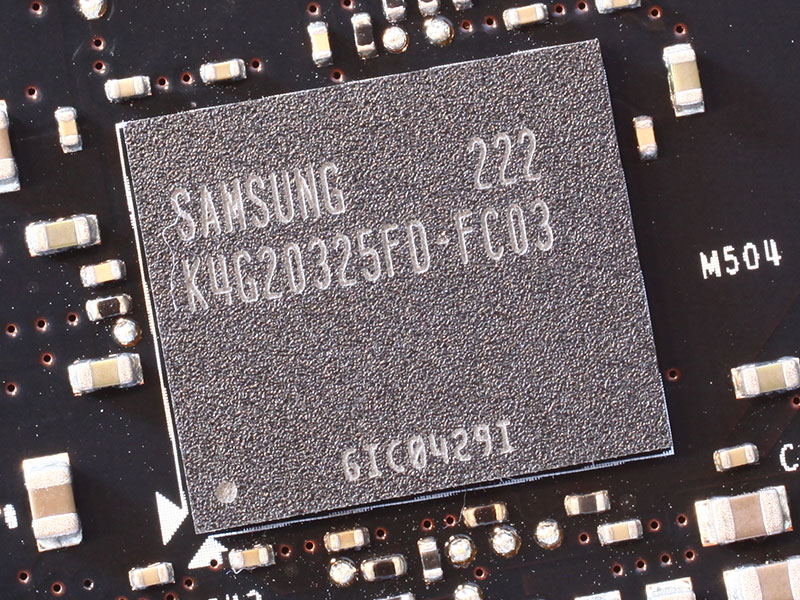
The GDDR5 memory chips are made by Samsung and carry the model number K4G20325F0-FC03. They are specified to run at 1500 MHz (6000 MHz GDDR5 effective).
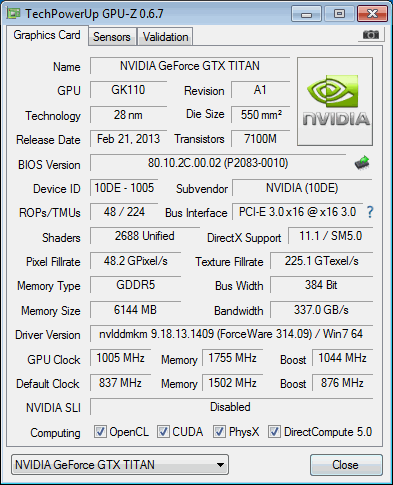
Since NVIDIA sent us three cards for tri-SLI testing, we tested each one individually for maximum overclocking potential. This larger sample size provides a better view on what clock speeds can be expected.
The best card reached 1005 MHz GPU clock (20% overclocking) and 1755 MHz memory (17% overclock).
what ever.
i was commenting on the stories about the memory failing to overclock in conjunction with the GPU which states the card is very TDP limited.
I wouldnt consider bios editing a solution to a 1k GPU that cant clock its GPU and memory at the same time.
You're probably also the type of person who wouldn't own a 1k GPU at all period. Your posts sound more like jealousy than anything.
Yep your right i would never buy one.
I dont pay £850+ for a GPU that gets owned by 2x7970 for £524
Same as i wouldnt buy a 7990.
Well, I actually like my games to feel like they're running at the framerate that's being reported.
I have used SLI and CF over the years and i dont have any problems.
I have Vsync turned on and since i learnt about 59fps caps i have no input lag now either.
Funny how Vsync fixes all problems with frame times and runts
It's fine as long as you're well above 60fps, which can be a problem playing at 1440p. When you're in the 60fps range, those bad frame times and runts can turn into no frames at all. Vsync is also not desirable for competitive FPS play.
Neither are 1440p monitors with 20-30ms input lag and 5-12ms of pixel lag.
Also the only competitive FPS games are games that a single GPU can do 250fps.
Tbh i often here this competitive FPS argument put forward for why not to use Vsync but really i doubt i have ever even spoken to a real competitive FPS player. If they were really competitive they wouldnt be using IPS screens also.
Vsync is fine with a 59 FPS cap. There doesnt seem to be any input lag with that trick. Its smooth and responsive and no CF or SLI problems
Also no screen tearing





 Facebook
 Twitter