Do you guys like windows 8?

Page 2 - Seeking answers? Join the AnandTech community: where nearly half-a-million members share solutions and discuss the latest tech.

gmaster456

Golden Member
Sep 7, 2011
1,877
0
71
I think it's a great solid OS. Using Windows 8 for a while and then going back to Windows 7 makes 7 look dated. That being said, both are fantastic OSes and you couldn't go wrong with either.

 

Kristijonas

Senior member
Jun 11, 2011
859
4
76
I'm using an old P4 computer with W7 while my signature PC is in the warranty service for two weeks now. Let me say that lack of metro-search function, lack of system menu (when right clicked on the bottom left corner of the screen) and old task bar really got me longing for Windows 8. Windows 7 is great, but Windows 8 just looks and feels better.
 

Whisper2

Member
Sep 17, 2009
144
0
0
Win 8 is optimized for tablets and workable with a desktop. If a utility that will allow optimizing for a desktop (such as "Start 8") is added, then it is superior to Win 7.

Although most of the attention is directed to the UI changes, Microsoft made many changes to the OS - most are improvements. Unfortunately, the one option they did not add was "Do you want to use Windows on a Desktop or a Tablet" and let the user set up the machine accordingly.

I continually read that we desktop users are just resistant to change and should be more willing to learn new ways. I do not mind changes when they add something, but I do mind when the changes are steps backwards. For example, to shutdown the system in Win 7, I click "Start" (or hit the Win key) and click on "Shutdown" -- I am done. With Win 8, I have to wake-up the "Charms Menu", click on "Settings", click on "Power", and finally, click on "Shutdown" -- this is improvement?
 

Mem

Lifer
Apr 23, 2000
21,476
13
81
Win 8 is optimized for tablets and workable with a desktop. If a utility that will allow optimizing for a desktop (such as "Start 8") is added, then it is superior to Win 7.

Although most of the attention is directed to the UI changes, Microsoft made many changes to the OS - most are improvements. Unfortunately, the one option they did not add was "Do you want to use Windows on a Desktop or a Tablet" and let the user set up the machine accordingly.

I continually read that we desktop users are just resistant to change and should be more willing to learn new ways. I do not mind changes when they add something, but I do mind when the changes are steps backwards. For example, to shutdown the system in Win 7, I click "Start" (or hit the Win key) and click on "Shutdown" -- I am done. With Win 8, I have to wake-up the "Charms Menu", click on "Settings", click on "Power", and finally, click on "Shutdown" -- this is improvement?

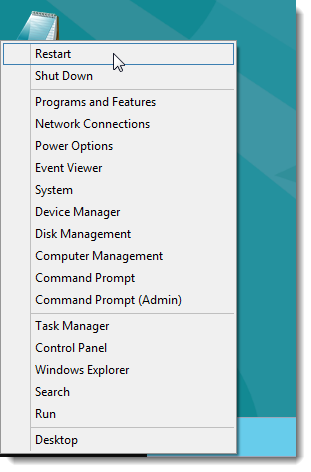
Shutdown is simple to add to Win+X,I just right click in left corner then select shutdown ,is that hard?..or in my case I could pin it to taskbar and its only one click.

This is how too http://www.howtogeek.com/113775/add-shutdown-and-reboot-to-the-windows-8-winx-menu/ ,


03_restart_and_shutdown_on_winx_menu.png


You can add more stuff to Win+X menu,Win8 in this regards is quite customizable.

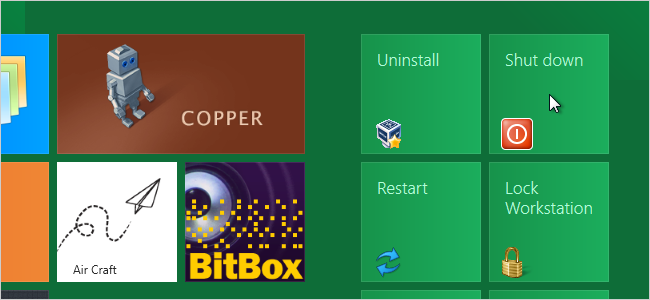
You can also add Shut Down tile to Metro columns as well ,like so http://www.howtogeek.com/77061/how-to-add-shutdown-restart-sleep-to-the-windows-8-metro-start-screen/

00_new_tiles_on_start_screen.png


Win8 is quite customizable as I keep saying.
 
Last edited:

zerogear

Diamond Member
Jun 4, 2000
5,611
9
81
Someone explain to me what advantage the Metro UI has. You can only have one app running at a time. you cannot resize the window and there is no way of closing it.

Metro UI in itself is designed for something like a tablet (limited memory, limited multitasking). But it is _NOT_ the main UI in a Windows 8 system. It is basically a Start Menu that is full screen, that happens to allow you some fast access to apps (such as checking email/news) without having to launch a full browser/email client.

Remember those FastBoot OS that booted from BIOS for quick email checks/internet? It's sort of like that. It is not meant to replace the Desktop, as the Desktop is still very much the center of the OS, assuming you are using a KB/Mouse setup.

Another nice thing is you can run some apps only had mobile variants nicely on the desktop.

Also, you are wrong on Metro on several cases:

1. You can run two instances of metro apps at once, one docked on the either side of the screen and one in main focus.

2. You can resize the window by using the the app docked. Just grab the top of the app and drag it to the side of your screen, once docked you can run anything else, including desktop.

3. You can close the metro app by hitting Alt-F4 within the Metro app.

There seems to be a lot of misconceptions about Windows 8/Desktop/Metro(Modern) UI that Microsoft seem to not have cleared up. That and a lot of FUD among user-base that reminds me of Vista.
 

Whisper2

Member
Sep 17, 2009
144
0
0
Shutdown is simple to add to Win+X,I just right click in left corner then select shutdown ,is that hard?..or in my case I could pin it to taskbar and its only one click.

This is how too http://www.howtogeek.com/113775/add-shutdown-and-reboot-to-the-windows-8-winx-menu/ ,


03_restart_and_shutdown_on_winx_menu.png


You can add more stuff to Win+X menu,Win8 in this regards is quite customizable.

You can also add Shut Down tile to Metro columns as well ,like so http://www.howtogeek.com/77061/how-to-add-shutdown-restart-sleep-to-the-windows-8-metro-start-screen/

00_new_tiles_on_start_screen.png


Win8 is quite customizable as I keep saying.

You are correct, Win 8 is very customizable (I used the Taskbar shutdown too), however, the user has to figure out what he can customize and how to do it. Microsoft went out of its way to make these changes difficult for the average user. Windows includes choices and set-up routines for almost everything one can think of -- except for the basic tablet vs. desktop UI.
 

Blueychan

Senior member
Feb 1, 2008
602
0
76
Yes you should...Best Windows to date..
Windows 8 > Windows 7 ... most of the complains were about the "metro" ui, which I am fine with. Performance wise, no contest.
 

KeypoX

Diamond Member
Aug 31, 2003
3,655
0
71
Its ok not as good as XP --> vista, more like a vista --> 7

Metro is really bad though, its something like 30 clicks and moves and/or multiple keyboard combos to sleep. Start8 works really nice, but not free. I have used pokki and its ok and free.
 

uallas5

Golden Member
Jun 3, 2005
1,667
1,946
136
Metro is really bad though, its something like 30 clicks and moves and/or multiple keyboard combos to sleep.

I realize you're exaggerating but really? 30?

Win7 - move mouse to lower left corner (Start Button), click twice and your computer is asleep.
Win8 - move mouse to lower right corner (Charms Bar), click 3 times and your computer is asleep.

Not seeing any massive difference here.
 

nitromullet

Diamond Member
Jan 7, 2004
9,031
36
91
Win8 certainly feels snappier than Win7 which is reason enough to upgrade IMO. Anyone upgrading does need to prepare themselves for the initial shock, but ultimately Win 8 is usable as a desktop OS. I would prefer a start menu out of the box, but it's workable as is and a start menu can be added if needed.
 

Aidenn1

Junior Member
Dec 10, 2012
4
0
0
Yeah i heard a lot about the features of window 8 but not used so far. So i'm excited to use this window.
 

pm

Elite Member Mobile Devices
Jan 25, 2000
7,419
22
81
So I was a Windows 8 hater - I have posts to prove it :) - but I'm starting to come around to it. I was using it again last night and it feels snappy and I'm getting the hang of Metro and I'm feel my original intense dislike gradually disappear the more that I use it.

I use Windows 8 as my "secure ebanking" virtual OS. So my main OS is Windows 7 and then I run virtualized versions of Linux (for development) and Windows 8 (for ebanking only). So I don't use Windows 8 daily, but I use it often enough. And some Linux people might say "use Linux for ebanking, it's more secure" but I've tried that and had some compatibility issues with a couple of banks and the browsers so I'm now Windows 8 instead.

Although I still don't like Metro, I don't absolutely hate it any more. Which is actually substantial progress over my first month. I actually could picture converting my main OS over to Windows 8...
 

Bat123Man

Member
Nov 14, 2006
191
4
81
Have been running Win8 for the last couple of months. I had to install "Classic Start Menu" (free open-source Start Menu) while learning Metro, otherwise I found I was losing a lot of time trying to figure out how to do simple things in Win8 (like ShutDown). One of the things which is really odd is that the Metro interface generally brings up the Desktop when you select an app. It is more or less a gigantic Start button. It just seems inefficient to use Metro to start the app, only to have it flick to the Desktop to launch.

However, the boot times are fantastic. Sleep mode works perfectly. The actual Metro start screen is very well done; news, weather, etc. are all dynamically updated. Games all seem to work perfectly. One thing I would recommend is a touchpad in order to use the gestures. That makes zipping around in Metro a much better experience.
 

Daedalus685

Golden Member
Nov 12, 2009
1,386
1
0
Frankly I'm really loving it.

It is so very much faster at booting than 7 which was enough to make me learn the interface. Plus the price was right. Now if only I can get my MB post image to accept the image I set as my home screen in win 8 rather than black (which is better than an ASUS logo)...

The start screen is not nearly as painful on my laptop as it is on my desktop, I may have to get start8 on the desktop. Though the released version seems to like my second display better than the RC I was playing with in the summer. I do find it pretty enough, I suppose. No real driver issues either.

However, the thing that has won me over is win+x... Already I'm trying to use it at work on the silly XP machines and find I miss it.
 

smakme7757

Golden Member
Nov 20, 2010
1,487
1
81
However, the thing that has won me over is win+x... Already I'm trying to use it at work on the silly XP machines and find I miss it.
That's funny because i do the same thing on my laptop (Windows 7). Now if only Broadcom would release an updated driver for my fingerprint reader I'd have Windows 8 on my laptop as well.
 

CSMR

Golden Member
Apr 24, 2004
1,376
2
81
I've installed it and like some aspects.

+Installation was very easy, including drivers, and I'm expecting Win8 to be low-maintenance.
+The start screen is fine, I just keep my most important desktop programs there.
+Integrated parental controls are better
+native ISO mounting

-It took me a few seconds to decide that metro apps are currently useless, will check back again in Win9.
-Some things are hard to find.
-Fast User Switching is now Slow User Switching, takes 10s on my system.
 

Wangstang

Member
Oct 30, 2005
190
0
0
Any chance that Microsoft will be adding a start8 type of upgrade for the software in an updates release. It seems that this is a common complaint, so much so that you'd think Microsoft would respond to the market.

Wes
 

Schmide

Diamond Member
Mar 7, 2002
5,751
1,042
126
Fastest way to manage computer I could find. Go to corner, click search, right click on computer, go down to blue bar and click manage. This is frilling the stupidest UI I've ever used. I may actually go apple just for spite.

PS I'm staring at the blue windows logo attempting a repair at the moment. This is dumb.
 

jhansman

Platinum Member
Feb 5, 2004
2,768
29
91
Actually, what I like best about it is all the gnashing of teeth and bitchy whining it has invoked. Good times...
 

capeconsultant

Senior member
Aug 10, 2005
454
0
0
I like it. Will never use it without Start8. Metro on a desktop computer is, well, there really is no word for how bad it is.

I forget it is even there and just work on the computer the way I always did with 7, which was/is a rockin' OS!

