I just got a MSI MAG X870E Tomahawk WiFi MB and want to update the BIOS with the board vacant. Where is the LED that lights up for that? Also using a Sandisk 32GB Ultra Fit USB 3.1 Flash Drive. Any pointers would be greatly appreciated.
What CPU are you installing that you need to do a BIOS upgrade before installing the CPU? Unless you have a CPU just released, the board should probably support everything up through a 9950X3D out of box and you should be able to update the BIOS through the BIOS flash interface.
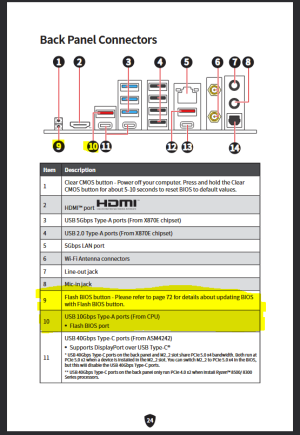
The LED should be adjacent to the flash button on the motherboard rear panel.
Generally, to do what you are wanting to do, you'll do the following:
1) Format the flash drive to FAT32 on another system.
2) Download the BIOS to be flashed from the MSI support website. It will download in a .ZIP format.
3) Extract the ZIP file to a known location, and rename the actual extracted BIOS file to MSI.ROM.
4) Copy the MSI.ROM file to the root directory of the flash drive.
5) Make sure the 24pin and 8pin connectors from the PSU are connected to the motherboard. No CPU or RAM is needed.
6) Make sure the power switch on your PSU is turned on. Since you don't have a CPU or DRAM installed, the motherboard should already be powered down.
7) Insert the flash drive into the designated flash port. The specific port to use will be shown on page 24 of your motherboard manual (it is the port on the back panel of the board and designated as item 10 in the diagram).
8) Press the flash button on the back panel of the board (designated as item 9 in the diagram on page 24 of your motherboard manual)
9) The flash LED should start flashing on and off to indicate that the BIOS is being written. It can take 5-10 minutes. The motherboard should shut off once the flash is completed.
Notes:
1) If the light flashes three times and then just turns off, it means either the flash drive is not being detected (MSI boards can sometimes be really picky about flash drives), the BIOS file isn't properly named (i.e. to MSI.ROM), or the file was not found in the flash drive root directory.
2) Once the flash starts, do not remove the flash drive while the light is still flashing. Give it plenty of time to finish and shut down on its own.
General instructions for using the flash BIOS button:
Back panel connectors for your motherboard:



 Discussion Zen 5 Speculation (EPYC Turin and Strix Point/Granite Ridge - Ryzen 9000)
 Discussion Intel current and future Lakes & Rapids thread
