Are any Celeron 1037U Motherboards actually available?

Page 8 - Seeking answers? Join the AnandTech community: where nearly half-a-million members share solutions and discuss the latest tech.

nForce2

Senior member
Aug 15, 2013
285
0
76
no nothing cool :( just spread spectrum. I don't think there is much on the cpu you can do. Maybe some boards will let you play with the memory speed some?

Maybe I never posted it... but I did find a website where someone had done a partial review of the ECS NM70-TI:

http://joeyhc.blogspot.tw/2013/08/ecs-nm70-ti-celeron-1037u-thin-mini-itx.html
http://joeyhc.blogspot.com/2013/08/ecs-nm70-ti-celeron-1037u-bios.html

ecs_nm70-ti_1037u_101.jpg


They posted some pictures of the BIOS screens, and it seemed to have a different set of options for power management:

ecs_nm70-ti_1037u_111.jpg


That one for "Configurable TDP" is the one that caught my interest. Here's a description of how "Configurable TDP" works:
http://www.anandtech.com/show/4764/ivy-bridge-configurable-tdp-detailed

It also looks like this motherboard will let you disable a core, and run in a single-core mode?


Surprisingly though, from the BIOS screenshots posted, this ECS motherboard doesn't have any ability to control the fan settings - they just are what they are. :\ Although, I suppose that doesn't make it any different from the Foxconn, since the Foxconn does its own thing and ignores the settings you give it. :p
 

86waterpumper

Senior member
Jan 18, 2010
378
0
0
hmm I don't think my board will limit the tdp for sure. I will say though, I don't know when you would ever really want that setting? If power usage is critical enough that you want to cripple the cpu down to 1 core, you probably were better off with a c60 or atom or some other system anyway? I know that windows also will limit the cores. You can edit the advanced boot options and limit things that way, but I have no idea how it affects power consumption compared to doing so in the bios?

It isn't fair to say I have no control over the fans at all. At first, when I went in the bios, the fan was turning 6k rpms. When I enabled smart fan it cut the fan speed in half. The difference was night and day on noise for sure. I need to play around with it more, there is a manual mode I have changed the startup speed under smart settings, but have not attempted to do that under "manual". I also could try the speed fan software utility. On this system, with it having the onboard 150 watt psu, there is not much point as it is the weakest link and loudest on noise...but I will test it for the heck of it
 
Last edited:

nForce2

Senior member
Aug 15, 2013
285
0
76
hmm I don't think my board will limit the tdp for sure. I will say though, I don't know when you would ever really want that setting? If power usage is critical enough that you want to cripple the cpu down to 1 core, you probably were better off with a c60 or atom or some other system anyway? I know that windows also will limit the cores. You can edit the advanced boot options and limit things that way, but I have no idea how it affects power consumption compared to doing so in the bios?

I think those configurable limits would be the most useful if you think of it as a sort of built-in upgrade path. Since these CPUs are not socketed, you get what you get, and can't really do much for upgrades.

So for example, if you are using your system as a HTPC and it runs everything great today at <50% CPU, you might be completely fine to disable a core and limit the TDP to its lower levels to save on power/heat/noise. But maybe in the future, you start doing higher bitrate recordings... or 2K video... or something else that starts to stress the machine more. You then have that option to re-enable the second core, bump up the TDP, etc. And if you REALLY need more oomph, there's that "cTDP up" option - basically an officially supported overclock. :thumbsup:

If you had bought an Atom, or something else lower powered that is only adequate for what you need right now, you don't have that overhead to grow if you need it. But if you can scale down the 1037U to use less power, that might be a pretty decent option. For desktop use, I could only ever imagine bumping it up, not down... but for the semi-embedded use (DVR HTPCs, firewall/router duty, NAS, etc), clocking it down could be beneficial.


(This is all with the assumption that the 1037U supports these cTDP modes... which it looks like it does from that BIOS screenshot, but I can't say for 100% certainty....)

It isn't fair to say I have no control over the fans at all. At first, when I went in the bios, the fan was turning 6k rpms. When I enabled smart fan it cut the fan speed in half. The difference was night and day on noise for sure. I need to play around with it more, there is a manual mode I have changed the startup speed under smart settings, but have not attempted to do that under "manual".

Ahh! Maybe that's it? The Smart Fan is overriding your configurations? Maybe if you set the mode to "manual", it will start turning the fan off if it is below your minimum temperature threshold? :hmm:
 

nForce2

Senior member
Aug 15, 2013
285
0
76
Last edited:

nForce2

Senior member
Aug 15, 2013
285
0
76
It should also be interesting to see how the 1037U BRIX GB-XM14-1037 performs in terms of power consumption, as the more powerful BRIX with the i5-3337U (GB-XM11-3337) idles at just 12W. Both are 17W TDP processors.

http://www.legionhardware.com/articles_pages/gigabyte_brix_xm11_3337,6.html

http://www.legionhardware.com/images/review/Gigabyte_Brix_XM11-3337/Power.png

Found a place that had tested the 1037U BRIX. 10.1W at idle, 31.9W at load (3DMark06 Max). :thumbsup::thumbsup:

http://nl.hardware.info/productinfo/197526/gigabyte-gb-xm14-1037#tab:testresultaten
 

Insert_Nickname

Diamond Member
May 6, 2012
4,971
1,696
136
Well insert all I can say is that you have the golden 6800k :biggrin: Out of about 10 reviews I have read on the 6800k only one tester was able to get under mid 30s on idle, and hd playback was in the mid 50s to mid 60s. I guess either you have a awesome one off power supply with high effic. compared to the other models like it or the board is undervolting the cpu on it's own because that is ridiculous low wattage for such a system. But the kill a watt is not always super accurate, and really the only thing that impressed me about mine was the load wattage. I guess I am used to power hogs I have never had a system that topped out at 40 watts under prime 95 regardless of what psu I used.

About the measuring, why do you think I used my multimeter? (I'm not sure that is the correct term in English) That is the only thing I trust 100%... :biggrin::thumbsup:

I have heard at least one user here has an A4-4000 which used 17W for bluray 1080p decoding, so I don't think my own 6800K is any more magical then the next one. Though I may have just gotten lucky in the CPU lottery. Where I think I have gotten really lucky is with the board itself. Instead of the usual not-quite-good-but-not-really-bad-either MOSFETs, this board uses four IR3550's. I think this is where the key is.

This thread also got me thinking on what might happen if I swap my main systems 80+ Platinum rated PSU (Antec EA-450 Platinum) into my media-centre. The Corsair CX-series is not really known for its low-load efficiency. But I'm a little peevish about disassembling my main system... :whiste:

I -think- I posted this somewhere in the CPU forum, but I can't remember where...

Notice almost all reviews of Trinity/Richland tend to use ridiculously overpowered PSUs for reviewing. Most units are 750W+ (the most ridiculous was a 1200W!). To power an APU with a TDP of 100W? Do those reviewers really think that's necessary? I think this has a negative and very noticeable effect on low-load efficiency. While I can respect that they do it for benchmark consistency across reviews, they could at least provide an alternative with a more reasonably sized quality 350-450W unit. Another thing is that apart from my F2A85XN, there are just two other ITX boards for FM2 available. No one has really thoroughly reviewed Trinity/Richland on an ITX platform. Anandtech's own review of the F2A85XN does list power consumption, but only with a bloody HD7970 attached. This is of course interesting from a theoretical point of view, but what "normal" user would pair a 6800K with a HD7970? Its simply not the target market... o_O
 

cbn

Lifer
Mar 27, 2009
12,968
221
106
Price comparison between Gigabyte Brix and Qotom-T30:


Gigabyte Brix: $169.99 shipped. http://www.newegg.com/Product/Produc...82E16856164005

Needs RAM and Storage, but does come with Wifi card.

Pros: US based customer support and warranty, Kensington lock.
Cons: needs fan for cooling, Very limited I/O


Qotom-T30: $165.95 shipped http://www.aliexpress.com/store/pro...dr3-ram-8g-ssd-fanless/108231_1314636964.html (Link does say to contact Sally for lower shipping price.)

Needs Wifi card, but comes with 2GB RAM and 8 GB msata SSD.

Pros: Fanless. Good amount of I/O, one SATA 3 Gbps port for 2.5" drive (see specs here).
Cons: computer case does not have fins/fluting to help aid passive cooling. Customer Support? How well does the computer work with Ubuntu and other Linux distros? Memory and mSATA SSD brands are not known.
 
Last edited:

86waterpumper

Senior member
Jan 18, 2010
378
0
0
Now that is impressive...

Not that super impressive to me it is about in line with what I would expect. Well...the idle number is, that part is awesome and shows how much better it is to use a brick type psu that can be downsized. Judging from the size of the psu on the brix it is 60 watt max. I am sure the nuc has a similar number. The load number is not far removed from mine, when you take into account the fact I am running a bigger cpu fan and a case fan and have a very inefficient psu. I also am not sure that 3dmark max would use as much power as prime would. I am downloading 3dmark 06 so we will see :p

BTW, according to core temp, cpuid etc the cpu uses 20 watts during hd playback, and 24 watts during prime95. It looks like the 17 watt tdp is a midrange workload number, not a max consumption with or without cTDP up.
 

Zap

Elite Member
Oct 13, 1999
22,377
7
81
Personally though, if it was my machine, I think I'd swap it for a PicoPSU anyway, just to get rid of a fan. ;)

I thought the stock 150W PSU fan was pretty quiet. Mine never spun up. I had to look to see that it was still working.

sitting idle at windows 8 desktop 28.8 watts.
playing a 1080p youtube video 37.0 watts (worst case)
prime 95 blend torture test 40.0 watts (worst case)

that is pretty funny to me...fully loaded cores on prime only added 3 watts
from 35 percent cpu usage...lol

It may be that it doesn't idle much below full speed. For instance I had a Core 2 ULV that was 1.3GHz and idled at 1.2GHz, because 1.2GHz was the lowest speed it could go. :D

Notice almost all reviews of Trinity/Richland tend to use ridiculously overpowered PSUs for reviewing. Most units are 750W+ (the most ridiculous was a 1200W!). To power an APU with a TDP of 100W?

The APUs tend to draw more power than their TDP when at full load, unlike Intel TDP.
 

nForce2

Senior member
Aug 15, 2013
285
0
76
just saw a thread in hk forum talking about the 1037 from biostar, he attached some pictures as well as some test results.

http://computer.discuss.com.hk/viewthread.php?tid=22426038&page=3#pid371511128


So I just stumbled across a thread on a different forum, and it looks like it might be the same poster?

http://global.hkepc.com/forum/viewthread.php?tid=2001547

This thread has 11 pages... and the fun starts on page 9, where they start converting one to be fanless! :thumbsup:


HKEPC Forum said:


I can't quite tell, but I think this second heatsink might just be set in place as a mockup at the moment?


HKEPC Forum said:


I recognized that CPU heatsink from my previous searches - it's another northbridge heatsink, like what I had talked about using earlier. I guess it fits!

http://www.frozencpu.com/products/5...per_Northbridge_Chipset_Heatsink_IXN-40C.html

vid-90.jpg


vid-90_2.jpg
 

SinceCCF

Member
Nov 15, 2007
40
0
66
So I just stumbled across a thread on a different forum, and it looks like it might be the same poster?

http://global.hkepc.com/forum/viewthread.php?tid=2001547

This thread has 11 pages... and the fun starts on page 9, where they start converting one to be fanless! :thumbsup:

I just went to check the posts and here is the reason he throw in a southbridge heatsink, the temperature on the CPU is only warm when the pc is idle, but the southbridge is burning his fingers so he bought a bigger heatsink to replace facotry one; he never tested the temperature on the cpu with new heatsink at full speed, because he's using this for windows 2008 server which is typically low on cpu usage, though at idle the whole setup consumes 25w and full load 35w.
 

cbn

Lifer
Mar 27, 2009
12,968
221
106
Another fanless Celeron 1037U: http://www.aliexpress.com/item/fanl...reme-ultra-thin-chassis-Intel/1350425798.html (Scroll down to see pictures of motherboard and inside of case)

This looks to be the same computer as sold by Qotom as the I-37C (but Qotom doesn't specifically mention it being fanless): http://www.aliexpress.com/store/pro...U-Dual-Core-1-8GHz-2GB/108231_1345408250.html

P.S. I wouldn't be surprised if that motherboard (from the first link) is exactly the same as the one found in the Qotom-T30.
 
Last edited:

cbn

Lifer
Mar 27, 2009
12,968
221
106
Habey has a 1037U system now, the Habey BIS-6762

http://www.habeyusa.com/products/bis-6732-celeron-fanless-system/


No idea on the pricing or availability, but it looks pretty nice. It's fanless, and it has a 2.5" drive bay, USB 3.0, and a 12V DC power supply. :thumbsup:

BIS-6762-1-1024x682.jpg


BIS-6762-3-1024x682.jpg

Comparing I/O and expansion on this Habey BIS-6762 vs. Qotom-T30, they appear to be almost identical.

Both (Habey BIS-6762 and Qotom-T30) have:

Internally--
1. One SODIMM slot
2. One SATA 3Gbps port (for internal 2.5" drive)
3. Two Mini PCI-E slots (one for msata, one for wifi)

External (front):
1. Two usb 2.0 ports
2. One audio in
3. One audio out

External rear:
1. DC-in
2. HDMI
3. VGA
4. Four usb 2.0 (Habey substitues two usb 3.0 ports for two usb 2.0 ports)
5. RJ45
6. audio in
7 audo out

Habey BIS-6762 comes with a serial port standard (On Qotom-T30 this is optional)

So other than those two differences (which I bolded) they appear, at this time, to be exactly the same from an I/O and expansion standpoint.
 

nForce2

Senior member
Aug 15, 2013
285
0
76
Here are two more new ones to keep an eye on:

The J&W Technology ITX-N1037IDG-2, which features onboard Nvidia GT610 1GB Graphics and a 19V DC input in a Thin Mini-ITX form factor:

http://www.jwele.us/products/N1037IDG-2.asp
http://www.jwipc.com/product/mt/thin/20130810/101.html

16-1210131404291.jpg


2-130Q4123020959.jpg


2-130Q41230112I.jpg


... and the J&W Technology IITX-N1037ID-2, which appears to be identical, but with the discrete graphics removed. Note that as a consequence, it appears to have twice as large of a heatsink as it actually needs, so that might be a good thing. :thumbsup:

http://www.jwele.us/products/ITX-N1037ID-2.asp
http://www.jwipc.com/product/mt/thin/20130810/102.html

2-130Q4122Q43G.jpg


2-130Q4122S1417.jpg


It looks like this exact same motherboard is sold as the Avalue EMX-NM70-A1-GPUR (with the NVIDIA graphics) and the Avalue EMX-NM70-A1R (without the NVIDIA graphics).

http://www.avalue.com.tw/en/product/detail.aspx?ccid=2&cid=9&id=68&zid=849

There is quite a bit more information on the Avalue website (specifications, manuals, drivers, setup guides, mechanical drawings, etc.), so I would assume that Avalue is the actual manufacturer, not J&W Technology.
 

nForce2

Senior member
Aug 15, 2013
285
0
76
A shot of the Habey BIS-6764 heatsink system (which looks identical to BIS-6762 from exterior):

BIS-6764-Open-1024x1018.jpg

Interesting. So are those Habey systems mostly empty inside then? I wonder why they made them so tall?

It also looks like these must require *extremely* high precision in the manufacturing process... as there are two separate thermal interfaces in the heat path, for both the CPU and the bridge chip, and everything is rigidly mounted. So if the top cover is too far away from the motherboard, then there could be a gap between those cylinders and the bottom of the cover, preventing heat transfer. Likewise, if the top cover is too close, then it will put pressure directly on the chips. :confused:
 

nForce2

Senior member
Aug 15, 2013
285
0
76
I just went to check the posts and here is the reason he throw in a southbridge heatsink, the temperature on the CPU is only warm when the pc is idle, but the southbridge is burning his fingers so he bought a bigger heatsink to replace facotry one; he never tested the temperature on the cpu with new heatsink at full speed, because he's using this for windows 2008 server which is typically low on cpu usage, though at idle the whole setup consumes 25w and full load 35w.

Thanks for those clarifications! :thumbsup:
 

nForce2

Senior member
Aug 15, 2013
285
0
76
Another fanless Celeron 1037U: http://www.aliexpress.com/item/fanl...reme-ultra-thin-chassis-Intel/1350425798.html (Scroll down to see pictures of motherboard and inside of case)

This looks to be the same computer as sold by Qotom as the I-37C (but Qotom doesn't specifically mention it being fanless): http://www.aliexpress.com/store/pro...U-Dual-Core-1-8GHz-2GB/108231_1345408250.html

P.S. I wouldn't be surprised if that motherboard (from the first link) is exactly the same as the one found in the Qotom-T30.

Comparing I/O and expansion on this Habey BIS-6762 vs. Qotom-T30, they appear to be almost identical.

Both (Habey BIS-6762 and Qotom-T30) have:

Internally--
1. One SODIMM slot
2. One SATA 3Gbps port (for internal 2.5" drive)
3. Two Mini PCI-E slots (one for msata, one for wifi)

External (front):
1. Two usb 2.0 ports
2. One audio in
3. One audio out

External rear:
1. DC-in
2. HDMI
3. VGA
4. Four usb 2.0 (Habey substitues two usb 3.0 ports for two usb 2.0 ports)
5. RJ45
6. audio in
7 audo out

Habey BIS-6762 comes with a serial port standard (On Qotom-T30 this is optional)

So other than those two differences (which I bolded) they appear, at this time, to be exactly the same from an I/O and expansion standpoint.


Aha! Excellent detective work! :thumbsup: :thumbsup:


On both the Qotom-T30 and the Qotom I-37C, you can see where the optional serial port would go. They both have the holes already cut in the side of the case, but they are covered up with that blue Intel sticker if the serial port option was not included.

The USB 3 on the Habey, and the similarity in the connector layout, is indeed interesting. It does look like a different motherboard, since the Qotom and the Habey have the processor on opposite sides of the motherboard relative to the connectors (Habey on top, Qotom on the bottom)... but maybe they are from the same company?


Qotom motherboard:

794521326_128.jpg


794521293_083.jpg


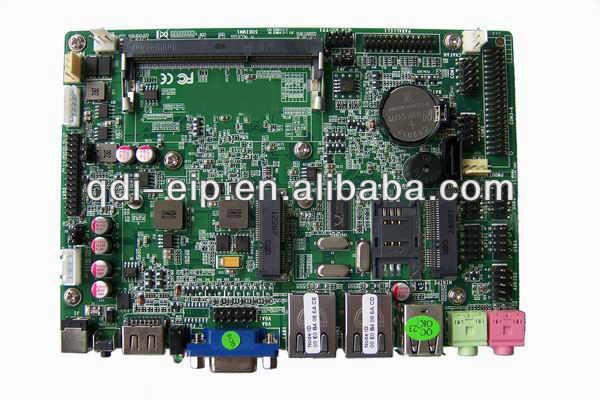
I can't quite figure out what form factor that is... it almost looks like the EPIC, or the 3.5" SBC size... but I think it looks too long on the short dimension? So it is probably something custom / non-standard...

%7B224F849A-C918-408D-95AE-73E8A91422C.jpg


I think this discovery of the I-37C pictures is also fantastic, as it shows how the fanless setup would work in the T30, thus giving some credibility to the "fanless" claim in the spec sheet. :thumbsup:

In the I-37C, the motherboard has the heat producing chips on the bottom, and is then installed upside-down into the chassis (which is the top and sides). The bottom cover is just a flat plate, with nothing attached to it other than a 2.5" drive.

794521308_311.jpg


794521314_254.jpg


Despite its small size, the I-37C looks to have a lot of empty space inside. It should even be large enough for a full thin-mini-ITX motherboard.

I-37C: 197mm x 197mm x 29mm
T30: 205mm x 140mm x 40mm


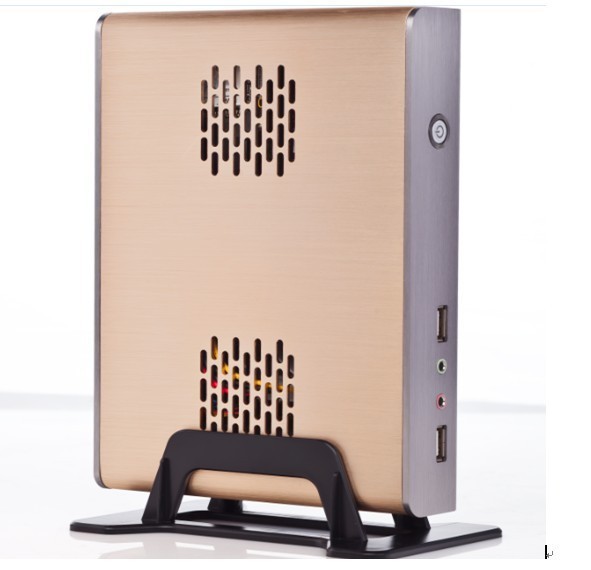
In the T30, the motherboard is installed in a different orientation, with the heat producing chips attached to the bottom of the chassis. So I suspect that the T30 would cool a lot better if you put some taller feet on it to give it more airflow underneath, or better yet - put some feet on the top and turned the whole thing upside down. The vertical orientation they show in the pictures (with the stand) may be the best way to run it, as the convection would draw air across it.


775821148_781.jpg


775821127_818.jpg
 

cbn

Lifer
Mar 27, 2009
12,968
221
106
Qotom motherboard:

794521326_128.jpg


794521293_083.jpg


I can't quite figure out what form factor that is... it almost looks like the EPIC, or the 3.5" SBC size... but I think it looks too long on the short dimension? So it is probably something custom / non-standard...

%7B224F849A-C918-408D-95AE-73E8A91422C.jpg

I found another computer with the same aluminum case as the Qotom-T30--->http://www.alibaba.com/product-gs/1199695657/EPIC_car_alluminum_pc_with_intel.html

EPIC is labeled in the title and if you scroll down after clicking on the link you can see a picture of the atom D2550 motherboard mounted inside the case with a 2.5" drive.
 
Last edited:

nForce2

Senior member
Aug 15, 2013
285
0
76
I found another computer with the same aluminum case as the Qotom-T30--->http://www.alibaba.com/product-gs/1199695657/EPIC_car_alluminum_pc_with_intel.html

EPIC is labeled in the title and if you scroll down after clicking on the link you can see a picture of the atom D2550 motherboard mounted inside the case with a 2.5" drive.

Nice find! :thumbsup:

That one appears to have an identical connector layout on the motherboard, and an identical case.

Inside, there's a surprising amount of space! It looks like you could easily fit a second 2.5" drive in there, or even a third if you reworked the internal connectors to lay down flatter. There's tons of space on that side too, so you could easily customize it with things like card readers, USB TV tuners, etc, all inside the case. :thumbsup:

657770873_594.JPG