• We’re currently investigating an issue related to the forum theme and styling that is impacting page layout and visual formatting. The problem has been identified, and we are actively working on a resolution. There is no impact to user data or functionality, this is strictly a front-end display issue. We’ll post an update once the fix has been deployed. Thanks for your patience while we get this sorted.

Discussion Apple Silicon SoC thread

Page 479 - Seeking answers? Join the AnandTech community: where nearly half-a-million members share solutions and discuss the latest tech.

Eug

Lifer
M1
5 nm
Unified memory architecture - LP-DDR4
16 billion transistors

8-core CPU

4 high-performance cores
192 KB instruction cache
128 KB data cache
Shared 12 MB L2 cache

4 high-efficiency cores
128 KB instruction cache
64 KB data cache
Shared 4 MB L2 cache
(Apple claims the 4 high-effiency cores alone perform like a dual-core Intel MacBook Air)

8-core iGPU (but there is a 7-core variant, likely with one inactive core)
128 execution units
Up to 24576 concurrent threads
2.6 Teraflops
82 Gigatexels/s
41 gigapixels/s

16-core neural engine
Secure Enclave
USB 4

Products:
$999 ($899 edu) 13" MacBook Air (fanless) - 18 hour video playback battery life
$699 Mac mini (with fan)
$1299 ($1199 edu) 13" MacBook Pro (with fan) - 20 hour video playback battery life

Memory options 8 GB and 16 GB. No 32 GB option (unless you go Intel).

It should be noted that the M1 chip in these three Macs is the same (aside from GPU core number). Basically, Apple is taking the same approach which these chips as they do the iPhones and iPads. Just one SKU (excluding the X variants), which is the same across all iDevices (aside from maybe slight clock speed differences occasionally).

EDIT:

Screen-Shot-2021-10-18-at-1.20.47-PM.jpg

M1 Pro 8-core CPU (6+2), 14-core GPU
M1 Pro 10-core CPU (8+2), 14-core GPU
M1 Pro 10-core CPU (8+2), 16-core GPU
M1 Max 10-core CPU (8+2), 24-core GPU
M1 Max 10-core CPU (8+2), 32-core GPU

M1 Pro and M1 Max discussion here:


M1 Ultra discussion here:


M2 discussion here:


Second Generation 5 nm
Unified memory architecture - LPDDR5, up to 24 GB and 100 GB/s
20 billion transistors

8-core CPU

4 high-performance cores
192 KB instruction cache
128 KB data cache
Shared 16 MB L2 cache

4 high-efficiency cores
128 KB instruction cache
64 KB data cache
Shared 4 MB L2 cache

10-core iGPU (but there is an 8-core variant)
3.6 Teraflops

16-core neural engine
Secure Enclave
USB 4

Hardware acceleration for 8K h.264, h.264, ProRes

M3 Family discussion here:


M4 Family discussion here:


M5 Family discussion here:

 
Last edited:
MacOS is very aggressive with swap. I've got 32GB on this machine, 8GB of swap, and 12 GB free.

Where I think MacOS is most aggressive is with holding inactive Safari tabs in swap. Cache doesn't really do the job for JS reliant pages, whereas swap can quickly reload in, and where going back to network for data would be really slow. So I think even when there's plenty of RAM, MacOS just dumps inactive tabs into swap. I don't think Safari is the only place where this happens either. I suspect it does the same with Mail and some other apps. These are carryovers from iOS.

I think this is both one reason why MacOS performs better than Windows on low RAM - because who doesn't have a browser open, and why Safari runs so much better than Chrome, because Apple can't do that with Chrome tabs.

So I wouldn't consider the presence of some swap to be indicative of memory pressure, I think it's just how MacOS sort of 'cheats' inactive processes, and frankly it's a pretty good cheat because all modern OSes have a lot of work put into blasting swap in quickly and resuming processes, so why not just leverage that instead of a whole separate caching scheme?
Yeah. And, having faster SSD bandwidth makes this not the problem it used to be. I remember getting beach balls anytime swap was going on with a device with spinning rust.
 
Will Ultrafusion stick around, now that they have moved to the new chiplet architecture?

Ultrafusion is effectively a chiplet architecture. Going to "real" chiplets won't change the physical limitations to any great degree.

Without knowing exactly what the cause(s) of the GPU scaling issues were I don't think we can make any educated guesses about whether they can/will fix it. It would be interesting to compare different types of benchmarks to see what stuff is more/less affected by it. If it was old school bitmaps and textures you could split "ownership" of parts of the display between the chips, but with fancier techniques let alone raytracing such simple division of work is no longer feasible (or at least way way more difficult)

Based on what (little) I know of GPU design if I had to guess I'd say the problem is more likely to be driver related than the physical design of the GPU and its split across separate dies. Heck just look at how even Nvidia would sometimes get nice double digit performance increases from a simple driver update not long after a new generation was released, and they know way more about GPUs than Apple does.
 
My iMac Pro (32GB) has 12GB of swap right now. And I'm not doing anything especially aggressive.

But it may ALSO mean that, for example, you've left an app in the background for three weeks, and the OS has sensibly concluded that all relevant modified pages should be paged out, so that the DRAM can be used by a more active app.
One difference between Eug and me may be that I open many apps, and leave them running perpetually – because why not, the system handles this appropriately. But other people either like to close apps after they use them, or simply don't open many apps.
Each of these parties will see a very different swap file size – with zero implications for actual usability and performance/stuttering.
Hmmm… I tend not to keep all my apps in swap forever, because I usually run a rather limited set of apps but continue to use them on a continual basis. I won’t load all my apps and keep them in memory because most of the time I don’t need those extra other apps. But what this also means is that I often actually use most of the apps I have in memory… and as mentioned, in this context I would sometimes notice pauses on my M1 machine when the swap started to accumulate. I’d imagine the experience would be very different if I had 32 GB of physical memory I could use for actual active applications, along with 8 GB of swap of applications I only use once in a blue moon, especially on a machine with decent SSD speeds.


Yeah. And, having faster SSD bandwidth makes this not the problem it used to be. I remember getting beach balls anytime swap was going on with a device with spinning rust.
AFAIK, the Neo is about tied for the slowest SSD of any Apple Silicon Mac ever made. Both the 256 and 512 GB models max out around 1.4 GB/s. Also, the CPU speed throttles severely very quickly in tests, and in prolonged use, the A18 Pro single-core is actually slower than M1 single-core in the fanless MacBook Air. There was a test out there that showed decreased throttling in the Neo if you add thermal pads to better connect the SoC to the chassis.

I can only hope the next Neo (A19 Pro next year?) fixes three of these problems:

1. 8 GB RAM —> 12 GB RAM. A19 Pro comes with 12 GB RAM.
2. Faster SSD speed in the 512 GB Neo. Apparently iPhone 17 Pro 512 GB SSD is faster than 256.
3. Better cooling. iPhone 17 Pro got a vapour chamber.

As for beach balls, see below.


Josh chimes in:
Pretty much made the same points I made when it was announced. Rev 2 will be so much more compelling.
He noticed the same pauses that I noticed, but even worse, he got a spinning beach ball of death doing stuff that wouldn’t be all that taxing for other recent 16 GB Apple Silicon machines.
 
Last edited:
AFAIK, the Neo is about tied for the slowest SSD of any Apple Silicon Mac ever made. Both the 256 and 512 GB models max out around 1.4 GB/s. Also, the CPU speed throttles severely very quickly in tests, and in prolonged use, the A18 Pro single-core is actually slower than M1 single-core in the fanless MacBook Air. There was a test out there that showed decreased throttling in the Neo if you add thermal pads to better connect the SoC to the chassis.

I can only hope the next Neo (A19 Pro next year?) fixes three of these problems:

1. 8 GB RAM —> 12 GB RAM. A19 Pro comes with 12 GB RAM.
2. Faster SSD speed in the 512 GB Neo. Apparently iPhone 17 Pro 512 GB SSD is faster than 256.
3. Better cooling. iPhone 17 Pro got a vapour chamber.

You're overlooking that Apple may not see those performance gaps as something that needs fixing, but rather something that justifies the large gap between the Neo's price and the MBA's price. If they fix all the Neo's shortcomings to where it is a Macbook Air less a few cores and smaller RAM/NAND defaults they'll lose a lot of Air sales to the Neo.

It is also funny that people now talking about 1.4 GBps from their storage as "slow". It wasn't that long ago that we dealt with hard drives, that could barely exceed 100 MBps sequential but in the real world when any random access was involved would be down in the single digit MBps or worse. 1.4 GBps was something you could only get by striping dozens or hundreds of disks in an enterprise array.
 
You're overlooking that Apple may not see those performance gaps as something that needs fixing, but rather something that justifies the large gap between the Neo's price and the MBA's price. If they fix all the Neo's shortcomings to where it is a Macbook Air less a few cores and smaller RAM/NAND defaults they'll lose a lot of Air sales to the Neo.
If you don't cannibalize yourself, someone else will.
- Steve Jobs

All these fixes already exist with the A19 Pro, which is in the device I’m typing on right now, a friggin’ phone. One of the three fixes is not on this particular phone model, but would be if I paid extra for more storage. I would suggest the same for the next MacBook Neo: A19 Pro with 12 GB RAM and better cooling, plus better NAND speed for a higher priced 512 GB model. The main question is when it will come out, 2027 or 2028.


It is also funny that people now talking about 1.4 GBps from their storage as "slow". It wasn't that long ago that we dealt with hard drives, that could barely exceed 100 MBps sequential but in the real world when any random access was involved would be down in the single digit MBps or worse. 1.4 GBps was something you could only get by striping dozens or hundreds of disks in an enterprise array.
People have been talking about that as slow for Macs since 2022. Technology progresses.
 
Last edited:
But it may ALSO mean that, for example, you've left an app in the background for three weeks, and the OS has sensibly concluded that all relevant modified pages should be paged out, so that the DRAM can be used by a more active app.
One difference between Eug and me may be that I open many apps, and leave them running perpetually – because why not, the system handles this appropriately. But other people either like to close apps after they use them, or simply don't open many apps.
Each of these parties will see a very different swap file size – with zero implications for actual usability and performance/stuttering.
Yeah, that's me as well.
~ % uptime
2:04 up 118 days, 13:45, 2 users, load averages: 4.72 4.64 4.04
Up 118 days on a laptop is maybe not advised and it's entirely possible Steam client has been running that whole time. Discord almost certainly has. I know I restarted Safari maybe two weeks ago?

So probably an artifact of how recently the machine has restarted and such.
 
It is also funny that people now talking about 1.4 GBps from their storage as "slow". It wasn't that long ago that we dealt with hard drives, that could barely exceed 100 MBps sequential but in the real world when any random access was involved would be down in the single digit MBps or worse. 1.4 GBps was something you could only get by striping dozens or hundreds of disks in an enterprise array.
Yeah, I ran some pretty big databases in my day and even with 5 figure budgets 1.4GBps was hard to reach back in the 15K RPM enterprise drive days. Mind you the client machine probably had the computational power of my AirPods. Definitely less than my Watch.
 
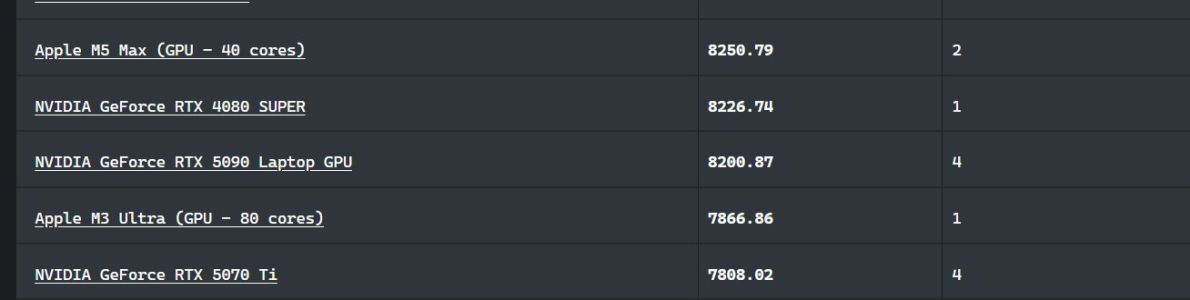
The M5 Max outperformed the 5090 laptop in Blender 5.1 View attachment 140338
Don't worry, the internet cope is already out in full force.
Apparently the 5090 is "really" better, but Apple cheats by having Metal be more efficient in its compilation.

Yes, really, that's the thinking on Twitter. Having a better compiler and a more well thought out shading language is apparently "cheating".

Screenshot 2026-03-20 at 10.42.19 AM.png
 
Ultrafusion is effectively a chiplet architecture. Going to "real" chiplets won't change the physical limitations to any great degree.

Without knowing exactly what the cause(s) of the GPU scaling issues were I don't think we can make any educated guesses about whether they can/will fix it. It would be interesting to compare different types of benchmarks to see what stuff is more/less affected by it. If it was old school bitmaps and textures you could split "ownership" of parts of the display between the chips, but with fancier techniques let alone raytracing such simple division of work is no longer feasible (or at least way way more difficult)

Based on what (little) I know of GPU design if I had to guess I'd say the problem is more likely to be driver related than the physical design of the GPU and its split across separate dies. Heck just look at how even Nvidia would sometimes get nice double digit performance increases from a simple driver update not long after a new generation was released, and they know way more about GPUs than Apple does.
There were a flurry of patents after the initial Ultras talking about this.
My understanding is that the single line summary is: not enough telemetry was being provided to the "combined GPU" scheduler to allow it to make optimal scheduling choices. You need to know what's happening on the other chiplet (along a number of dimensions) and only the bare minimum of that was available.

This is not exactly "driver" related. As I understand it (happy to take corrections!) Apple delegates much of the lowest level work that might, in "traditional" GPUs be handled by the driver, to a low level small CPU that acts as a "companion/controller" to the GPU. This low level CPU handles things like memory allocation and scheduling. (It's not clear to me how many of these controller CPUs there are. There may be one per small cluster (say 5 or 6 GPU cores?) There are a lot of signals that Apple use for scheduling, many described in patents. But, like I said, it's possible that many of these same signals were not considered for transport from one chiplet to another - until the scaling problems were encountered.

The good news is that this is, in principle, an easily fixed problem.
 
I wrote up a longish analysis of this, but Safari crashed (yay!) and ate it, so to hell with that.
Just read this
(and also read the github link)

It's fascinating along a number of dimensions. One is the whole "run an LLM out of flash" angle. Another is the speed at which you can experiment and test hypotheses if you are collaborating (and know what you are doing) with the highest level data-center agentic LLMs.
 
I wrote up a longish analysis of this, but Safari crashed (yay!) and ate it, so to hell with that.
Just read this
(and also read the github link)

It's fascinating along a number of dimensions. One is the whole "run an LLM out of flash" angle. Another is the speed at which you can experiment and test hypotheses if you are collaborating (and know what you are doing) with the highest level data-center agentic LLMs.

I wish he'd try this on an iPhone, because that's the real audience for this sort of thing. The resources are smaller, but there's enough room in flash (at least if you go beyond the 256 GB base config) to hold the model weights.

I'm seriously impressed he was able to create all this using Claude code and feeding it Apple's paper, while acting in an architect role. Seeing the exact sequence of prompts he gave to make this all happen would be more interesting for me than the actual end product tbh.
 
From: https://www.heise.de/hintergrund/Ap...rne-mehr-als-nur-Marketing-sind-11219792.html

Apple in an interview: Why the new M5 cores are more than just marketing

In a background discussion with Mac & i, Apple managers reveal what really lies behind the Super, Performance, and Efficiency cores in the new M5 chips.

In March 2026, Apple introduced new MacBook Pros featuring the Apple M5 Pro and M5 Max chips. Both SoCs no longer include efficiency cores, but instead feature performance cores and, for the first time, cores that Apple refers to as “Super Cores.”

As our test of the MacBook Pro with the M5 Max showed, the two core types are clocked at nearly the same speed, with a difference of only 228 MHz. We asked Apple whether this represents a departure from efficiency in Apple Silicon.

In an exclusive background discussion, we were able to question three Apple managers about technical details and the reasoning behind these changes. Among them was Anand Shimpi, who is responsible for platform architecture at Apple and is well known to many readers as the co-founder of AnandTech. Doug Brooks is part of Mac product marketing, and Aaron Coday handles pro workflows at Apple.

According to Shimpi, all three types of cores are efficient—they are simply designed for different performance ranges:
“The Super Core is the fastest CPU core in the world. It is optimized for single-core performance. The efficiency core is our most efficient CPU core.”

While the latter does not achieve the same single-thread performance as a Super Core, it reduces power consumption during background tasks.


The Performance Core is the newcomer


Although the name “Super Core” is new, it is essentially the former performance core. The efficiency core retains its name and characteristics but has been removed from the M5 Pro and M5 Max. The real innovation is the new Performance Core, which sits between the two previous core types.


According to Shimpi, the difference compared to the Super Core is not just clock speed:
“In fact, it is a completely custom microarchitecture. It differs significantly from both the Super Core and the Efficiency Core. It also manages to surpass the efficiency of the Efficiency Core.”


According to Shimpi, the new Performance cores take over the role of efficiency cores in applications that are not optimally adapted for multithreading.
“This way, you get the best of both worlds,” said the Apple manager.


Renamed cores in the M5


The MacBook Pro with the base M5 chip was already released in October, at that time still featuring efficiency and performance cores. Since then, Apple has somewhat confusingly renamed the terminology retroactively. The former performance core is now called the Super Core.

Brooks explains the reasoning:
“We now have three types of cores in the M5 chip family, and we wanted to name each one in a way that clearly reflects its performance characteristics.”


PCIe 5 and Fusion architecture


In the new MacBook Pros with the M5 Max and M5 Pro, SSDs achieve transfer rates of over 15,000 MB/s. Previously, the M4 Max reached over 7,500 MB/s, and the M4 about 3,750 MB/s. These figures roughly correspond to the tiers of PCIe 5.0, 4.0, and 3.0.

This might suggest that the controller in Apple’s M-series chips also uses PCIe 5. Brooks clarified that while the chips do support PCIe 5, they actually rely on custom-designed controllers:
“This extends all the way down to the software and the security processors that handle encryption at this level of performance.”


Similarity between UltraFusion and Fusion


The Ultra versions of the M3 chips consist of two Max SoCs connected via an interposer called UltraFusion. In contrast, the M5 Pro and M5 Max use a new Fusion architecture that connects two stacked dies (the silicon substrates that contain the transistors).

According to Shimpi, this is a high-bandwidth, low-latency interface made highly energy-efficient through advanced packaging.

Applications and the operating system still see only a single SoC—just like with UltraFusion. So what exactly distinguishes the two technologies?

“In a way, this is a newer version of a similar concept,” Shimpi explains. He continues:
“With the earlier Ultra chips, we connected two identical SoCs to form a larger SoC. Now, we’ve actually split a number of functions across two different dies. They are not mirror images of each other—we’ve integrated distinct IP blocks into each.”

We were also interested in whether two chips using the Fusion architecture could be combined via UltraFusion into a single SoC with four dies—effectively an M5 Ultra. However, Apple traditionally does not comment on future products.

“At the moment, we have only announced the M5 Pro and M5 Max,” Shimpi said in response.


Differences between M5 Pro and Max


All Pro and Max chips differ in the number of GPU cores, memory bandwidth, and the maximum supported RAM. However, across different generations of M-series chips, Apple has also varied the CPU differences between Pro and Max quite significantly. In some cases, the CPUs in their maximum configurations were identical, while in others—especially with the M3 Pro—the Pro was noticeably weaker than the Max.

This raised the impression that Apple might be experimenting with how to scale core counts.
“We’re not trying to experiment and figure things out that way,” Shimpi explained. He continued:
“Ultimately, we are not a commercial semiconductor manufacturer. We design chips specifically for a particular product generation.”

Even though the number and type of CPU cores may vary, the Apple manager points to a key advantage:
“Across the entire product lineup—M5, M5 Pro, M5 Max—you consistently get the same excellent single-thread performance, and all of these devices are extremely efficient.”

This means users can choose the system with the right chip that best fits their specific needs.

According to Brooks, the M5 Pro is particularly popular in software development and audio-related workflows—both of which tend to be highly CPU-intensive, with an increasing use of AI.


No explanation for shorter battery life


In our tests, we consistently observed slightly shorter battery life in the new MacBooks and asked Apple whether this might be due to macOS 26 and Liquid Glass.

Doug Brooks countered that, according to their standard testing, battery life reached “up to 24 hours,” and pointed instead to the performance improvements.


Who benefits from the AI units in GPU cores


Finally, we asked which apps already support the AI units in the GPU cores of the various M5 processors.


Aaron Coday cited three programs as examples: DaVinci Resolve, Topaz Video AI, and Adobe Premiere Pro:

“Content creators may want to upscale their videos from 1K to 4K or from 4K to 8K using DaVinci Resolve—this is where the accelerators come into play.”


Topaz offers similar capabilities. Another feature where neural accelerators are used in both Topaz and DaVinci Resolve is retiming, where the frame rate is converted. In Europe, common frame rates for video and film are 25, 50, or 100 fps, while in the United States, they are 30, 60, and 120 fps.
 
Back
Top