
-
We’re currently investigating an issue related to the forum theme and styling that is impacting page layout and visual formatting. The problem has been identified, and we are actively working on a resolution. There is no impact to user data or functionality, this is strictly a front-end display issue. We’ll post an update once the fix has been deployed. Thanks for your patience while we get this sorted.
You are using an out of date browser. It may not display this or other websites correctly.
You should upgrade or use an alternative browser.
You should upgrade or use an alternative browser.
AMD Ryzen 3000 Builders Thread
Page 71 - Seeking answers? Join the AnandTech community: where nearly half-a-million members share solutions and discuss the latest tech.
LLC was on level 3 in the BIOS.
I've put it on level 1, but actually lost a little bit of performance (7250 -> around 7125, 2 runs)
I put it on auto, and raised the fan curve from normal to performance, and scored 7275 and 7267.
I don't think without the next BIOS there is more to gain here, maybe a bit with the waterblock keeping temps under the thresholds that reduce frequency.
BTW, I was expecting bad noise after 5 years on a watercooled PC.
Not at all. The CPU cooler is like dead silent, so is the GPU blower during idle.
There is a some blow noise during game and bench, but really, nothing worth noting.
Even during timespy the 5700XT is not a nuisance. Not even undervolted yet.
I'll put my loop in anyway, just, as usual, because I can, but I could live with that easily.
I've put it on level 1, but actually lost a little bit of performance (7250 -> around 7125, 2 runs)
I put it on auto, and raised the fan curve from normal to performance, and scored 7275 and 7267.
I don't think without the next BIOS there is more to gain here, maybe a bit with the waterblock keeping temps under the thresholds that reduce frequency.
BTW, I was expecting bad noise after 5 years on a watercooled PC.
Not at all. The CPU cooler is like dead silent, so is the GPU blower during idle.
There is a some blow noise during game and bench, but really, nothing worth noting.
Even during timespy the 5700XT is not a nuisance. Not even undervolted yet.
I'll put my loop in anyway, just, as usual, because I can, but I could live with that easily.

DrMrLordX
Lifer
PSA for all-core OC maniacs:
With the new release of AGESA 1.0.0.3ABBA, it appears that there may also be some changes in the effectiveness of LLC settings when maintaining high static clocks. I ran CBR20 through the paces (again) and found that on my x570 Aorus Master, LLC settings of Turbo for CPU and SoC were no longer the most-effective way to stabilize the CPU. When using Turbo/Turbo I had to push ~1.344v (as measured by CPU-z) to get the chip running at 4375 MHz. When using LLC Normal (which is essentially, LLC 0 or LLC OFF) I only had to push ~1.32v to achieve stability at the same clockspeed. Due to vdroop, that meant 1.3625v in Ryzen Master. Scores were nearly identical between the runs (7835 vs 7832) so there was no observable clock stretching. Note that I used to have 4400 MHz stable, but aggressive RAM OC seems to have made it difficult - if not impossible - for me to stabilize at that speed.
All above data is assuming no vcore offsets, either. I might try it again with -.1v offset and see how it goes.
edit:
I added a -.1v offset to LLC OFF to see how it would go. Some interesting bits.
When moving up in clockspeed to 4375 MHz, behavior with the negative offset was about the same as just running LLC OFF without any offset at all. CPU-z reported that stabilizing 4375 MHz in CBR20 required ~1.32v with a score of 7821. Temps were about the same as well (65-66C). The interesting bits happened at speeds of 4300-4325 MHz: I got those speeds running at stupidly-low voltages. 4300 MHz only required ~1.236v (actually closer to 1.24v). Most of my previous testing has required around 1.25v-1.26v to stabilize at that clockspeed. The chip turned in a score of ~7670 on several different runs with a reported temp of ~58C. Higher voltages did not improve score (but did raise temps). Needs to be some more testing done to research the effects of LLC + offsets.
With the new release of AGESA 1.0.0.3ABBA, it appears that there may also be some changes in the effectiveness of LLC settings when maintaining high static clocks. I ran CBR20 through the paces (again) and found that on my x570 Aorus Master, LLC settings of Turbo for CPU and SoC were no longer the most-effective way to stabilize the CPU. When using Turbo/Turbo I had to push ~1.344v (as measured by CPU-z) to get the chip running at 4375 MHz. When using LLC Normal (which is essentially, LLC 0 or LLC OFF) I only had to push ~1.32v to achieve stability at the same clockspeed. Due to vdroop, that meant 1.3625v in Ryzen Master. Scores were nearly identical between the runs (7835 vs 7832) so there was no observable clock stretching. Note that I used to have 4400 MHz stable, but aggressive RAM OC seems to have made it difficult - if not impossible - for me to stabilize at that speed.
All above data is assuming no vcore offsets, either. I might try it again with -.1v offset and see how it goes.
edit:
I added a -.1v offset to LLC OFF to see how it would go. Some interesting bits.
When moving up in clockspeed to 4375 MHz, behavior with the negative offset was about the same as just running LLC OFF without any offset at all. CPU-z reported that stabilizing 4375 MHz in CBR20 required ~1.32v with a score of 7821. Temps were about the same as well (65-66C). The interesting bits happened at speeds of 4300-4325 MHz: I got those speeds running at stupidly-low voltages. 4300 MHz only required ~1.236v (actually closer to 1.24v). Most of my previous testing has required around 1.25v-1.26v to stabilize at that clockspeed. The chip turned in a score of ~7670 on several different runs with a reported temp of ~58C. Higher voltages did not improve score (but did raise temps). Needs to be some more testing done to research the effects of LLC + offsets.
Last edited:
Hi everyone, new user here, been reading Anand from the very beginning though! - im 43!
Just built a new home workstation mainly for Cinema4d and Cubase, I cant wait any longer for a 3900x so I bought a 3700x and will upgrade when supply is a bit better.
So I maybe won the silicon lottery??
My 3700x overclocks to 4.25ghz allcore at 1.275v on my asus b450 prime with stock cooling, and scores 5127 in CB20. I also stress tested this profile in Cinema4D with a 4 hour intense render, and its stable at 1.275v, whereas CBr20 will pass at 1.25v easily at this speed. Under these conditions in a poorly ventilated case (soon to be upgraded) i hit 80C and HWmonitor records Im using a pretty straight 100 Watts package.
I can allcore OC all the way up to 4375ghz at 1.45v, but 4.4 is not stable, and im not willing to push the voltage higher.
However Im very pleased with the results regardless. Very happy I can run 4.25ghz all-core all day, - turbo speed is not so important to me, and im only 125mhz off the turbo (max on PBO is 4375) which is negligible <3%, but I gain 8% in multicore.
So here are some observations, maybe to comment on
• When I originally built the system, under pre-OC conditions, it would boost allcore to 3975mhz under cinebench. After a day of OC testing, it only boosts to 3925mhz. Ive lost 50mhz across all cores somehow. Have I degraded the CPU?
• Under stock, I use 88W and get standard scores in CB20 of around 4600, where the allcore boost is around 3950mhz and occasional boosts to 4300+ mhz
However, if I set 4.2ghz all core at 1.2v, I can easily score 5000+, using essentially the same 90W - is PBO wasting power to hit those rapid but very short lived highs?
• Power usage goes up rapidly over 1.25v for little increase in speed or performance.
• When running Cinebench, the power usage goes up to 105W with all 8 cores maxed at 100%, however when I stress test in C4D over 4 hours with any scene I create, the power draw never goes above 100W. Is there something fishy going on with gimping the results in CB at the MB level?
• Increasing the voltage lowers the per core wattage! - for instance under stock conditions with PBO, the cores use around 9W each with the remaining power consumed by the chiplet controller I assume. Under my overclock, I notice that the cores are using around 8W each, but the total power consumption increases, meaning that the controller is consuming a higher percentage of the total power.
Is this all standard behaviour? Did I win silicon lottery? Have I discovered anything of value?
Just built a new home workstation mainly for Cinema4d and Cubase, I cant wait any longer for a 3900x so I bought a 3700x and will upgrade when supply is a bit better.
So I maybe won the silicon lottery??
My 3700x overclocks to 4.25ghz allcore at 1.275v on my asus b450 prime with stock cooling, and scores 5127 in CB20. I also stress tested this profile in Cinema4D with a 4 hour intense render, and its stable at 1.275v, whereas CBr20 will pass at 1.25v easily at this speed. Under these conditions in a poorly ventilated case (soon to be upgraded) i hit 80C and HWmonitor records Im using a pretty straight 100 Watts package.
I can allcore OC all the way up to 4375ghz at 1.45v, but 4.4 is not stable, and im not willing to push the voltage higher.
However Im very pleased with the results regardless. Very happy I can run 4.25ghz all-core all day, - turbo speed is not so important to me, and im only 125mhz off the turbo (max on PBO is 4375) which is negligible <3%, but I gain 8% in multicore.
So here are some observations, maybe to comment on
• When I originally built the system, under pre-OC conditions, it would boost allcore to 3975mhz under cinebench. After a day of OC testing, it only boosts to 3925mhz. Ive lost 50mhz across all cores somehow. Have I degraded the CPU?
• Under stock, I use 88W and get standard scores in CB20 of around 4600, where the allcore boost is around 3950mhz and occasional boosts to 4300+ mhz
However, if I set 4.2ghz all core at 1.2v, I can easily score 5000+, using essentially the same 90W - is PBO wasting power to hit those rapid but very short lived highs?
• Power usage goes up rapidly over 1.25v for little increase in speed or performance.
• When running Cinebench, the power usage goes up to 105W with all 8 cores maxed at 100%, however when I stress test in C4D over 4 hours with any scene I create, the power draw never goes above 100W. Is there something fishy going on with gimping the results in CB at the MB level?
• Increasing the voltage lowers the per core wattage! - for instance under stock conditions with PBO, the cores use around 9W each with the remaining power consumed by the chiplet controller I assume. Under my overclock, I notice that the cores are using around 8W each, but the total power consumption increases, meaning that the controller is consuming a higher percentage of the total power.
Is this all standard behaviour? Did I win silicon lottery? Have I discovered anything of value?
DrMrLordX
Lifer
@marcUK2
Seems like you've got a decent sample. If you want to experiment with boost, you're going to need to wait until your board has a UEFI update that implements AGESA 1.0.0.3ABBA before you get the best possible speeds. Not sure why you lost boost, but basically if the chip is performing well enough at 4200 MHz for your needs, may as well leave it there for now until you decide to play with it later. 1.25v should be safe in nearly every scenario except for extreme AVX2 workloads (and then it won't be the voltage, but heat, that gets you). And yes PBO is wasting power. I still haven't figured out how to make it worthwhile for my 3900x.
Also, I think Maxon is still using a different codebase for Cinebench than they do their commercial Cinema4D software. Could be wrong. Has Cinema4D even incorporated Embree yet?
Seems like you've got a decent sample. If you want to experiment with boost, you're going to need to wait until your board has a UEFI update that implements AGESA 1.0.0.3ABBA before you get the best possible speeds. Not sure why you lost boost, but basically if the chip is performing well enough at 4200 MHz for your needs, may as well leave it there for now until you decide to play with it later. 1.25v should be safe in nearly every scenario except for extreme AVX2 workloads (and then it won't be the voltage, but heat, that gets you). And yes PBO is wasting power. I still haven't figured out how to make it worthwhile for my 3900x.
Also, I think Maxon is still using a different codebase for Cinebench than they do their commercial Cinema4D software. Could be wrong. Has Cinema4D even incorporated Embree yet?

PotatoWithEarsOnSide
Senior member
I had no issues running 4.275GHz at 1.1v in Cinebench R20 MT. Got 3875 for the 3600X.PSA for all-core OC maniacs:
With the new release of AGESA 1.0.0.3ABBA, it appears that there may also be some changes in the effectiveness of LLC settings when maintaining high static clocks. I ran CBR20 through the paces (again) and found that on my x570 Aorus Master, LLC settings of Turbo for CPU and SoC were no longer the most-effective way to stabilize the CPU. When using Turbo/Turbo I had to push ~1.344v (as measured by CPU-z) to get the chip running at 4375 MHz. When using LLC Normal (which is essentially, LLC 0 or LLC OFF) I only had to push ~1.32v to achieve stability at the same clockspeed. Due to vdroop, that meant 1.3625v in Ryzen Master. Scores were nearly identical between the runs (7835 vs 7832) so there was no observable clock stretching. Note that I used to have 4400 MHz stable, but aggressive RAM OC seems to have made it difficult - if not impossible - for me to stabilize at that speed.
All above data is assuming no vcore offsets, either. I might try it again with -.1v offset and see how it goes.
edit:
I added a -.1v offset to LLC OFF to see how it would go. Some interesting bits.
When moving up in clockspeed to 4375 MHz, behavior with the negative offset was about the same as just running LLC OFF without any offset at all. CPU-z reported that stabilizing 4375 MHz in CBR20 required ~1.32v with a score of 7821. Temps were about the same as well (65-66C). The interesting bits happened at speeds of 4300-4325 MHz: I got those speeds running at stupidly-low voltages. 4300 MHz only required ~1.236v (actually closer to 1.24v). Most of my previous testing has required around 1.25v-1.26v to stabilize at that clockspeed. The chip turned in a score of ~7670 on several different runs with a reported temp of ~58C. Higher voltages did not improve score (but did raise temps). Needs to be some more testing done to research the effects of LLC + offsets.
Seems like quite a big jump to get the 3900X running the same clocks.
Edit:
After updating to ABBA AGESA I clicked the "OC Tuner" button in the BIOS. It decided that 4.1GHz at 1.1v was the optimum level.
I entered Ryzen Master and selected one of the default profiles, clicked the Manual tab, left Voltage Control disabled, and set all core clocks to 4.275GHz.
The CPU behaves normally where the 1.1v isn't required, and maintains 1.1v when 4.1GHz (up to 4.275GHz) is clocked.
Edit2: normally you cannot set a manual profile without enabling Voltage Control, however it works in OC Tuner mode.
I've not then tried increasing the voltage in the BIOS to see if I can hit higher clocks but with normal behaviour and lower voltages.
Last edited:
DrMrLordX
Lifer
I had no issues running 4.275GHz at 1.1v in Cinebench R20 MT. Got 3875 for the 3600X.
What were you using to measure the voltage? I've found that CPU-z reports the most-plausible numbers (I admit, I haven't tried using a multimeter to confirm those numbers). Stuff like HWiNFO64 gives much lower numbers.
vnt@marcUK2
Also, I think Maxon is still using a different codebase for Cinebench than they do their commercial Cinema4D software. Could be wrong. Has Cinema4D even incorporated Embree yet?
Embree is the default option in physical render, at least in r20, which is what my own stress test was conducted under.
Does your 3900x boost to 4.6? I would hope for an all core OC of 4.2, not really interested in boost. Is this likely when I finally get one?

Markfw
Moderator Emeritus, Elite Member
well, I have 2 3900x's at 4100 all core 24/7 100%load. So 4.2 is not unreasonable. I did not even try for higher, as I am happy with the temps. You are going to need at lease a 240 AIO water cooler to keep temps reasonable if you do get 4.2. Oh, and I got one of those at 1.1 vcore.vnt
Embree is the default option in physical render, at least in r20, which is what my own stress test was conducted under.
Does your 3900x boost to 4.6? I would hope for an all core OC of 4.2, not really interested in boost. Is this likely when I finally get one?
well, I have 2 3900x's at 4100 all core 24/7 100%load. So 4.2 is not unreasonable. I did not even try for higher, as I am happy with the temps. You are going to need at lease a 240 AIO water cooler to keep temps reasonable if you do get 4.2. Oh, and I got one of those at 1.1 vcore.
Maybe even better than 240, Before thinking better of it I had PBO and AutoOC on (was on by default) with my 3900x, stress testing the CPU with a H100i (240) it was thermally throttling from 4.1 to 4GHz after a couple minutes. Now my install might not be perfect, my silicon not the greatest, and I wasn't doing a 4 fan push pull from the H100 (can't do the with the cooler where it is at), I also wasn't manually clocking it to 4.1 (where I might have been able to use less voltage). But there was room for sustained with a good cooler just my 240 setup wasn't enough.
Also worth noting I wasn't using the corsair fans but was using 2 Noctua NF-A12x25 PWM fans.
Markfw
Moderator Emeritus, Elite Member
I am running 62c now. My fans are always@100%. Maybe that the problem ?Maybe even better than 240, Before thinking better of it I had PBO and AutoOC on (was on by default) with my 3900x, stress testing the CPU with a H100i (240) it was thermally throttling from 4.1 to 4GHz after a couple minutes. Now my install might not be perfect, my silicon not the greatest, and I wasn't doing a 4 fan push pull from the H100 (can't do the with the cooler where it is at), I also wasn't manually clocking it to 4.1 (where I might have been able to use less voltage). But there was room for sustained with a good cooler just my 240 setup wasn't enough.
Also worth noting I wasn't using the corsair fans but was using 2 Noctua NF-A12x25 PWM fans.
PotatoWithEarsOnSide
Senior member
Ryzen Master...which matched up exactly with what it said in the BIOS.What were you using to measure the voltage? I've found that CPU-z reports the most-plausible numbers (I admit, I haven't tried using a multimeter to confirm those numbers). Stuff like HWiNFO64 gives much lower numbers.
I thought it was strange due to the manual tab normally requiring voltage control to be set as enabled, yet here it didn't require it and the CPU exhibited normal voltage changing behaviour when not needed.

For all you Ryzen tweakers, has anyone had luck with PCIe 4 on an X470 board? This would be for the m.2 slot, in particular the ultra m.2 on the Asrock X470 Taichi with a 3700X. I am currently on BIOS 3.50 and was considering ordering a Sabrent Rocket 4.
So...would this be possible? Is a modded bios needed, or will current BIOS(s) work? I looked over at OCN and there are modded BIOSs for Ryzen, but I couldnt find any info on enabling PCIe 4. Thanks!
So...would this be possible? Is a modded bios needed, or will current BIOS(s) work? I looked over at OCN and there are modded BIOSs for Ryzen, but I couldnt find any info on enabling PCIe 4. Thanks!
DrMrLordX
Lifer
vnt
Embree is the default option in physical render, at least in r20, which is what my own stress test was conducted under.
Interesting. Back in the R15 days, I'm pretty sure Cinema4D used a different codebase. That must not be the case anymore.
Does your 3900x boost to 4.6? I would hope for an all core OC of 4.2, not really interested in boost. Is this likely when I finally get one?
Under 1.0.0.3ABBA, yes, but only on maybe 2-3 cores, and not forever. It will permaboost to anywhere from 4550 to 4600 MHz (depending on workload) in ST workloads like SuperPi or CBR20 ST. When I am "serious" about performance, I run it at 4.3 GHz or higher. Default boost behavior is only for messing around on the desktop, gaming, or other casual stuff.
Ryzen Master...which matched up exactly with what it said in the BIOS.
Yeah I don't trust those readouts. I can make Ryzen Master report all kinds of crazy numbers depending on LLC and vcore offset. CPU-z is the only program that seems to be displaying realistic voltage numbers. Hold on, an example:
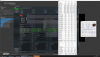
Ryzen Master clearly has no idea what is going on. I have LLC set to OFF, so major vdroop, and I have a -.1v offset. I set it to 1.4v and vdroop + offset should give me around 1.26v . . . just like CPU-z is reporting. HWiNFO64 is reporting lower voltages than CPU-z for whatever reason.
Make of that what you will. CPU-z seems to show voltages that track reliably with temperature (at any given level of current draw).
PotatoWithEarsOnSide
Senior member
I'll check it out again later. It's easy enough for me to test; just a couple of button clicks and reboots.
From memory, temperatures looked good.
The thing with Ryzen Master is that it's polling rate is so low, hence why it misses true behaviour. For instance, even peak clocks are missed unless there's a sustained load.
From memory, temperatures looked good.
The thing with Ryzen Master is that it's polling rate is so low, hence why it misses true behaviour. For instance, even peak clocks are missed unless there's a sustained load.
Just in case some end users haven't read the user guide I'll quote a section of it.
The above is from the Quick Reference Guide
I'd imagine that it's not the only app that could have potential issues after a uEFI update.
On the first use after installation, Ryzen Master copies the current processor parameters to create default reset parameters
‒ If the processor is first configured in BIOS to other than default parameters, these changes will be reflected in the Ryzen Master default settings
‒ If the processor is changed after Ryzen Master installation, Ryzen Master will notice and will advise that the default configuration will be reset to the new processor
‒ If the system BIOS is updated, please uninstall then re-install Ryzen Master to link supporting BIOS elements for Ryzen Master to use
‒ If you have favorite profiles set up, use the profiles Export feature to save them, then Import them after re-installing Ryzen Master
‒ These steps will assure that Ryzen Master is accessing the correct information for the new processor and new BIOS
The above is from the Quick Reference Guide
I'd imagine that it's not the only app that could have potential issues after a uEFI update.

amrnuke
Golden Member
Well, that may explain some issues I've been seeing with my computer. I'm on a 2200G + DS3H B450 with G.skill Trident RGB 16GB/3200/CL16. I overclocked the RAM a bit, using the DRAM calculator (only to 3400/CL16), and then started running into Windows BSODs and weird issues (like my sound not working, only a full Windows re-install fixed it). Now, I still get the BSOD (edit: with various stop codes, not the same one). It could be that I need to reset my BIOS settings. It could also be that I have a crummy motherboard, as my wireless keyboard and mouse drop-out and I have to unplug and replug my USB transmitter roughly daily. The DS3H was open-box. I'm starting to think there was something wrong.Just in case some end users haven't read the user guide I'll quote a section of it.
The above is from the Quick Reference Guide
I'd imagine that it's not the only app that could have potential issues after a uEFI update.
Off-topic as my case is obviously Zen1, but thanks for the info.
I am running 62c now. My fans are always@100%. Maybe that the problem ?
I mean mine were at 100% for the test as well but I am running mine in a mostly set it and forget it setup. Didn't want to play around with the BIOS. Didn't want to worry about to much undervolting. To much tendency to run at OC setting and so on. A perfect world I would go over everything with a fine comb and have it run at its most efficient but quick settings. But I am running it like a consumer who doesn't know better, while knowing better and being ok with that. It spends 98% of its time at idle.
But what it does say is if you don't know better. Trying to get 4.1 all core on a off the shelf 240 probably is pushing it.
DrMrLordX
Lifer
I'd imagine that it's not the only app that could have potential issues after a uEFI update.
That's weird that they want you to re-install it. It's been screwing up voltage readings from day 1 for me though, so I don't think uninstall/reinstall is gonna fix that.
That's weird that they want you to re-install it. It's been screwing up voltage readings from day 1 for me though, so I don't think uninstall/reinstall is gonna fix that.
It's weird, but it at least sounds plausible in the end. If nothing changed between uEFI versions then what would really be the point of updating them. If Ryzen Master only scans the uEFI on 1st activation then I could see this potentially causing issues for the end user. Guess it's one of those better safe than sorry things.
I don't remember which thread it was, but there was a user that said Ryzen Master took over his uEFI and wouldn't let go of some memory settings if I remember correctly. I believe he had to uninstall Master an reflash the uEFI to regain control.
I'm guilty of not removing and reinstalling Ryzen Master after a uEFI version update, but I have noticed some strange behavior with it after a uEFI update.
Markfw
Moderator Emeritus, Elite Member
I have a Corsair MP600 V4 on a x470 board. The only benchmark i TRIED RATED IT 4 TIMES BETTER THAN THE BEST..I went ahead and ordered the Sabrent Rocket 4 1TB NVMe SSD. I will test it and see what speeds I get, but I figure it will be a good upgrade for my 950 Pro either way and it was such a good price.
(damn caps again)

That's weird that they want you to re-install it. It's been screwing up voltage readings from day 1 for me though, so I don't think uninstall/reinstall is gonna fix that.
Pretty sure it's showing VID in Ryzen Master, and not actual applied vcore.
You can see this by setting a -0.100V offset in BIOS and then viewing voltage in RM vs CPU-Z. CPU-Z will be "correct" versus RM. But the only real way to see actual voltage would be to take a DMM to the right solder points.
Have the that exact sabrent. As long as you aren't doing extended file transfers the thing is blindingly quick. Had a 6GB file move I did and it finished as the copy process started. That's the real bonus of the drives insanely quick in bursts and those bursts can move insane amounts of data. Just not great for any extended use.
DrMrLordX
Lifer
It's weird, but it at least sounds plausible in the end. If nothing changed between uEFI versions then what would really be the point of updating them. If Ryzen Master only scans the uEFI on 1st activation then I could see this potentially causing issues for the end user. Guess it's one of those better safe than sorry things.
I don't remember which thread it was, but there was a user that said Ryzen Master took over his uEFI and wouldn't let go of some memory settings if I remember correctly. I believe he had to uninstall Master an reflash the uEFI to regain control.
I'm guilty of not removing and reinstalling Ryzen Master after a uEFI version update, but I have noticed some strange behavior with it after a uEFI update.
I tried uninstall/reinstall and it seems to have changed nothing in terms of voltage reporting. It still reports the chip pulling exactly the voltage I set irrespective of vdroop, offsets, or anything else.
Pretty sure it's showing VID in Ryzen Master, and not actual applied vcore.
Actually, if you look at my screenshot, you can see VID reported for cores 9-12 by HWiNFO64 as 1.313v. Ryzen Master is reporting 1.39994v (heh).
You can see this by setting a -0.100V offset in BIOS and then viewing voltage in RM vs CPU-Z. CPU-Z will be "correct" versus RM. But the only real way to see actual voltage would be to take a DMM to the right solder points.
Multimeter is best, agreed. Some boards actually have measurement points on the board specific for this purpose so that it's easy to take readings. I've just been too lazy to do the work myself.
TRENDING THREADS
-
 Discussion Zen 5 Speculation (EPYC Turin and Strix Point/Granite Ridge - Ryzen 9000)
- Started by DisEnchantment
- Replies: 25K
-
Discussion Intel Meteor, Arrow, Lunar & Panther Lakes + WCL Discussion Threads
- Started by Tigerick
- Replies: 25K
-
 Discussion Intel current and future Lakes & Rapids thread
- Started by TheF34RChannel
- Replies: 24K
-

-
