• We’re currently investigating an issue related to the forum theme and styling that is impacting page layout and visual formatting. The problem has been identified, and we are actively working on a resolution. There is no impact to user data or functionality, this is strictly a front-end display issue. We’ll post an update once the fix has been deployed. Thanks for your patience while we get this sorted.

Question AIO over Air cooled?

Page 2 - Seeking answers? Join the AnandTech community: where nearly half-a-million members share solutions and discuss the latest tech.
sigh...

Lessons in water cooling.
Unless your a Custom Water Cooling Loop build person, whose done it several times, and knows the math, anyone that says they NEED a AIO, either really needs it, or is completely lost in the laws of thermodynamics, and think water is something akin to Yoshi's stomach which deflys the 4th dimensional wall in space.

Meaning... water is not mana,, it not magical.. it can not do impossible things with physics like carry an unlimited heat load at any ambient, and definitely can not destroy heat.


PSA... radiator size is in direct relationship with pump head flow.
A D5 (our custom liquid cooling standard) can push water though most looks at about 1gpm.
With that flow thats 350-400W of carry capacity @ that flow.
Meaning inside the ENTIRE SYSTEM... not just that cpu part the entire system is now shuffling 350-400W of heat to another location... NOTE... this is not dissipation, but transportation.

Then you need the Radiator with the Fans.
Rad size + Fan STATIC... (NOT CFM but STATIC) translates to how much a radiator can dissipate.
150W @ 2200RPM on moderate static fans = 120mm radiator space.
So you need a minimum of 240 in most custom liquid systems to balance flow.

Now this is where most people think water is magical and can destroy heat, or even funnier.. make your room cooler...
Its the opposite... a good h2o system will make your room warmer, because its that more efficient at moving the heat OUTSIDE your CPU case.

Its a complex match, of course you can YOLO it with a Man grunt, or just go Dubai Chocolate sytle, and just get the best of everything with radiators so big you can cool the pacific ocean. (sarcasm) but you know what i mean.

AIO's at best are toys meant for gamers.
AIO pumps do not push out more then 0.5GPM. and well do the math guys.. how much heat is that in transportation capacity.

You see what i mean about people thinking they NEED an AIO either really do, (SPACE reasons is always the main), or they want bling first and performance is secondary, because they like that big LCD screen that now comes on the CPU PUMP Block.

wife is a much bigger noise problem than server rooms

:O
Those fans be insane...
Are you married to an Opera singer like Diana Damrau, and she is practicing Mozarts, Magic Flute.

I remember in my college days people would do that, and well, we busted out the whip cream and shaving cream to make them shut up.
 
Last edited:
sigh...

Lessons in water cooling.
Unless your a Custom Water Cooling Loop build person, whose done it several times, and knows the math, anyone that says they NEED a AIO, either really needs it, or is completely lost in the laws of thermodynamics, and think water is something akin to Yoshi's stomach which deflys the 4th dimensional wall in space.

Meaning... water is not mana,, it not magical.. it can not do impossible things with physics like carry an unlimited heat load at any ambient, and definitely can not destroy heat.


PSA... radiator size is in direct relationship with pump head flow.
A D5 (our custom liquid cooling standard) can push water though most looks at about 1gpm.
With that flow thats 350-400W of carry capacity @ that flow.
Meaning inside the ENTIRE SYSTEM... not just that cpu part the entire system is now shuffling 350-400W of heat to another location... NOTE... this is not dissipation, but transportation.

Then you need the Radiator with the Fans.
Rad size + Fan STATIC... (NOT CFM but STATIC) translates to how much a radiator can dissipate.
150W @ 2200RPM on moderate static fans = 120mm radiator space.
So you need a minimum of 240 in most custom liquid systems to balance flow.

Its a complex match, of course you can YOLO it with a Man grunt, or just go Dubai Chocolate sytle, and just get the best of everything with radiators so big you can pool the pacific ocean. (sarcasm) but you know what i mean.

AIO's at best are toys meant for gamers.
AIO pumps do not push out more then 0.5GPM. and well do the math guys.. how much heat is that in transportation capacity.

You see what i mean about people thinking they NEED an AIO either really do, (SPACE reasons is always the main), or they want bling first and performance is secondary, because they like that big LCD screen that now comes on the CPU PUMP Block.
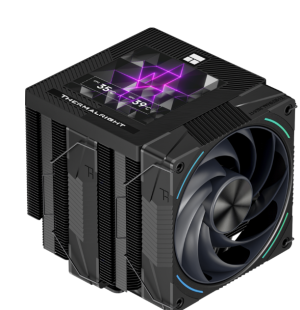
you can get LCD on aircooler as well xd

1761147656408.png

as to the old battleaxe, her volume is stuck on 11.
 
Last edited:
I myself am at a crossroads. I have these two ABSOLUTELY STELLAR SKY / KABY LAKE systems, both running fine with regular updates to Windows 11 Pro.

I BUILT these things to do what I wanted them to do. I've got multiple NVME drives including the boot-system disk. Plenty of storage -- never likely to run out. Using hot-swap 2.5" 4 to 5TB HDDs for scheduled Macrium backup. 64GB of RAM in each system.

SOMEBODY is going to tell me those old Skylakes are slow, but there not slow at all for what I need.

Last year -- maybe I mentioned it in my earlier post here -- I bought parts for a newer system with the Rocket Lake core and a Z590 Strix motherboard. I did this partly because of the Win 10 EOL panic of last summer. I can use the old G.SKILL RAM from the Sky/Kaby systems. [Just look at memory prices now! And I'm having a tight year financially, paying off Medicare B IRMAA surcharges from selling a rental property].

So I've put the CPU, motherboard and RAM [spares I had, beyond what the running machines are using]. Put it in another case like cases already used. Idea being that I can (a) test it, then swap it with the motherboard/CPU of a running system and no need to do case mods and special fan installations, or (b) use this third CoolerMaster Stacker 830 and DO the case mods and special fan installations.

With (b), I can keep all the computers running and don't need to recycle old parts.

But the main thing: I'm using another ThermalRight Le Grand Macho RT cooler. No AiO, no custom water. I BELIEVE that just the testing will prove out the adequacy of the cooler for an i7-11700K. The Google AI query result for "is . . .Macho RT adequate for i7-11700K . . " provides high confidence.

And then I'm good to go.
 
Last edited:
SOMEBODY is going to tell me those old Skylakes are slow, but there not slow at all for what I need.

If office work had been all that I needed my desktop PC for, the i5-4690k rig I replaced in 2023 wouldn't have been necessary. My 7800X3D is barely any faster in Linux for basic use, it's only when I'm doing stuff that pulls out all the stops that the better processor comes into play (Handbrake, XZ data compression, gaming probably).
 
Last edited:
If office work had been all that I needed my desktop PC for, the i5-4690k rig I replaced in 2023 wouldn't have been necessary. My 7800X3D is barely any faster in Linux for basic use, it's only when I'm doing stuff that pulls out all the stops that the better processor comes into play (Handbrake, XZ data compression, gaming probably).
When I was teaching in a university computer science department, my benefactor -- the department chair -- told me that I would very likely "buy or build a new computer every year". Not so much of that came to pass, but when I returned to CA to be with my fam-damn-ily, I would build new when the family needed new PCs, or I would do it every few years for myself and hand down the discarded systems to my family.

At this point, I've gone so long without new technology that I wonder -- I ask myself -- if I'm relying on old processors and chipsets beyond practicality. I just know that Win 11 is doing fine on these systems.
 
When I was teaching in a university computer science department, my benefactor -- the department chair -- told me that I would very likely "buy or build a new computer every year". Not so much of that came to pass, but when I returned to CA to be with my fam-damn-ily, I would build new when the family needed new PCs, or I would do it every few years for myself and hand down the discarded systems to my family.

At this point, I've gone so long without new technology that I wonder -- I ask myself -- if I'm relying on old processors and chipsets beyond practicality. I just know that Win 11 is doing fine on these systems.
I think if my need for a computer was purely for casual and basic use, I'd use each one up until it died / became sufficiently problematic. SSDs have been a game-changer for the longevity of PCs.

Until a month ago, a customer of mine had been using one of my Athlon 64 AM2 builds that dates back to 2007, which went from 512MB RAM / WinXP to probably 4GB / Win7 to an A64 X2 / Win10 / SSD. The only reason it was replaced was the end of support for Win10 and their desire for continued security updates. They were happy with its performance and it was reliable, so why not get as much from it as possible. They're now on a Skylake build of mine on Win11, IIRC.

IMO if the user's needs aren't so time-sensitive that they can potentially do without an ailing computer for say a week then it makes perfect sense to get as much longevity out of it as possible, the only trick is to look out for scenarios that could be costly (e.g. weird / intermittent stability issues that cost time/resources to investigate).
 
I think if my need for a computer was purely for casual and basic use, I'd use each one up until it died / became sufficiently problematic. SSDs have been a game-changer for the longevity of PCs.

Until a month ago, a customer of mine had been using one of my Athlon 64 AM2 builds that dates back to 2007, which went from 512MB RAM / WinXP to probably 4GB / Win7 to an A64 X2 / Win10 / SSD. The only reason it was replaced was the end of support for Win10 and their desire for continued security updates. They were happy with its performance and it was reliable, so why not get as much from it as possible. They're now on a Skylake build of mine on Win11, IIRC.

IMO if the user's needs aren't so time-sensitive that they can potentially do without an ailing computer for say a week then it makes perfect sense to get as much longevity out of it as possible, the only trick is to look out for scenarios that could be costly (e.g. weird / intermittent stability issues that cost time/resources to investigate).
I think it's good to have input from colleagues such as yourself. I should "take it easy". I bought the Rocket Lake i7-11700K and Z590 STrix board almost a year ago before fully exploring the possibilities of (a) Win 10 IoT Enterprise LTSC and (b) Windows 11 on the Sky/Kaby cores. I've upgraded three Z170 systems to Win 11 with absolutely no problem whatever. So I think your advice about old hardware is very practical.

What I need? and what I want? I need a PC that's fast for applications like MS Office, a DMS like PaperPort or FileCenter, and other "office" applications. I want it to rip DVDs and BDs to ISO files for my Media PC -- it must have an optical burner/drive. It must have hot-swap trays for 2.5" HDDs. I WANT a PC capable of running dated racing and flight simulators. The old Sky/Kaby systems provide both and all.

Yesterday I ordered about $16 in 3.5->5.25 adapter brackets and SATA cables. If I want new fans, they'll run about $30 each -- Noctua iPPC 120 and 140 mm units. So over last year's CPU/motherboard investment of maybe $400, I might drop another $100+ into a completely "new" -- "additional" system without throwing away the old one.

I know several "mainstreamers" who've moved on to laptops, and I've met a few people who manage their lives with a cellphone. But I have my preferences, and old habits are difficult to shake if they keep you in a margin of comfort.

I do not relish the prospect of getting old with ongoing dependence on the technology. Maybe I'm thinking too far ahead. A computer-building project of any kind -- ANY KIND! -- helps take my mind off these unpleasant thoughts and prospects.
 
@BonzaiDuck ripping DVDs and BRs (assuming you want to make smaller files than the originals) is CPU intensive (assuming software encoding and not GPU accelerated encoding), at least I always go for software as you get smaller file sizes and better quality than with GPU acceleration.
 
A day without vaguely related movie quotes is like a day without sunshine.
I always meet amazingly interesting people in these forums, Mikeymikec. And I need to think about that thought. OK! Here's a movie quote -- the trivia question : Guess the name of the movie.

"My children, I'm your father,
your protector.
I'm of your blood.
But believe me,
these matters take time.
You must be patient."

"With your permission,
my president,
we make our tortillas
out of corn, not patience.
And patience will not cross
an armed and guarded fence."

YOU UP TO THE CHALLENGE, MIKEY? I'll provide the full detail if you give up.
 
@BonzaiDuck ripping DVDs and BRs (assuming you want to make smaller files than the originals) is CPU intensive (assuming software encoding and not GPU accelerated encoding), at least I always go for software as you get smaller file sizes and better quality than with GPU acceleration.
Anyway, Bro, I never had a problem ripping optical media to ISO files I could play on my Media PC -- and we're talking about Sky and Kaby Lake cores. With the Rocket Lake, I'll have to find out if (a) it's easier and (b) if the output is better.
 
Only if you use a more advanced and powerful codec that would've been too slow to use on the older CPUs, like HEVC.
Igor is "Johnny on the Spot"!

But back to topic, which I think was "AiO over Water-Cooled".

There have been times when I thought I would try an AiO, and I'd looked at or considered a few. And remember -- I was overclocking the Skylake and Kaby. I tried as many cooling enhancements in the midtower cases I'd chosen as would be practically feasible, but always with a top-end air-cooler. I became a Master of "foam-art-board-ducting" and "fan-noise-suppression".

Tomorrow, $6-worth of SATA cables arrive, and about $8-worth of metal 3.5"-to-5.25" device brackets. I'm almost at a crossroads. I can merely test the Z590 and Rocket Lake and then replace the Z170 and Skylake components -- also the PSU at this point. Or -- I can build a new configuration on the model I'd followed with these CM Stacker 830 cases since 2017. I'll have to buy new fans. It shouldn't be a problem. But I won't pay for the extra parts until I'm sure the basic CPU-mobo-and-RAM combination are working.

And it's nice to think of mistakes born of foreign purchases and unexpected tariffs as mistakes of "old money". Water under the bridge! I bought the TR Le Grand Macho RT from a reseller in Spain -- $85. That was what it cost here in the states when resellers stocked them. Then, a few weeks after the package arrived, a bill from Uncle Sam for $218, thanks to the Asshole-in-Chief.

Easy come, easy go. But it will be a good cooler for this processor.

My big worry derives from how the used CM Stacker case arrived. All the USB, Audio and 1394 cables were disconnected from the top-front-panel switch and port hub.

image_2026-04-28_190005320.png
I had to carefully disassemble it from the case, plug in what looked like a new set of cables, and re-assemble it. The previous owner may have cut the old USB2 and HD Audio cables, and then -- reselling it -- removed the cut pieces from the front panel and threw in a new set, although I cannot imagine how he would've come by those new cables. Maybe he just removed them as irrelevant to his purpose with newer Mobos. I have to cross my fingers when I first try and switch on the system. The system panel header wires for motherboard connection were still connected to the circuit board in the case. As long as the PWR_SW switch and RST_SW work, then I should be able to "light this candle" and get to the BIOS.
 
Last edited:
There have been times when I thought I would try an AiO, and I'd looked at or considered a few.
I'm not going back to air cooling unless I have little choice in the matter. Installation takes a bit longer due to all the different wires and connectors but still much easier than trying to fiddle with a gigantic heatsink and the huge benefit is that the heat is dumped OUT of the case instead of inside from where the case fans try to expel that heat but the damage in my opinion is already done because those heated air molecules end up warming things that are already in no need of being warmed.
 
I always meet amazingly interesting people in these forums, Mikeymikec. And I need to think about that thought. OK! Here's a movie quote -- the trivia question : Guess the name of the movie.

"My children, I'm your father,
your protector.
I'm of your blood.
But believe me,
these matters take time.
You must be patient."

"With your permission,
my president,
we make our tortillas
out of corn, not patience.
And patience will not cross
an armed and guarded fence."

YOU UP TO THE CHALLENGE, MIKEY? I'll provide the full detail if you give up.
No idea 🙂
 
No idea 🙂
Brando's third film, screenplay by John Steinbeck: "Viva Zapata!" Steinbeck spent two years in what had once been the Mexican state of Morelos, interviewing old people and researching his subject. The quote comes from the opening scene, where the villagers visit the President Porfirio Diaz, to complain of having their lands seized by sugar-cane plantations.

I think you can watch it on YouTube "free with ads". It featured Brando, Anthony Quinn, Jean Peters, Joseph Wiseman, Frank Silvera, Margo and other renowned actors.
 
Back
Top