
• We’re currently investigating an issue related to the forum theme and styling that is impacting page layout and visual formatting. The problem has been identified, and we are actively working on a resolution. There is no impact to user data or functionality, this is strictly a front-end display issue. We’ll post an update once the fix has been deployed. Thanks for your patience while we get this sorted.

Question a simple PFSense question...

luv2liv

Diamond Member
i just got this mini pc Intel Celeron J4125 with 4 ethernet ports. during installation, it asks me which port is the WAN and LAN, so i assigned it in the way it makes sense to me. i have no idea if igc0 is actually ETH0....

anyway, how do i set up my pfsense machine so that i have 1 WAN and 3 LAN ports? seems i have to assign the 3LAN ports totally different IPs for 3 different networks. would just want to keep it simple for now so any devices plugged into the 3LAN ports will see each other, like a normal Netgear router. how do i do that?
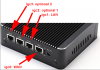


1662666251489.png
 
Those of the shelf routers have a switch behind the LAN ports and the switch is connected to the main CPU.

Your appliance is different and every port is independent. I am not sure if PFSense has any software switch implementation that you can use for this case but even if it has one performance won't ever be as good as with a real hardware switch.

The best option is to use a single LAN port and connect it to a discrete switch and then connect your devices to that switch. A simple and cheap unmanaged switch will do the job!
 
Although it’s possible, pfsense offers the flexibility to divide up your network.

Personally, I would go with @thigobr suggestion to get you started, as it will be the easiest option to get a single network going will little hardware
 
The best option is to use a single LAN port and connect it to a discrete switch and then connect your devices to that switch. A simple and cheap unmanaged switch will do the job!
yes, i see what you mean. i notice all the youtube vids doing the same thing as well. i was hoping not to use a switch though beause this pfsense machine will be in the living room. i needed something discreet.
 
yes, i see what you mean. i notice all the youtube vids doing the same thing as well. i was hoping not to use a switch though beause this pfsense machine will be in the living room. i needed something discreet.
It's easy enough to do. You just need a couple of packages to enable bridging and add some lines to the /etc/network/interfaces file or the equiv.

Code:
auto br0
iface br0 inet manual
iface br0 inet static
address 192.168.0.1
bridge_ports enp5s0 enp6s0 enp10s0 

iface enp5s0 inet manual
iface enp6s0 inet manual
iface enp10s0 inet manual

This takes the 4 ports and combines them into a bridge port w/ a static IP. I don't know what PF uses for the underlying OS off the top of my head so, it might be slightly different but, it should still work.
 
yes, i see what you mean. i notice all the youtube vids doing the same thing as well. i was hoping not to use a switch though beause this pfsense machine will be in the living room. i needed something discreet.

you can run that switch anywhere within Ethernet cable length limits
 
Back
Top