• We’re currently investigating an issue related to the forum theme and styling that is impacting page layout and visual formatting. The problem has been identified, and we are actively working on a resolution. There is no impact to user data or functionality, this is strictly a front-end display issue. We’ll post an update once the fix has been deployed. Thanks for your patience while we get this sorted.

4k player stutter and high CPU utilization

Sonikku

Lifer
Been trying to watch Mad Max in VLC but it stutters and maxes out all four of my i5 2500 cores. I figured the only thing it could be would be hardware acceleration being turned off, but when I went into settings it was set to automatic. With automatic not working, I changed it to the only other option that wasn't disable, "Direct X Video Acceleration (DXVA) 2.0. 4k playback still stutters and still chokes my CPU. My 1060 6gb should handle 4k playback with ease, but I seem unable to get any 4k media player to use anything other than the CPU. Help would be appreciated.
 
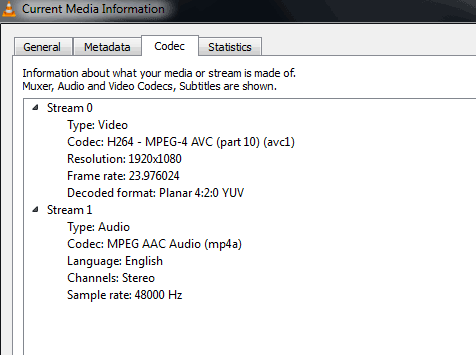
How is the video encoded? Can you post a screenshot like this?
current-media-information.png
 

OK, I see the problem now. 100% CPU usage means that your CPU is trying to decode the stream and your GPU is not doing anything. You have to ensure that whatever player you use (VLC in this case) is passing decode responsibility to your GTX 1060. This is clearly not happening. Try the latest nightly build of VLC (2.2.5, I think) and make sure that GPU-accelerated playback is selected.

I don't have a perfect list yet, but:

Pure hardware decode of 4K HEVC Main10 is available on:
1. NVIDIA Maxwell 2 GPUs (only GTX960 and GTX950)
2. NVIDIA Pascal GPUs (all mobile and desktop)
3. Intel Kaby Lake CPUs (all mobile and desktop)
4. AMD Polaris GPUs (all mobile and desktop)

Partial/Hybrid hardware decode of 4K HEVC Main10 is available on:
1. Intel Skylake CPUs

Other 4K HEVC profiles (not Main10) fully or partially supported in hardware or software:
1. AMD Fiji GPUs
2. AMD Carrizo APUs
3. Maxwell 1 GPUs (all mobile and desktop)
4. Intel Broadwell CPUs (all mobile and desktop)
5. Intel Haswell CPUs (only 4-core+ models)
6. Intel Atom CPUs (Apollo Lake and Braswell)
 
You probably need to set the default graphics to High-Performance Nvidia Processor for VLC in Nvidia's control panel. If that option is greyed out, you'll have to use Nvidia Inspector or some other tool to manually change the value in the drivers.
 
Well it definitely isn't going to be as simple as toggling a setting in the control panel, it's gone in the latest version. Ugh. More hoops to jump through and more stupid shit just to get options and functionality that once existed, but has since been removed. I'm started to tire of this behavior in software in general. More and more it all feels increasingly stripped down.
 
Try MPV, in my own personal testing I found it works well with GPU decoding.

The GTX 1060 should support Main 12 HEVC decoding up to 8K res. So it's gotta be something in your software that's preventing hardware acceleration of the GPU.
 
Well it definitely isn't going to be as simple as toggling a setting in the control panel, it's gone in the latest version. Ugh. More hoops to jump through and more stupid shit just to get options and functionality that once existed, but has since been removed. I'm started to tire of this behavior in software in general. More and more it all feels increasingly stripped down.

Like I said, you could try the Nvidia Inspector route.
 
MPV uses the CPU for decoding like everything else.

Like I said, you could try the Nvidia Inspector route.
Yeah, I know. I just lament having to put up with downloading all kinds of additional 3rd party software now to restore the functionality that we used to see baked in for free with the primary program. Alright I downloaded it, went into the inspector and found the VLC profile but see no "High-Performance Nvidia Processor" or gpu acceleration option. What's next?
 
MPV uses the CPU for decoding like everything else.


Yeah, I know. I just lament having to put up with downloading all kinds of additional 3rd party software now to restore the functionality that we used to see baked in for free with the primary program. Alright I downloaded it, went into the inspector and found the VLC profile but see no "High-Performance Nvidia Processor" or gpu acceleration option. What's next?

You need to make sure Enable application for Optimus is on, then scroll down the window until you find Shim Rendering Mode Options per application for Optimus and on the dropdown menu select SHIM_RENDERING_OPTIONS_DEFAULT_RENDERING_MODE and apply changes.
 
You need to make sure Enable application for Optimus is on, then scroll down the window until you find Shim Rendering Mode Options per application for Optimus and on the dropdown menu select SHIM_RENDERING_OPTIONS_DEFAULT_RENDERING_MODE and apply changes.
I don't see that option in particular. Which should I select?

dKgeTeW.jpg
 
I don't see that option in particular. Which should I select?

dKgeTeW.jpg

Since It's already green that means it's enabled, you can just skip to the next step:

then scroll down the window until you find Shim Rendering Mode Options per application for Optimus and on the dropdown menu select SHIM_RENDERING_OPTIONS_DEFAULT_RENDERING_MODE and apply changes.
 
What I'm saying is "SHIM_RENDERING_OPTIONS_DEFAULT_RENDERING_MODE " isn't available. Look at the screenshot to see what options I have available from the pull down. Is it a variation of another option listed? Is it "SHIM_RENDERING_MODE_ENABLED"?
 
What I'm saying is "SHIM_RENDERING_OPTIONS_DEFAULT_RENDERING_MODE " isn't available. Look at the screenshot to see what options I have available from the pull down. Is it a variation of another option listed? Is it "SHIM_RENDERING_MODE_ENABLED"?

SHIM_RENDERING_OPTIONS_DEFAULT_RENDERING_MODE is under Shim Rendering Mode Options per application for Optimus, you're looking the wrong place.
 
Closed VLC. Made the change, selected Apply changes. Reopened VLC. Same problem.

Op8dCSj.jpg


Now what?

Well now VLC should always run using Nvidia card by default, so the problem is clearly not that. Other causes could be either drivers or OS configuration.
 
Back
Top