• We’re currently investigating an issue related to the forum theme and styling that is impacting page layout and visual formatting. The problem has been identified, and we are actively working on a resolution. There is no impact to user data or functionality, this is strictly a front-end display issue. We’ll post an update once the fix has been deployed. Thanks for your patience while we get this sorted.

Question 2 NVMe Controllers in Device Manager, which is for what SSD?

So in my Alienware 15 m5 R7 AMD, it has 2 SSD slots, in slot 1, I have the WD SN810 1TB SSD and in slot 2 I have a Toshiba Kioxia KXG70PN84T094TB 4TB SSD.

I am wanting to install the WD NVMe Driver but how can I know which of the NVMe controllers is attached to which SSD slot? I don't want to install the WD NVMe driver on the wrong controller
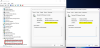
2022-05-21_080036.png
 
Well, if it doesn't install the it's the other one. Also those are the slot controllers on the board not the drives themselves. The drives would be under disks higher up. And usually the controllers on the drives would be firmware not a driver.
 
The installer takes care of all that. You don't need to know which drive is in which slot.
Tried installing it on both, none of them found a driver. Weird. I know I can force install them but then I wouldn't know which controller is the one behind the Western Digital SSD
 
Tried installing it on both, none of them found a driver. Weird. I know I can force install them but then I wouldn't know which controller is the one behind the Western Digital SSD

do you really need a driver to begin with? should have been installed automatically.
 
@Super Spartan
Check the HardwareIDs of the listed "Standard NVM Express Controllers" (right-click onto them and choose the options "Properties" > "Details" > "Property" > "HardwareIDs".
If the related HardwareIDs are different (from different vendors or just different models), you will know which one of the listed Controllers belongs to which specific NVMe SSD.
 
windows driver for nvme work well enough. for some laptops the drivers increase battery usage with performance.
 
@Super Spartan
Check the HardwareIDs of the listed "Standard NVM Express Controllers" (right-click onto them and choose the options "Properties" > "Details" > "Property" > "HardwareIDs".
If the related HardwareIDs are different (from different vendors or just different models), you will know which one of the listed Controllers belongs to which specific NVMe SSD.
Still can't figure out which controller is managing which SSD, does this tell you anything?

2022-05-22_120725.png
 
Back
Top