• We’re currently investigating an issue related to the forum theme and styling that is impacting page layout and visual formatting. The problem has been identified, and we are actively working on a resolution. There is no impact to user data or functionality, this is strictly a front-end display issue. We’ll post an update once the fix has been deployed. Thanks for your patience while we get this sorted.

Discussion Zen 5 Builders thread

Page 40 - Seeking answers? Join the AnandTech community: where nearly half-a-million members share solutions and discuss the latest tech.
42 minutes ago! 😱

He confirms EXPO was on...

Not sure about PBO and ran the CPU at motherboard default settings. BIOS wasn't the latest.
is 3.25 the lastest bios?

as I saw a post with someone using that one and also dead cpu yesterday I think.

Any 9950X3D cases you know of? Appreciate if you can link them.

Will keep an eye out for those don't think i've seen one yet.
 
Haven’t been entirely following the Asrock issues, PBO, fried X3Ds

I’ve got an MSI Tomahawk 870E/9900X3D. PBO is off and Expo is enabled, all else default. Any concerns there?
 
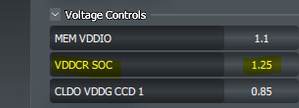
Check voltages. Vsoc should be around 1.2V I think. Any more and it might be unnecessarily high so need to dial that down.
This!!

I manually capped my Vsoc to 1.2v the day I got my board.

PBO -15 all core and scaler at 1x, EXPO on everything else at default and i've been good.
 
Last edited:
1.19V VDDCR SOC here. PBO has not been enabled.
It could also be Windows-related but it's odd I've only had the USB disconnect problem starting when I changed my memory.

I plan to reinstall the previous memory and see if it occurs again.
 
My VSOC experience has been highly variable. With early BIOSes and Z4 1.25V was the absolute minimum that would work, even though various OC guides and gurus said to lower it (Their PBO OC negative offset advice was also garbage). On later BIOSes with Z4 and now with Z5 I run completely fine with 1.2V.
 
Over recent months, ASRock has experienced significant motherboard failures and issues with the 9800 X3D CPUs, prompting investigation and community concern. A visit to ASRock’s booth at Computex was unannounced; they initially refused to provide information but later VP Chris Lee acknowledged awareness of the issues.


Key points from the ASRock interview include:


  • They recognize some failures, primarily involving user mishandling such as improper thermal paste application, which they do not consider motherboard defects.
  • Some CPU failures were diagnosed as memory compatibility or BIOS setting issues, particularly related to PBO (Precision Boost Overdrive) and TDC/EDC settings. ASRock released BIOS versions 3.20 and later 3.25 to address these, with the latest BIOS lowering TDC and EDC values to mitigate problems.
  • They claim no defective motherboards have been identified so far; all failures seem to be CPU or user-related, and motherboards continue to operate correctly after CPU replacement.
  • For existing boards, updating to BIOS 3.25 is recommended, and ASRock will cover shipping costs for warranty replacements if defective components are confirmed.
  • They admit their communication has been limited, and they acknowledge the complexity of the issues, emphasizing ongoing R&D work.
  • Concerns remain about potential manufacturing or socket debris issues, especially since some failed CPUs show scorch marks, but analysis is pending.

The media outlet (Gamers Nexus) expresses skepticism, noting that many failures occur without PBO enabled and that the focus on BIOS and user error might overlook underlying hardware problems. They intend to monitor reports post-BIOS update, suspect additional causes such as socket debris or manufacturing defects, and highlight past tensions with ASRock's transparency.


Overall, while ASRock has publicly addressed the issues and released BIOS updates, the investigation remains ongoing. The media outlet urges users to report failures, especially after BIOS 3.25 deployment, and emphasizes cautious monitoring of the situation.

 
Haven't had the issue yet since reverting to the slow 2x32GB CL36 memory.
And I put the 2x48GB CL30 memory in another machine to keep running memtest. No failures yet but I am really suspicious of it now. I'll likely return it either way.
 
Haven't had the issue yet since reverting to the slow 2x32GB CL36 memory.
And I put the 2x48GB CL30 memory in another machine to keep running memtest. No failures yet but I am really suspicious of it now. I'll likely return it either way.
is the new kit on the QVL for your motherboard?
 
Haven't had the issue yet since reverting to the slow 2x32GB CL36 memory.
And I put the 2x48GB CL30 memory in another machine to keep running memtest. No failures yet but I am really suspicious of it now. I'll likely return it either way.
Are you having issues with a particular port/device or all of them?
 
Are you having issues with a particular port/device or all of them?
That's a good question. I had not tried moving anything to other ports. The device was indiscriminate. Sometimes my mouse, the keyboard, the USB DAC or the USB microphone. Sometimes multiple at a time. Most of the time things were OK.

My debugging is a bit haphazard, but since I noticed problem when I changed memory I decided to revert that change first. And so far the problem hasn't reappeared. But I'm impressed it can run memory test for so long.
 
That's a good question. I had not tried moving anything to other ports. The device was indiscriminate. Sometimes my mouse, the keyboard, the USB DAC or the USB microphone. Sometimes multiple at a time. Most of the time things were OK.

My debugging is a bit haphazard, but since I noticed problem when I changed memory I decided to revert that change first. And so far the problem hasn't reappeared. But I'm impressed it can run memory test for so long.
I see. So a bit different than what I faced. I had basically identical situation but it was limited to one device and was solved after I replaced USB-C cable for properly rated one, I actually did not expect that to help but haven't had issues in a month
 
Looks like latest AGESA may have some fun stuff in store:
(From an ASUS BETA bios for my X670E Pro):
1. Updated AGESA to ComboAM5 PI 1.2.0.3d.
2. Significantly enhanced memory compatibility, with a focus on configurations utilizing all four DIMM slots.

Guess I'll wait for non-beta version to test if my 4x16GB of single rank 6000 CL30 Hynix memory from GSkill works with all 4 DIMMs populated.
 
Can anyone link any vendors offering Turin / Zen5 Epyc pre-built workstations or rackmount systems?

I thought surely enough time had elapsed by now for there to be offerings but checking Broadberry and Servers Direct I was still only seeing Zen4 based systems
 
Back
Top