Question x86 and ARM architectures comparison thread.

Page 26 - Seeking answers? Join the AnandTech community: where nearly half-a-million members share solutions and discuss the latest tech.

DavidC1

Platinum Member
Dec 29, 2023
2,096
3,218
106
Correct me if I'm wrong, but doesn't the use of a dGPU in a laptop result in a huge idle or near idle power consumption issue? at least when the dGPU is NOT disabled, what I mean is, imagine if I want to use the dGPU lightly for some reason (codec support, etc), isn't the dGPU going to consume a lot more power than the iGPU doing the same thing?
Most of the higher idle in dGPUs are due to the dedicated VRAM. Everything that is responsible for transferring data and traffic needs to have a high-on state, so it has to be the last one that can be put to idle.

But for the best performance, there's no alternative to having things dedicated. Because sharing causes contention, which reduces performance, even if you had same bandwidth and capacity.
 

mikegg

Platinum Member
Jan 30, 2010
2,091
633
136
View attachment 134333

not bad here since this was tested on a fanless M4. AMD did well too considering it was a HX 350.

Kinda expected better from the 285H but likely running on 50watts.
1763960280596.png

This benchmark is literally using Blender 2.8 from 2019. We are at Blender 5.0 now.

Why Qualcomm used a 6 year old outdated Blender bench is beyond me. It was released a year before M1 was launched.

Anyways, here's the official CPU bench using the latest stable Blender release.


Blender 4.5 CPU benchmark


DeviceMedian scoreNumber of benchmarks
Apple M5277.0219
Intel Core Ultra 9 285H229.8237
Apple M4221.71176
AMD Ryzen AI 7 350 w/ Radeon 860M185.6724
Snapdragon X Plus (8 core) @ 3.30 GHz178.181
Snapdragon X Plus — X1P42100 — Qualcomm Oryon CPU177.934

Source: https://opendata.blender.org/benchm...PU&group_by=device_name&blender_version=4.5.0
 
Last edited:
  • Like
Reactions: Gideon and Joe NYC

jdubs03

Golden Member
Oct 1, 2013
1,440
1,012
136
Definitely misleading there. It probably scores decently well. Weird how they’re shying away from using the latest number.
 

mikegg

Platinum Member
Jan 30, 2010
2,091
633
136
Definitely misleading there. It probably scores decently well. Weird how they’re shying away from using the latest number.
Not only is it misleading but there is almost no world where the owners of these SoCs will use the CPU to render instead of the GPU. GPU results would be far more relevant here. Apple Silicon pulls even further ahead of Intel, AMD, Qualcomm if we use GPU rendering.

CPU rendering on Blender 2.8 in 2025 is just not realistic. GPU rendering on Blender 4.5/5.0 is way more realistic.
 

poke01

Diamond Member
Mar 8, 2022
4,744
6,081
106
View attachment 134376

This benchmark is literally using Blender 2.8 from 2019. We are at Blender 5.0 now.

Why Qualcomm used a 6 year old outdated Blender bench is beyond me. It was released a year before M1 was launched.

Anyways, here's the official CPU bench using the latest stable Blender release.


Blender 4.5 CPU benchmark


DeviceMedian scoreNumber of benchmarks
Apple M5277.0219
Intel Core Ultra 9 285H229.8237
Apple M4221.71176
AMD Ryzen AI 7 350 w/ Radeon 860M185.6724
Snapdragon X Plus (8 core) @ 3.30 GHz178.181
Snapdragon X Plus — X1P42100 — Qualcomm Oryon CPU177.934

Source: https://opendata.blender.org/benchm...PU&group_by=device_name&blender_version=4.5.0
It’s lower is better. It’s also not from Qualcomm but a YouTuber
 

mikegg

Platinum Member
Jan 30, 2010
2,091
633
136
It’s lower is better. It’s also not from Qualcomm but a YouTuber
Goes the same way. Qualcomm's CPUs aren't as bad in the official benchmark which suggests that Blender 4.0 and above have more Arm Windows optimizations.

Problem with a lot of Youtuber tests is that they either don't know any better or they simply want to portray Arm in a worse way. Sometimes both.

The thing is, Arm is new. A lot of software in Windows isn't optimized for Arm. Therefore, any benchmark should carefully use updated versions, not find the oldest one they can run. It's mind blowing how incompetent some Youtubers are.
 
Last edited:

Hitman928

Diamond Member
Apr 15, 2012
6,752
12,483
136
View attachment 134376

This benchmark is literally using Blender 2.8 from 2019. We are at Blender 5.0 now.

Why Qualcomm used a 6 year old outdated Blender bench is beyond me. It was released a year before M1 was launched.

Anyways, here's the official CPU bench using the latest stable Blender release.


Blender 4.5 CPU benchmark


DeviceMedian scoreNumber of benchmarks
Apple M5277.0219
Intel Core Ultra 9 285H229.8237
Apple M4221.71176
AMD Ryzen AI 7 350 w/ Radeon 860M185.6724
Snapdragon X Plus (8 core) @ 3.30 GHz178.181
Snapdragon X Plus — X1P42100 — Qualcomm Oryon CPU177.934

Source: https://opendata.blender.org/benchm...PU&group_by=device_name&blender_version=4.5.0
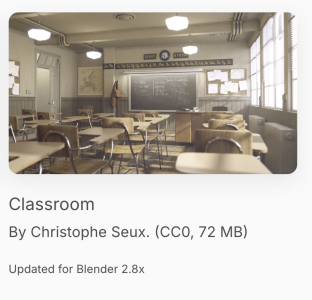
Classroom is just a scene to render, you can use it with whatever blender version you want. You need the tester to say which blender version they used but I highly doubt it was that old.

Edit: looks like v4.5 with full, stable WARM support did not release until July of this year, so if the test was done before then or if the reviewer continued to use a prior version for comparison against previous data, then the QC chip will most likely be gimped due to lack of support in the software.
 
Last edited:

soresu

Diamond Member
Dec 19, 2014
4,240
3,742
136
This benchmark is literally using Blender 2.8 from 2019. We are at Blender 5.0 now.

Why Qualcomm used a 6 year old outdated Blender bench is beyond me
Classroom is just a scene to render, you can use it with whatever blender version you want. You need the tester to say which blender version they used but I highly doubt it was that old.
As Hitman said it's just a scene - nothing about it is new or old, it's just what might be classed as a standardised workload by which you can judge the performance of any given hardware, assuming a pixel accurate 1:1 implementation with no bugs or hacks for each backend.

I suspect it's marked as "updated for Blender 2.8.x" because a new type of ubershader was implemented in 2.8 that the scene was updated to make use of - almost certainly the Principled BSDF shader.

Principled is roughly equivalent to the standard PBR shading model used by UE4 onwards.

That being said circling back to my first point, this all assumes that each backend is implemented equally which I have doubts about, even beyond the hardware specific optimisations.

Renderman XPU has been going for a several years now, yet they only just started claiming with the latest version 27.0 that it is ready for final frame renders, meaning that it was not reliably pixel accurate to the CPU renderer before.
 

poke01

Diamond Member
Mar 8, 2022
4,744
6,081
106
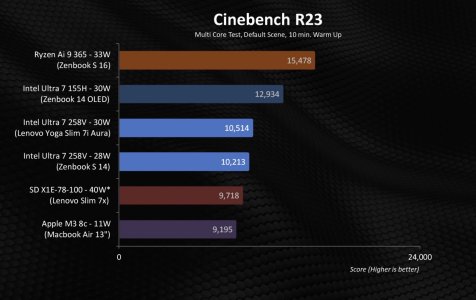
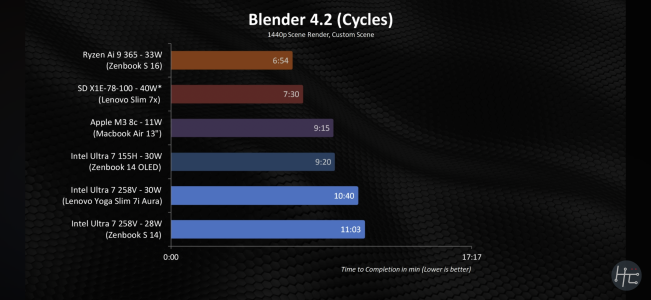
Here is a better comparison
IMG_2971.jpeg
IMG_2972.png

This also shows how poorly Cinebench R23 is optimised for ARM CPUs.


Blender shows the true nT performance of each CPU architecture.
 
  • Like
Reactions: Kryohi

poke01

Diamond Member
Mar 8, 2022
4,744
6,081
106
I dunno, 75% the performance on ⅓ the wattage with no fan. Nothing to sneeze at.
I was referring to the fact that graph is more clear and notes what blender version is used.

You can also see how Cinebench R23 favours Intel. Intel won in the R23 test but lost in the Blender test when compared to ARM cpus
 

mikegg

Platinum Member
Jan 30, 2010
2,091
633
136
Here is a better comparison
View attachment 134409
View attachment 134410

This also shows how poorly Cinebench R23 is optimised for ARM CPUs.


Blender shows the true nT performance of each CPU architecture.
Blender 4.2 is not good. Use 4.3 and higher. 4.3 is when Arm got experimental native support on Windows. 4.4 and 4.5 had further CPU optimizations.

Just use the official Blender benchmark. 🤦‍♂️
 

LightningZ71

Platinum Member
Mar 10, 2017
2,660
3,347
136
At least one USB-A 5Gbps port is a minimum requirement of mine. I have to have a real wired mouse available at all times in case my wireless dies for any reason. I also sometimes need to dump data on and off of external drives which are often USB-A only.
 

lopri

Elite Member
Jul 27, 2002
13,325
706
126
Base M4 Mac Mini is now sub-$500, it is getting harder and harder to justify spending on X86.


Edit: Granted Apple robs you with upgrades.
 

DavidC1

Platinum Member
Dec 29, 2023
2,096
3,218
106
At least one USB-A 5Gbps port is a minimum requirement of mine. I have to have a real wired mouse available at all times in case my wireless dies for any reason. I also sometimes need to dump data on and off of external drives which are often USB-A only.
Yea this is not early 2000's where every tech upgrade was almost necessary. 90% of my devices are USB-A, and will continue to be so. Also from the reliability perspective, USB-C power is a downgrade. The negotiation required means more parts required, means more failures, and harder to repair on the circuitry side. If it was instead a dedicated power port, like a 20V laptop power jack, it will always be at 20V and only need filters to use that thing.
Base M4 Mac Mini is now sub-$500, it is getting harder and harder to justify spending on X86.
Yes, but there should always be justification in having systems that you can upgrade, which gets you the trifecta of benefits: lower long term cost for you, REAL environmental benefits, and better serviceability.
 

poke01

Diamond Member
Mar 8, 2022
4,744
6,081
106
Yes, but there should always be justification in having systems that you can upgrade, which gets you the trifecta of benefits: lower long term cost for you, REAL environmental benefits, and better serviceability.
It’s a mini PC. It idles at 0.5 watts for the whole system. If it was a tower PC, it would make sense to have proper upgradability.
 

DavidC1

Platinum Member
Dec 29, 2023
2,096
3,218
106
It’s a mini PC. It idles at 0.5 watts for the whole system. If it was a tower PC, it would make sense to have proper upgradability.
I'd get that instead, and that supports a dGPU. iGPU versions will be not far away from that miniPC in size. Even Apple laptops don't idle at 0.5W. You mean on standby maybe?

I recently went through the experience of trying to replace the power switch on my Lenovo Yoga, and realizing how they are basically built to break. I might go small desktop route with a power pack so I can sleep it without fear of data loss and never buy a laptop again. Louis Rossman and his Right to Repair movement should be the mindset everywhere.
 

poke01

Diamond Member
Mar 8, 2022
4,744
6,081
106

I'd get that instead, and that supports a dGPU. iGPU versions will be not far away from that miniPC in size. Even Apple laptops don't idle at 0.5W. You mean on standby maybe?
Yes on standby. idle Should be around 4 watts
 

DavidC1

Platinum Member
Dec 29, 2023
2,096
3,218
106
Yes on standby. idle Should be around 4 watts
I'm getting 0.9-1.1W on my Pentium G6400, GTX 1080 desktop through Kill-a-watt. Margin of error, that's about equal to that Apple. That's why I am thinking of buying a power pack so I can sleep this system without fear of data loss when power goes out.

My 27-inch Acer monitor is set to 0% brightness settings, because it's actually fine for me. I'm used to 30% brightness setting on laptops. The monitor uses about 12W.
65W gaming PC.
 
Last edited: