
• We’re currently investigating an issue related to the forum theme and styling that is impacting page layout and visual formatting. The problem has been identified, and we are actively working on a resolution. There is no impact to user data or functionality, this is strictly a front-end display issue. We’ll post an update once the fix has been deployed. Thanks for your patience while we get this sorted.

Windows, Yellow Triangle

When the yellow triangle appears over the network taskbar Icon, what isn't connected? What triggers that triangle?

Modem shows connected. Upstream and downstream rates are degraded in this screenshot, normally they're 30/1.8 or so, but all modem light are green and status shows as connected. But regardless of modem status or rates, if that yellow triangle is showing, I can't browse or even ping anything.
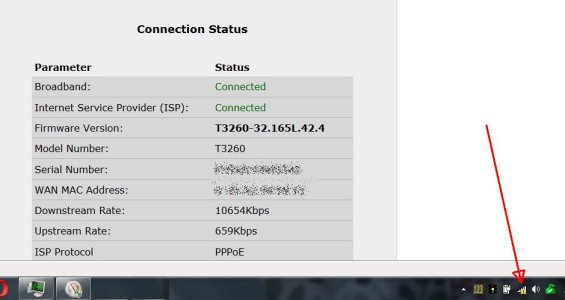
YellowTriangle.jpg
 
Nothing like any of that. It might only be a few seconds, or it could be several minutes, but it clears by itself and I can browse again. Windows has to be pinging something somewhere that tells it yes or no. Something in NetSvcs maybe. Whatever it is has to be beyond the ISP network nodes that tell my modem it's connected.

Current DNS numbers are 8.8.8.8 and 9.9.9.9, but that doesn't matter either as it still happens when I change them.
 
Does the PC have a direct connection to the modem? I'm wondering about a hardware fault, failing switch or router, flaky network cable. I'd try the simple things first, like unplug and replug the cable at both ends, and try a different port.

Instead of a ping, how about a tracert to see where it stops?
 
Last edited:
No. That's all the same stuff. Tells you all sorts of things to try, but it's usually back before I could even get halfway through that. And it doesn't even begin to say WHY or what triggers it. Windows has to be pinging something somewhere to know when to display it.

I can see trying those things if you're having network issues on one machine while others work. When this happens EVERY machine, wired or not is disconnected from the web.

It's downstream somewhere, but no one seems to know how Windows knows it can't browse.
 
Type netsh winsock reset and press Enter.
Type netsh int ip reset and press Enter.
Type ipconfig /release and press Enter.
Type ipconfig /renew and press Enter.

Ignore the output saying machine needs to be restarted. It might help but my internet started working with this sequence of commands, without a system reboot.
 
Back
Top