

Catalin2525
Junior Member
So, my problem is that my desktop is not loading once I start the computer.
The problem started after I dust cleaned my computer, I unplugged everything and cleaned everything. After I put everything back together it kept beeping, but it was a problem with the ram, so I took the ram out and put it bacck in one by one and it worked.
After this, when I started the computer it showed me this message: “Reboot and select proper Boot Device or Insert Boot Media in selected Boot device”
So I switched the boot priority to another one, it started after this and at first it showed a blue screen and the code was something like this (I don’t remember it perfectly): “switch boot device”.
After it restarted it repaired by itself, it finally started well, windows booted up, but when it opened some of the icons were missing and others showed the white rectangle, like the file is deleted.
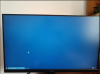
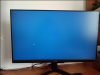
And from there it turns the screen to a blue, and the taskbar keeps appearing and dissapearing, and from time to time the screen flickers like I refresh it.
What can I do?
Is the problem from the storage disk?
Will it fix if I reinstall windows?
Thanks for the help!
The problem started after I dust cleaned my computer, I unplugged everything and cleaned everything. After I put everything back together it kept beeping, but it was a problem with the ram, so I took the ram out and put it bacck in one by one and it worked.
After this, when I started the computer it showed me this message: “Reboot and select proper Boot Device or Insert Boot Media in selected Boot device”
So I switched the boot priority to another one, it started after this and at first it showed a blue screen and the code was something like this (I don’t remember it perfectly): “switch boot device”.
After it restarted it repaired by itself, it finally started well, windows booted up, but when it opened some of the icons were missing and others showed the white rectangle, like the file is deleted.
And from there it turns the screen to a blue, and the taskbar keeps appearing and dissapearing, and from time to time the screen flickers like I refresh it.
What can I do?
Is the problem from the storage disk?
Will it fix if I reinstall windows?
Thanks for the help!


