
• We’re currently investigating an issue related to the forum theme and styling that is impacting page layout and visual formatting. The problem has been identified, and we are actively working on a resolution. There is no impact to user data or functionality, this is strictly a front-end display issue. We’ll post an update once the fix has been deployed. Thanks for your patience while we get this sorted.

Windows 7 RC. Functionality expiration.

JackMDS

Elite Member
Super Moderator
Windows 7 RC expiration functionality.

Effective February 14, 2010, the expiration notification process begins:

· Windows 7 RC users receive an expiration notification in the task bar one time per day.

· Windows 7 RC users are presented with the Notification Wizard one time every four hours and then one time every hour.

Effective March 1, 2010, Windows 7 RC enters the next phase of expiration:
· Expiration notifications in the task bar continue.
· Computers that are running Windows 7 RC restart every two hours.

Effective June 1, 2010, Windows 7 RC expires:
· Windows starts to a black desktop.
· Windows 7 RC users are presented with a Windows Activation screen. The screen states that the Windows that you are running is not genuine.

Computers that are running Windows 7 RC restart every two hours.


.
 
Last edited:
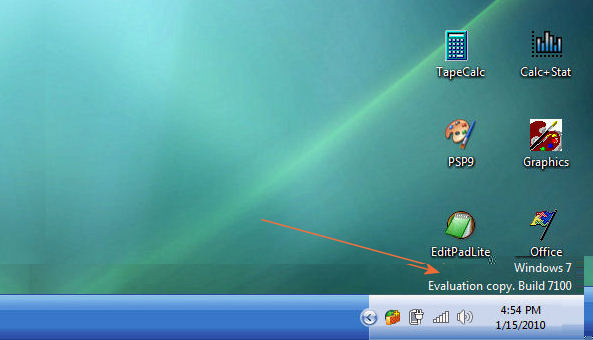
How do I know if my Win 7 installation is RC?

Windows 7 RC displays the following in the lower right side of the screen.

7100 is the RC1 release, other releases would have a different number but they all are Win 7 RC.

Win7-RC.jpg


.
 
Jack, is there any way to get rid of the popup boxes? I'm not interested in stopping the actual expiration process, just the notifications of it.
 
Damn...that came a lot faster than I had hoped. I still haven't purchased a new hard drive to install my retail copy on.
 
Damn...that came a lot faster than I had hoped. I still haven't purchased a new hard drive to install my retail copy on.

Seriously....

· Computers that are running Windows 7 RC restart every two hours.


On march 1? what the crap is THAT? Yeah i know, it was free, and I shouldn't complain about it, but I thought the deal was that it worked until summer, not it worked until spring and then is gimped until summer.


Anyone know if itll still reboot if you're actually using the machine?
 
anyone know what happens to an RC install that was activated with a valid key? (ultimate in this case). I still get the pop-up, but wondering if the valid license makes it okay on 3/1...
 
anyone know what happens to an RC install that was activated with a valid key? (ultimate in this case). I still get the pop-up, but wondering if the valid license makes it okay on 3/1...

I'd like to know this as well. I plan to buy my Win7 license tomorrow and I'd like to just activate my RC with the serial that comes with it, I wonder if that's possible.
 
It does not matter (there is No if and buts). All RC installations are based on a special interim release would expire as noted in the OP.

.
 
I lost the webpage that had instructions for copying over the retail files to upgrade from RC. Does anyone have that link?
 
Well I'm done installing on a new RAID0 setup. Wow, it's a LOT faster than my old shitty IDE drive. :awe:

Regarding clean installing with retail upgrade media, I didn't have to do anything special. I was going to follow the registry trick mentioned on winsupersite (method #2)...but the registry already reflected such an entry. So I just entered the key and it worked (I didn't activate during install, obviously).

I had removed the old IDE OS drive before starting the clean install...but one of my SATA data drives was previously used as an OS drive for Vista Home Premium, and the recovery partition was still there. Maybe that's what the upgrade media went off of? Whatever, it's installed and working great.
 
Back
Top