

Windows 11 25H2 Turn off FASTBOOT! Forks USB Devices

terpsy

Platinum Member
May 30, 2000
2,567
51
91
After the latest Windows 11 25H2 update, my Corsair USB keyboard as well as my Razer mouse macros were not working.

I had to do a second reboot after logging in to get them to work.

Downgraded from Synapse 4 to Synapse 3, same issue
Removed all profiles from mouse, reset, added just a single one, same issue
Always had to unplug and replug the keyboard after initial boot to just get it to work

Turning off Fast Startup fixed everything! Seems rebooting once in the OS bypasses fast boot.
Now, when I just turn on the PC, everything works again, no second reboot needed.
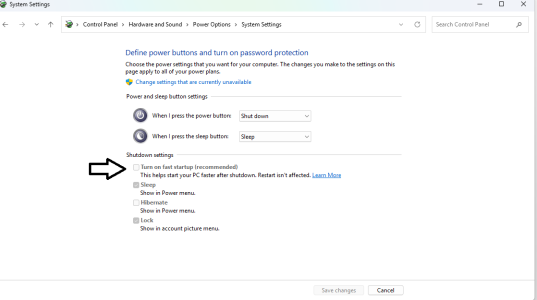
1760970642559.png
 
Last edited:
  • Like
Reactions: sauria and yodap

yodap

Member
Jan 13, 2014
63
127
106
Did you update to 25H2 manually or did MS sneak it in on you?

I just upgraded from Home to Pro with a new key yesterday and after finishing all the updating it’s still on 24H2.
 

WilliamM2

Diamond Member
Jun 14, 2012
3,022
896
136
Turning off FastBoot fixed everything! Seems rebooting once in the OS bypasses fast boot.
Now, when I just turn on the PC, everything works again, no second reboot needed.

I think you are confusing Fastboot, which is a bios setting, with Fast startup in windows. Fast startup in windows makes the computer "hibernate" instead of shutting down. A reboot forces a full shut down

Once you disable hibernation, you will not even have the option in your picture. I don't.
 

Hail The Brain Slug

Diamond Member
Oct 10, 2005
3,889
3,329
146
I think you are confusing Fastboot, which is a bios setting, with Fast startup in windows. Fast startup in windows makes the computer "hibernate" instead of shutting down. A reboot forces a full shut down

Once you disable hibernation, you will not even have the option in your picture. I don't.
Actually they are related. If fast boot is disabled in the UEFI, fast start doesnt work and Windows logs an error in the event log every time you boot about it.

On a desktop, fast boot in the UEFI and fast startup in Windows should both be disabled for best function. These were really meant for fixed hardware devices like laptops, tablets, and mini PC/all-in-ones.
 

WilliamM2

Diamond Member
Jun 14, 2012
3,022
896
136
Actually they are related. If fast boot is disabled in the UEFI, fast start doesnt work and Windows logs an error in the event log every time you boot about it.

On a desktop, fast boot in the UEFI and fast startup in Windows should both be disabled for best function. These were really meant for fixed hardware devices like laptops, tablets, and mini PC/all-in-ones.
They are not related. UEFI Fast Boot skips hardware initialization in the bios during power-on (saving maybe 2 seconds), while Windows Fast Startup is a power-saving feature that hibernates the Windows kernel on shutdown to load it faster on the next boot.

You can turn off fast boot in the bios, and STILL enable fast startup in Windows, and the other way around as well. Not sure where you got that from.

Fast boot in the UEFI will have no effect on the function of windows at all. Just makes it harder to get into the bios, so I disable it.

I disable hibernation, because I have no use for it, modern NVmE drives boot so fast it's pointless.
 

mikeymikec

Lifer
May 19, 2011
21,389
16,601
136
I disable hibernation, because I have no use for it, modern NVmE drives boot so fast it's pointless.
IMO hybrid sleep is such a sensible no-brainer default feature to have that I'm surprised it hasn't become a default / easily selectable option on Linux, but to each their own I guess.

To those that don't know: hybrid sleep (aka. the sleep mode feature on default settings) takes about 30 seconds to kick in because Windows saves the contents of RAM to the hibernation file. In the event of an unexpected loss of power, Windows falls back to loading the contents of RAM from the hibernation file.
 

WilliamM2

Diamond Member
Jun 14, 2012
3,022
896
136
IMO hybrid sleep is such a sensible no-brainer default feature to have that I'm surprised it hasn't become a default / easily selectable option on Linux, but to each their own I guess.

To those that don't know: hybrid sleep (aka. the sleep mode feature on default settings) takes about 30 seconds to kick in because Windows saves the contents of RAM to the hibernation file. In the event of an unexpected loss of power, Windows falls back to loading the contents of RAM from the hibernation file.
Hibernation is not the same as hybrid sleep. I use sleep daily, with hibernation disabled...I have adequate power backups, so losing work is not a concern.


mikeymikec

Lifer
May 19, 2011
21,389
16,601
136
Hibernation is not the same as hybrid sleep. I use sleep daily, with hibernation disabled...I have adequate power backups, so losing work is not a concern.


I know it's not, however, hybrid sleep also uses the hibernate file as a backup for the reason I already stated. It's why a system going into non-hybrid-sleep will enter sleep mode within a second or two whereas the default hybrid sleep feature takes about 30 seconds to engage.

- edit - I find it odd that you would supply a linked article that confirms what I'm saying. Did you not read it?
 
Last edited:

WilliamM2

Diamond Member
Jun 14, 2012
3,022
896
136
I know it's not, however, hybrid sleep also uses the hibernate file as a backup for the reason I already stated. It's why a system going into non-hybrid-sleep will enter sleep mode within a second or two whereas the default hybrid sleep feature takes about 30 seconds to engage.
It confirmed they were different, and that plain old "sleep" is much faster.

To those that don't know: hybrid sleep (aka. the sleep mode feature on default settings) takes about 30 seconds to kick in because Windows saves the contents of RAM to the hibernation file.
- edit - I find it odd that you would supply a linked article that confirms what I'm saying. Did you not read it?

Sleep mode is NOT the same as hybrid sleep, or hibernation. If it were, I could not use sleep with hibernation disabled.
 

mikeymikec

Lifer
May 19, 2011
21,389
16,601
136
It confirmed they were different, and that plain old "sleep" is much faster.


Sleep mode is NOT the same as hybrid sleep, or hibernation. If it were, I could not use sleep with hibernation disabled.

Hybrid sleep is enabled by default, so when the average person sees "sleep mode", they're actually using hybrid sleep. It's fine to strip away protection features if one knows that's what they're doing. My original response was intended as information for others reading the thread who don't know.

This is aside of course from a lot of modern laptops that don't do S3 sleep any more.
 

tcsenter

Lifer
Sep 7, 2001
18,949
575
126
Did you update to 25H2 manually or did MS sneak it in on you?

I just upgraded from Home to Pro with a new key yesterday and after finishing all the updating it’s still on 24H2.
Bring 24H2 up to date i.e. cumulative update and then run this:


Once 24H2 is fully up to date, it is the same code base as 25H2 just with the 25H2 things disabled. The "enablement package" (KB5054156) download size is less than 200KB that 'upgrades' 24H2 to 25H2.
 
Last edited:

sauria

Member
Mar 15, 2001
80
0
66
After the latest Windows 11 25H2 update, my Corsair USB keyboard as well as my Razer mouse macros were not working.

I had to do a second reboot after logging in to get them to work.

Downgraded from Synapse 4 to Synapse 3, same issue
Removed all profiles from mouse, reset, added just a single one, same issue
Always had to unplug and replug the keyboard after initial boot to just get it to work

Turning off Fast Startup fixed everything! Seems rebooting once in the OS bypasses fast boot.
Now, when I just turn on the PC, everything works again, no second reboot needed.

View attachment 132302
I just updated to Win 11 25H2 and don't see "Turn on fast startup" as an option here, I want it disabled. Thanks.
 

mindless1

Diamond Member
Aug 11, 2001
8,819
1,789
136
I disable hibernation, because I have no use for it, modern NVmE drives boot so fast it's pointless.
Isn't there still a point in that you can leave all your apps open and pick up right where you left off? That takes longer to get into again than booting.

As far as how long it takes to shut down and save the memory contents to the hibernation file, what do I care as long as it's not a laptop that I'm waiting on to pick up and travel with?

I can just walk away and let the PC do it's thing but when I am losing time is after windows loads, opening apps to get back to same environment I had the last time I was using the system. Of course you can set them up to load at boot, but they won't have the files open or be on the websites you want - which you can also set for browsers, except that's static, the same every load instead of whatever sites might have been loaded last time after some use.

That was how I used hibernate, though haven't done so in years. Systems didn't have as much memory back then, so with an SSD holding the hibernation file, hibernate only took single-digit # of seconds.

You could just put the system to sleep (S3 power state) instead, let the PSU 5VSB rail keep ram contents live, but over time that is hard on PSU, one of the common failure points I see in PSU is their 5VSB subcircuit filter capacitor(s) failing, mostly due to the PSU being otherwise off, fan not running, so zero active airflow through the PSU.
 

WilliamM2

Diamond Member
Jun 14, 2012
3,022
896
136
Isn't there still a point in that you can leave all your apps open and pick up right where you left off? That takes longer to get into again than booting.

I just use sleep. Power backup will run for hours in that state.
