
-
We’re currently investigating an issue related to the forum theme and styling that is impacting page layout and visual formatting. The problem has been identified, and we are actively working on a resolution. There is no impact to user data or functionality, this is strictly a front-end display issue. We’ll post an update once the fix has been deployed. Thanks for your patience while we get this sorted.
You are using an out of date browser. It may not display this or other websites correctly.
You should upgrade or use an alternative browser.
You should upgrade or use an alternative browser.
Win7: Why does AHCI greatly improve SSD but not regular hard drives?
- Thread starter JEDI
- Start date

JEDI
Lifer
I think the main reason for using AHCI is so that the TRIM feature will work correctly. If you did a test on a bare drive, AHCI and IDE modes would probably have similar scores (assuming you are using a good controller).
ahh it enables hardware on the ssd that a regular hard drive doesn't have?
thx!

Elixer
Lifer
I know ahci enables ncq.
but I still don't understand how ahci greatly improves ssd performance but not a regular hard drive?
NCQ is the big gun for SSDs, without it, SSDs get very slow.
The main reason is, HDs are still gosh darn slow compared to the SSD, so, even with NCQ enabled, HDs still must wait a long, long time compared to SSDs.
Oh, and you can use TRIM on IDE as well, assuming the driver supports it, this isn't a AHCI feature.
AHCI also enables hotplug support.

Ketchup
Elite Member
Thanks Elixer, seems I was looking at some outdated (read:wrong) material. This seems to be a pretty good explanation for the NCQ improvement:
http://kb.sandisk.com/app/answers/detail/a_id/8146/~/native-command-queuing-(ncq)-defined
http://kb.sandisk.com/app/answers/detail/a_id/8146/~/native-command-queuing-(ncq)-defined

VirtualLarry
No Lifer
Most "consumer" workloads don't push more than QD==1, except when booting.NCQ is the big gun for SSDs, without it, SSDs get very slow.
Elixer
Lifer
Most "consumer" workloads don't push more than QD==1, except when booting.
I dunno, more and more people are doing multiple things at the same time these days, and while they don't have the same I/O workloads as say a business environment, you would still notice a dramatic drop in speeds with NCQ disabled after booting up.
VirtualLarry
No Lifer
I dunno, more and more people are doing multiple things at the same time these days, and while they don't have the same I/O workloads as say a business environment, you would still notice a dramatic drop in speeds with NCQ disabled after booting up.
*shrug*. I can't even tell the difference from AHCI and IDE mode with an SSD. (Without doing synthetic benchmarks.)

Cerb
Elite Member
It does, IME. I can't stand it off. But, even if the benchmark is a 100% full Phison or SMI SSD (IE, <1K IOPS), you may as well be adding a turbo to a riding lawnmower, and asking why it can't reach highway speeds. With NCQ, HDDs can do more work quicker than without it, but often at the cost of average request time, if too much seeking is needed (it optimizes what gets written where in part by how far away it is, and your preferred order doesn't matter). If enough random seeking is required (IE, not seeking slightly ahead or behind where it already is), the HDD will hit a wall well before 200 IOPS, typically.I know ahci enables ncq.
but I still don't understand how ahci greatly improves ssd performance but not a regular hard drive?
http://www.storagereview.com/wd_black_4tb_desktop_hard_drive_review_wd4003fzex
http://www.storagereview.com/micron_m600_ssd_review
The tests aren't identical, but notice how the latency figures are off by a factor of 1000-5000, and HDDs can get into taking many seconds to complete IOs, as the queue fills, while the SSDs mostly stay at or under a couple milliseconds.
And, TRIM works fine in IDE mode.

Puffnstuff
Lifer
I find this thread amusing because there's no magic speed up for a spinner. This is why people install ssd's in the first place. I tried a clean install of windows 7 on my fastest spinner recently, a wd veloraptor, and it was horribly slow compared to the slowest ssd I've ever owned.
Cerb
Elite Member
Varies. NCQ allows up to 32 queued reads or writes. If the SSD is fast enough that the queue can't start filling up, no faster at all. If it can, faster, the amount varying by SSD, controller, and interface speed.let me rephrase this.
How much faster is a SSD w/ncq than without?
http://www.guru3d.com/articles-pages/samsung-850-pro-ssd-review,16.html
Here, for example, this new SSD can do random reads up to 10x faster, and random writes up to 3x faster, on a new Intel 6Gps port w/ Iastor.
JEDI
Lifer
Varies. NCQ allows up to 32 queued reads or writes. If the SSD is fast enough that the queue can't start filling up, no faster at all. If it can, faster, the amount varying by SSD, controller, and interface speed.
http://www.guru3d.com/articles-pages/samsung-850-pro-ssd-review,16.html
Here, for example, this new SSD can do random reads up to 10x faster, and random writes up to 3x faster, on a new Intel 6Gps port w/ Iastor.
so ncq/ahci actually helps platters more than ssd's?
Cerb
Elite Member
It helps anything that supports it reasonably well (basically any HDD or SSD that came out later than 2009). If you have a read or write going to an ATA device without it, you must wait until that device completes that action to send the next one. With NCQ, you just need to wait until it acknowledges the action, and then can send more commands (up to a maximum of 32 at any point in time). If there aren't more reads or writes to be sent, before the current one completes, it will not yield any improvement at all, whether on an HDD or SSD.so ncq/ahci actually helps platters more than ssd's?
To me it is a big difference. AHCI is the only way to go. Too bad with many computers the default is still IDE emulation mode.*shrug*. I can't even tell the difference from AHCI and IDE mode with an SSD. (Without doing synthetic benchmarks.)

rockfella79
Member
I could feel my PC way faster after i enabled AHCI mode in BIOS after installing new SSD.

Watwatwat
Member
I know ahci enables ncq.
but I still don't understand how ahci greatly improves ssd performance but not a regular hard drive?
But it does, as far as I remember it allows the drive to reorder requests so it can more efficiently read from the platter, it even sounds different supposedly.
Visual makes this easier to understand
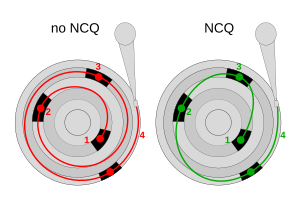
Last edited:
TRENDING THREADS
-
 Discussion Zen 5 Speculation (EPYC Turin and Strix Point/Granite Ridge - Ryzen 9000)
- Started by DisEnchantment
- Replies: 25K
-
Discussion Intel Meteor, Arrow, Lunar & Panther Lakes + WCL Discussion Threads
- Started by Tigerick
- Replies: 25K
-
 Discussion Intel current and future Lakes & Rapids thread
- Started by TheF34RChannel
- Replies: 24K
-

-
