• We’re currently investigating an issue related to the forum theme and styling that is impacting page layout and visual formatting. The problem has been identified, and we are actively working on a resolution. There is no impact to user data or functionality, this is strictly a front-end display issue. We’ll post an update once the fix has been deployed. Thanks for your patience while we get this sorted.

Win 7, Selective HDD Control

21stHermit

Senior member
Can I selectively control different hard drives by drive letter?

What I would like is a SSD as C: for a boot drive, then a large mechanical HDD which would be commanded off unless a file was requested, it would then have to spin up before reading/writing the file. Is this possible?

Thanks
 
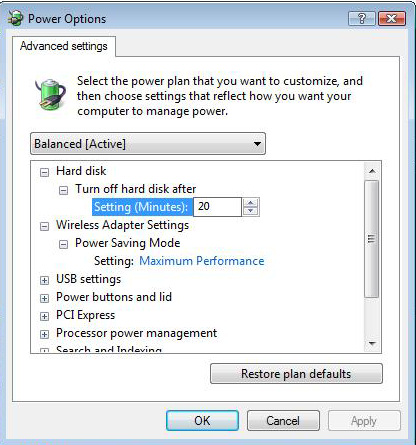
Similar to Vista, Win 7 has advance Power Options that can be tuned.

power-saving3.jpg


.
 
Last edited:
You can also do this with a hardware solution by using mobile racks. SATA ones can be hot-switched on and off. And, you can use external drives that can be physically turned on and off.
 
Similar to Vista, Win 7 has advance Power Options that can be tuned.

power-saving3.jpg
I found the same control in Win XP, it appears identical to the above screen shot. Neither allows selective control by drive letter. The above control is a global command treating all HDD's the same.

I was hoping for selective control.

Thanks for the replies.
 
Hermit,

Give Jack's suggestion a try. Remember, your SSD drive is, for all practical purposes, in the OFF position when you are not commanding it to access a file, so this setting should serve your purpose.
 
Back
Top