• We’re currently investigating an issue related to the forum theme and styling that is impacting page layout and visual formatting. The problem has been identified, and we are actively working on a resolution. There is no impact to user data or functionality, this is strictly a front-end display issue. We’ll post an update once the fix has been deployed. Thanks for your patience while we get this sorted.

Question WiFi extenders, do they work?

tinpanalley

Golden Member
I've got a modem with WiFi-6 (HH4000 on Bell Fibe in Canada for those that know the device) but because of where it sits in my den, it has trouble sending an adequate signal down the hall to where the dining room and kitchen are because it's a bit of an elbow out of the room and down the hall that I think ruins its ability to get to the other side of the apartment.

But luckily there is a power outlet right in the middle of the hall, so is there a good extender for this kind of situation that is favoured by the community or is any one brand just as good as anything else? We're talking about a 9-13m distance total from the modem to the dining room/kitchen and the outlet is about halfway down that hall.

Thanks!
 
Have you tried elevating/rotating it? You live in a condo no?
No, not in a condo. Apartment building.
Elevating I haven't tried yet because I don't wanna have to install a shelf, and where it is that's the only option. Rotating I tried but I did something else.. I forced it to a specific channel and it seems better. Looks like everyone else in the building (4 apartments) tend to hover around the same channels. Definitely improved it.
 
I had a different app but basically does the same thing. Didn't know 5ghz ran on such different channels.
If this doesn't work though, I'll have to look into extenders.
There are coax or powerline ethernet bridges, then you would add an ap on the other end.
 
The choosing of specific channels isn't quite doing the trick. Not enough anyway for pushing audio and video own my hall.
Been looking at something like this but for some reason I feel skeptical about their ability to do the job. Just me, I suppose.
 
Try to use different SSID for N, AC and AX so you know which one you are connected to and you probably will see different result.

N has better penetration (dry wall) than the other 2.

Powerline WiFi extender is another choice. You can put the devices in your den area & kitchen/dining room instead the hallway where wifi signal probably can't penetrate or deflect effectively
 
Last edited:
Try to use different SSID for N, AC and AX so you know which one you are connected to and you probably will see different result.
Yeah, I do use different SSIDs. The 5Ghz and 2.5 are equally bad in the end because they just don't give enough juice to run video. The problem is this isn't drywall. I'm in a very well preserved building from 1930. These walls are plaster and the doors and frames are all wood. Interior supporting walls are brick. The alcove/den is on one end of the hall so the signal has to do an elbow from the left just to get to the hall and then I'm asking it to get down that hall and then do another elbow to the right to go into the dining room/kitchen. That plug as I said is half way down and just repeating from there would work great.
I've tried channels, widening the band, it's just too darn far. (Insert a Scotty clip from Star Trek). I don't know how the mesh thing works with my ISP's modem though. I don't want to have to rent gear from them.
 
Wow. The apartment with brick walls is too old even the powerline quality/noise can be an issue. Maybe 3-unit mesh system with 2 ethernet ports for each unit is the best solution then.

You can mix and match wired & wifi units together and solve the brick wall and the elbow turn situation. One unit in the den, one in the hallway and one in the kitchen/dining room.
 
You can mix and match wired & wifi units together and solve the brick wall and the elbow turn situation. One unit in the den, one in the hallway and one in the kitchen/dining room.
Yes, but when you say "unit" do you mean extender? Mesh? I'd rather have something that doesn't need its own SSID.
 
Mesh. Like the following one.


If you want completely seamless experience, you have to disable ISP router's wifi and just use the mesh system's wifi so they won't conflict with each other.
I'm not sure I understand how this works. How are these mesh stations any different than extenders? Aren't they also just receiving a signal from a main base and redistributing it in another location? I mean, if I'm already struggling to get the modem in my den to send a wifi signal to the back of the apartment, how is one of these mesh devices going to be any different?
 
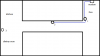
The problem is signal can't make turns. You probably still need wire between 1 & 2

Untitled.png
 
Last edited:
Eerily similar to my layout... 😀 Position 2 gets perfect WiFi signal on 2.4 or 5Ghz

Because it's 15m to position 2 and 24m to the first place I could reasonably place another device in the kitchen/dining room area.

And? All you need is wire clips if you cannot run it in wall.
I ran a wire down to my server stack and put my ap close to center of main floor. I get signal everywhere on my property from one AP. That includes front yard and backyard.

Ceiling mount the AP at the center of the back space.


Example, not recommendation

 
Last edited:
And? All you need is wire clips if you cannot run it in wall.
I do have about a 30m ethernet cable I used in the old place to run a far more complex path from a back alcove through a bedroom, through a kitchen, 6m into a living room... Wouldn't be the most discrete cable, bright white. And what would you guys then recommend on the other end? It's literally for picking up regular phone WiFi and for a tablet to be able to stream video. Meaning WiFi6 would be overkill.
 
I do have about a 30m ethernet cable I used in the old place to run a far more complex path from a back alcove through a bedroom, through a kitchen, 6m into a living room... Wouldn't be the most discrete cable, bright white. And what would you guys then recommend on the other end? It's literally for picking up regular phone WiFi and for a tablet to be able to stream video. Meaning WiFi6 would be overkill.

You want wifi 6 anyway, no point in getting older gear.


Last edited:
Back
Top