• We’re currently investigating an issue related to the forum theme and styling that is impacting page layout and visual formatting. The problem has been identified, and we are actively working on a resolution. There is no impact to user data or functionality, this is strictly a front-end display issue. We’ll post an update once the fix has been deployed. Thanks for your patience while we get this sorted.

Why this much difference in perfomance??

ya,new build only...you mean flashing the board?i din't made any change to the components ratherthan updating the graphic driver to the latest...perfomance is fine,still this change is kinda huge so i wantd to know why
 
AMD A10 5800k,
MSI FM2-A75MA-P33,
Gskill 4GB 1600,
....

I assume that's 1x4GB, so there's your answer: single channel vs dual channel makes a huge difference to APUs. For CPU-only it's almost negligible (1-3%) but for graphics (and synthetic memory bandwidth scores) the difference is huge.

As is the memory speed. This computerbase article shows some of that but they didn't test single channel:
http://www.computerbase.de/artikel/grafikkarten/2013/amds-richland-im-gpu-test/5/
 
I assume that's 1x4GB, so there's your answer: single channel vs dual channel makes a huge difference to APUs. For CPU-only it's almost negligible (1-3%) but for graphics (and synthetic memory bandwidth scores) the difference is huge.

As is the memory speed. This computerbase article shows some of that but they didn't test single channel:
http://www.computerbase.de/artikel/grafikkarten/2013/amds-richland-im-gpu-test/5/

It looks like his motherboard only has two RAM slots so likely it's 2 x 2GB.
 
I use a single 4GB 1600 kit. And am not clear about this dual channel stuff,is it applicable for single RAM's too?can someone tell me in brief?
As I understood the problem is with my RAM,but can't get what really.....
 
I use a single 4GB 1600 kit. And am not clear about this dual channel stuff,is it applicable for single RAM's too?can someone tell me in brief?
As I understood the problem is with my RAM,but can't get what really.....

That's the problem


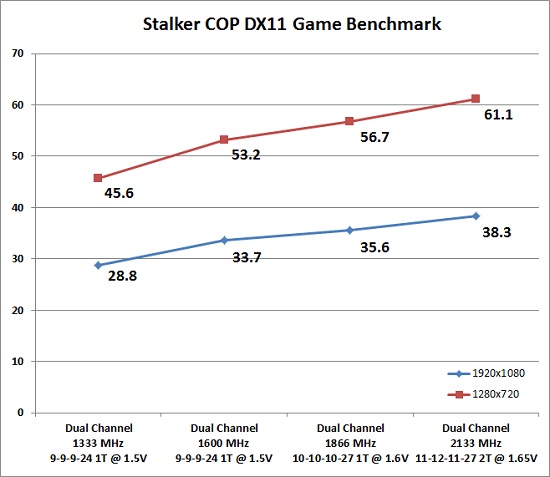
APU's benefit greatly from Dual channel & Faster RAM ( 1866 & 2133)


u3kr.jpg
 
Last edited:
1866 was not much available here and a bit expensive too 🙁 again,plz be clear that if dual channel is applicable for single RAM's too?
so you mean with a 1600 RAM all those values are as expected???
and a few values are better than the legitreview system(like pixel fillrate,texture fillrate etc) and the memory sixe too is greater than the review system.how these variations happenning?
 
Last edited:
1866 was not much available here and a bit expensive too 🙁 again,plz be clear that if dual channel is applicable for single RAM's too?
so you mean with a 1600 RAM all those values are as expected???

You need two sticks of similar RAM (2x2GB, 2x4GB, etc) to get dual-channel capability (and three for triple-channel, etc). More info if you need it.

EDIT>> The bandwidth still seems quite low in your case. Not sure why, though.
 
Last edited:
is [dual channel] applicable for single RAM's too?

No. Dual-channel requires an even number of sticks of similar RAM inserted in the correct slots. For the similar requirement, it's usually just recommended to buy the same RAM. For the correct slot, you normally put a stick in the left-most slot, skip a slot, and put the second stick into the third slot. If you only have two slots, just fill both.

I don't want to get too technical, but so you understand why you need to do this, dual-channel works by letting the computer talk to two different sets of memory at once. To software, it's just one big block, but to the hardware, by being able to talk to more at once, it's faster. So, as you can see, by not giving your computer two different sets of memory, you aren't letting it work as fast as it can.
 
Make sure both ram sticks are the same speed and CAS. AMD's can be picky about it.

So to make it simple, what ever ram you have now, by another identical stick and place it into the other slot. And your graphics performance should go up significantly.
 
will it makes any difference if I use a single 4GB 1600 module and two 2GB 1600 modules in the same system alternatively???
 
Last edited:
will it makes any difference if I use a single 4GB 1600 module and two 2GB 1600 modules in the same system alternatively???

Its possible to set that up so you have 2x 2GB in dual channel and 1x4GB in a single channel so only if you exceed 4GB does the single channel get used. But its a problematic setup, it might not work as expected due to hardware limitations or the software mapping of memory and so its largely best to not put memory in as anything but pairs. You would be better off getting another 1600 4GB than trying a more complicated and potentially problematic setup.

Actually the best thing would be to get 2x 4GB of 1866 or even 2133 for the maximum performance as you can see in the graph, but that depends on your budget and whether you are willing to try and second hand sell that stick of RAM you have today.
 
will it makes any difference if I use a single 4GB 1600 module and two 2GB 1600 modules in the same system alternatively???


I like to think of dual channel memory like a v8 motor,if half the cylinders won't fire or the plugs are foiled then you lose nearly half your horsepower and torque.

You want the two identical sticks from a qualified dual channel kit to get the most from your APU.
 
1866 was not much available here and a bit expensive too 🙁 again,plz be clear that if dual channel is applicable for single RAM's too?
so you mean with a 1600 RAM all those values are as expected???
and a few values are better than the legitreview system(like pixel fillrate,texture fillrate etc) and the memory sixe too is greater than the review system.how these variations happenning?

With one stick of memory your APU is using a single 64 bit connection to the memory. With a second stick of memory your APU will use a second 64 bit connection to the memory in addition. So with one stick of ram, you're always going to be at only half of what you could be at as far as bandwidth goes.

But in your case something still seems a bit off. You should have way more than 1.6GB/s of bandwidth. Double check your bios settings.
 
Its possible to set that up so you have 2x 2GB in dual channel and 1x4GB in a single channel so only if you exceed 4GB does the single channel get used. But its a problematic setup, it might not work as expected due to hardware limitations or the software mapping of memory and so its largely best to not put memory in as anything but pairs. You would be better off getting another 1600 4GB than trying a more complicated and potentially problematic setup.

Actually the best thing would be to get 2x 4GB of 1866 or even 2133 for the maximum performance as you can see in the graph, but that depends on your budget and whether you are willing to try and second hand sell that stick of RAM you have today.

I don't know how it works for his CPU, but, for Intel CPUs 2+2 and 4GB could work in dual channel with no problem or "flex mode", just use the 2 modules for one channel and the 4GB for the other, 4GB per channel,
 
Back
Top