
-
We’re currently investigating an issue related to the forum theme and styling that is impacting page layout and visual formatting. The problem has been identified, and we are actively working on a resolution. There is no impact to user data or functionality, this is strictly a front-end display issue. We’ll post an update once the fix has been deployed. Thanks for your patience while we get this sorted.
You are using an out of date browser. It may not display this or other websites correctly.
You should upgrade or use an alternative browser.
You should upgrade or use an alternative browser.
Why double 'internet access'
- Thread starter bobbobbob
- Start date
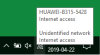

You run a Public Network and (in the past) complained few times about people trying to connect to you Network?
https://www.online-tech-tips.com/windows-10/change-from-public-to-private-network-in-windows-7-8-10/
As for Unidentified Network.
https://www.thewindowsclub.com/fix-unidentified-network-windows
😎
https://www.online-tech-tips.com/windows-10/change-from-public-to-private-network-in-windows-7-8-10/
As for Unidentified Network.
https://www.thewindowsclub.com/fix-unidentified-network-windows
😎

VirtualLarry
No Lifer
Just a note, Jack, that "Public Network" in Windows' Connection Properties, does NOT mean that the router is a "Public Hotspot", or that the PC's wifi adapter is functioning as a Hotspot.
It just means that your Windows' Firewall is set to Maximum protection, and doesn't allow incoming file sharing/printing connections or network discovery.
It just means that your Windows' Firewall is set to Maximum protection, and doesn't allow incoming file sharing/printing connections or network discovery.
VirtualLarry
No Lifer
As far as having two connections, trying opening a Command Prompt, and then type "IPCONFIG /ALL" (without the quotes). See how many "adapters" you have, and which ones have a gateway and DNS server.

HutchinsonJC
Senior member
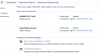
The two internet connections seem to be provided by one of these based on the 2nd screen shot:
https://consumer.huawei.com/en/smart-home/b315/
Perhaps you have a wireless card that's capable of using both 2.4GHz bands and 5GHz bands at the same time to increase throughput and it's showing up as two separate connections? not sure
https://consumer.huawei.com/en/smart-home/b315/
Perhaps you have a wireless card that's capable of using both 2.4GHz bands and 5GHz bands at the same time to increase throughput and it's showing up as two separate connections? not sure

VirtualLarry
No Lifer
Weird. Seems like, someone could be "spoofing" the ISP router? Just one possibility. A more likely possibility, is simply that Windows somehow mis-identified the connection, and is listing it as an "unknown network".
I noticed my machine, which is ethernet-connected, was showing a wifi connection to my up-stream router, and the network graph showed activity.
So, perhaps I have a RAT on my PC, and it was trying to probe/hack my upstream router. Or Windows just lost track of the ethernet, connected the wifi as the backup connection, and then forgot to disconnect the wifi again, once I had ethernet, until I manually pulled up the Connection List widget. (Or the Chinese/Russian hackers saw me do that, so they disconnected.)
I noticed my machine, which is ethernet-connected, was showing a wifi connection to my up-stream router, and the network graph showed activity.
So, perhaps I have a RAT on my PC, and it was trying to probe/hack my upstream router. Or Windows just lost track of the ethernet, connected the wifi as the backup connection, and then forgot to disconnect the wifi again, once I had ethernet, until I manually pulled up the Connection List widget. (Or the Chinese/Russian hackers saw me do that, so they disconnected.)

bobbobbob
Member
This happens ( as displayed in attachment picture ) only then if:
I UNPLUG POE wire, and connect to houseMate internet [ router ].
( houseMate have diffrend ISP & router )
If I PLUG POE wire and connect to my internet [ router ].
Example1. if I would connect to my router, while POE wire is UNPLUGGED, this 'double network' wouldnt happen.
if I would connect to my router, while POE wire is PLUGGED, this 'double network' happens.
Example2. if I would connect to houseMate router, while POE wire is PLUGGED, this 'double network' wouldnt happen.
if I would connect to houseMate router, while POE wire is UNPLUGGED, this 'double network' happens.
POE wire belongs to my internet. Housemate have router with 'card'.
I UNPLUG POE wire, and connect to houseMate internet [ router ].
( houseMate have diffrend ISP & router )
If I PLUG POE wire and connect to my internet [ router ].
Example1. if I would connect to my router, while POE wire is UNPLUGGED, this 'double network' wouldnt happen.
if I would connect to my router, while POE wire is PLUGGED, this 'double network' happens.
Example2. if I would connect to houseMate router, while POE wire is PLUGGED, this 'double network' wouldnt happen.
if I would connect to houseMate router, while POE wire is UNPLUGGED, this 'double network' happens.
POE wire belongs to my internet. Housemate have router with 'card'.
VirtualLarry
No Lifer
I'm really not sure what you're trying to say. If you have an ethernet cable (is it really POE?), and you have wifi on the PC / laptop, that is saved with SSID credentials and set to auto-connect, it's possible in Windows (7, 10, at least, I think), to be connected to both wifi and ethernet at the same time. Note that Windows will try to "detect" the router (MAC address internally, and named externally), and sometimes it takes a while or doesn't detect due to some issue.
I'm really not sure what you're trying to detect or prove, here. It's just so much rambling.
When you say "connect to my router", do you mean, with ethernet, or wifi? Please be much more specific in your descriptions, and include pictures from all your tested cases.
I'm really not sure what you're trying to detect or prove, here. It's just so much rambling.
When you say "connect to my router", do you mean, with ethernet, or wifi? Please be much more specific in your descriptions, and include pictures from all your tested cases.


Fanatical Meat
Lifer
Darn it
I was hoping this thread would be about those “shotgun” late 90s modems. Two phone lines, two dialup modems synchros together
I was hoping this thread would be about those “shotgun” late 90s modems. Two phone lines, two dialup modems synchros together

Fanatical Meat
Lifer
Darn it fell for a mini necro
bobbobbob
Member
Actually situation got a bit more clear.The OP hasn't been around for a while.
I wonder if his housemates traced his laptop, and located him and his secret computer hideout in the forest? 😳
If I turn on laptop, but my WiFi is disabled ( nowadays always ), my ethernet is unplugged. I even disconnect charger, when I turn on laptop: -Housemate is mad alot.
Housemate using android iphone.
Housemate is mad entire summer, because I don't connect to internet. (2 ISP providers in 1 house ).
I don't know about desktop PC, even it has no wifi card and ethernet wire is unplugged. It still feels for me ambigous.
I suspect that housemate needs my computer MAC or IP or motherboard resources. Which he access, once I am connected to house internet ( atleast 1 out of 2 ).
Housemate likely to make VPN out of my computer.
Using computer without internet.
Off Topic YouTube video removed.
admin allisolm
Last edited by a moderator:
Fanatical Meat
Lifer
Android iPhone????
bobbobbob
Member
Housemate have android iphone, yes. Also 1 android tablet.Android iPhone????
TRENDING THREADS
-
 Discussion Zen 5 Speculation (EPYC Turin and Strix Point/Granite Ridge - Ryzen 9000)
- Started by DisEnchantment
- Replies: 25K
-
Discussion Intel Meteor, Arrow, Lunar & Panther Lakes + WCL Discussion Threads
- Started by Tigerick
- Replies: 25K
-
 Discussion Intel current and future Lakes & Rapids thread
- Started by TheF34RChannel
- Replies: 24K
-

-
