Question Why does TDP and PPT differ, on consumer CPUs? And what role does Core Performance Boost and Turbo Clocks have on TDP and wattage?

Page 8 - Seeking answers? Join the AnandTech community: where nearly half-a-million members share solutions and discuss the latest tech.

VirtualLarry

No Lifer
Aug 25, 2001
56,587
10,225
126
Serious question. I've got a 65W-rated TDP Ryzen R5 1600, in a rig, on a 65W-rated AMD stock heatsink. It's blue-screening, crashing, and the CPU temps just keep going up and up.

I updated HWMonitor, and it's showing a "Package Power" for the entire chip, at 82W or so. No wonder it's constantly overheating and crashing. 82W TDP CPU > 65W TDP Heatsink.

The worst part is, this is AFTER limiting the number of PrimeGrid threads, down from 12 to 9. That's right, I'm not even running the CPU at a full thread load.

Edit: Yes, I know that the obvious answer, is to "get a better heatsink", and that the "stock heatsink" for the 1600 was the 95W TDP model. Which, at the time, was stated that AMD wanted to give users the ability to OC on the stock heatsink. Now I know that was a lie, it's because AMD CPUs (at least, the 1600), are NOT able to stay within their stated rated specs.

Edit: A slight update, very important, actually. My original premise for this thread, was that I *thought* I was using a 65W TDP-rated AMD stock Wraith Stealth cooler with my Ryzen R5 1600 CPU, and it was crashing, at "stock BIOS" settings, which includes "Core Performance Boost" on "Auto", which defaults to enabled, to allow "Turbo Clocks" (the 1600 has an ACT of 3.4Ghz). I was initially placing the blame on AMD for the fact that HWMonitor reported the "Package Power" as something like 82W, which I thought was overcoming the 65W-rated heatsink. As it turned out, I actually was using a 95W Wraith Stealth (copper-cored) in the first place. Yet, it was still crashing due to overheating of the CPU. Part of this was due to the heat load of dual GPUs mining, and part of it was due to using a case that had NO vents on top, no fan mounts, no rad mounts, nothing but a solid steel top, and only a single 120mm exhaust out the rear, combined with the fact that my PCs are in desk cubbies. They are open to the front, and have dual 120mm intakes and vented fronts, but that still wasn't enough to prevent the CPUs from slowly creeping up in temp, passing 95C, and crashing/restarting.

Thus far, I have split the two GPUs up, one per PC (same case, same type cubby, same EVGA 650W G1+ 80Plus Gold PSUs), and disabled CPB on both of them (one has a 3600 CPU, one has a 1600 CPU), and then also in Wattman, set the Power Limit for the RX 5600XT (which was a refurb, both of them) to -20%. Thus far, overnight, they seem to have stabilized at under 90C on the CPU, and haven't crashed.
 
Last edited:

VirtualLarry

No Lifer
Aug 25, 2001
56,587
10,225
126
In this case though I really feel like Larry should stop trying to rush getting these things running and troubleshoot the components one by one. Then work on undervolting/downclocking both the CPU and GPU since it won't affect mining performance much if any as another poster stated. That will reduce the heat output of it significantly and only once that is stable throwing them back in the cubbies. aybe he's got limited space and doesn't want them cluttering up the limited space he has who knows.

Oh and a new case and heatsink for those things wouldn't hurt either
That's a large part of it, I don't want these huge PC cases cluttering up what little walk-way I have through my apt. (Yes, I should clean/de-clutter badly.)

I do have another pair of 240mm AIO WC kits waiting in the wings, BNIB, for when I pick up some new cases with top-mount vents and Rad. mounts.

I also attempted to purchase 3x Seasonic 1200W Platinum PSUs, BNIB, but by the time I got in my order, they only had one left available. (So I got one, which should really go into a real mining rig, so that I can put more than five cards in one.)
 

StefanR5R

Elite Member
Dec 10, 2016
6,791
10,827
136
I do have another pair of 240mm AIO WC kits waiting in the wings,
Note, they will be useless if you let the fans on their radiators pull air out of the GPU coolers.

Edit, therefore, try to keep the air flows separate; i.e. take care to expel the exhaust of the GPUs such that it does not get near to the intake of the CPU cooler.
 
Last edited:

StefanR5R

Elite Member
Dec 10, 2016
6,791
10,827
136
That said, the thread title should be "Why does my mining rig keep freezing up?" as the TDP/PPT values seem have a very tenuous relationship with the basis of this thread.
In the opening post, VL reported three observations:
  1. The CPU power consumption is different from the TDP.
  2. The CPU (and, as we later learned, not just the CPU) gets quite warm.
  3. The system experiences crashes and bluescreens.
The thread title relates to one of these, so that's good at least.
The three issues should be discussed in separate threads, not in a single one, so that's bad.
And the third issue should be pursued only after the second has been addressed.
 

blckgrffn

Diamond Member
May 1, 2003
9,687
4,348
136
www.teamjuchems.com
In the opening post, VL reported three observations:
  1. The CPU power consumption is different from the TDP.
  2. The CPU (and, as we later learned, not just the CPU) gets quite warm.
  3. The system experiences crashes and bluescreens.
The thread title relates to one of these, so that's good at least.
The three issues should be discussed in separate threads, not in a single one, so that's bad.
And the third issue should be pursued only after the second has been addressed.

I mean, I guess I see what you are saying, but there are many un-changed inaccuracies in his first post, Like the fact that he is using an AMD 95W rated cooler for his 65 88W (which is in the specs, but not labeled TDP as you pointed out) CPU.

And the whole idea that "TDP isn't what you think it should be" schtick has been covered here many times.

The meat of the thread and the responses has so little to do with the thread title and the ultimate resolution of this issue that it's comical.

Finally, we've seen no proof that his CPU is, in fact, running more than 65/88W as far as I can tell. Not even a wall meter showing the amount of power usage differing from idle to "worst case AVX load" in this given configuration. Many members have pointed out that even enabling XMP is amping up power usage but we've yet to see a kill-a-watt of before and after effects. There have been, historically speaking, amazing threads where people have gone to great lengths with tables, graphs, pictures and the whole bit to prove a thread title like this one. This thread is not one of those.

The clickbait thread title is clickbait.
 

VirtualLarry

No Lifer
Aug 25, 2001
56,587
10,225
126
The CPU (and, as we later learned, not just the CPU) gets quite warm.
Well, for the record, even with dual GPUs, they are triple-fan, with one of the biggest/best coolers (from a RX 5700XT OC Gigabyte triple-fan model), they were reporting only temps of around 67C. If the problem were solely case cooling, wouldn't the GPU temps keep getting higher and higher too?

I think (and so far, knock on wood, seems to be solved) the primary problem is that:
1) AMD Ryzen CPUs have PPT set higher than TDP
2) Their thermal-throttling mechanism sucks
3) mobos enable Core Performance Boost (to be fair, that's basically required for Turbo clocks, but those turbo clocks are apparently NOT where the TDP is rated), and potentially overvolt, and thanks to Gigabyte (supplier of both mobos, and both RX 5600XT cards, as well as both GTX 1650 4GB D5 cards), the mobo BIOS on at least one of those boards, doesn't even allow manual vcore adjustment (without delving into P-states, which I personally consider arcane).
 

VirtualLarry

No Lifer
Aug 25, 2001
56,587
10,225
126
Finally, we've seen no proof that his CPU is, in fact, running more than 65/88W as far as I can tell. Not even a wall meter showing the amount of power usage differing from idle to "worst case AVX load" in this given configuration. Many members have pointed out that even enabling XMP is amping up power usage but we've yet to see a kill-a-watt of before and after effects. There have been, historically speaking, amazing threads where people have gone to great lengths with tables, graphs, pictures and the whole bit to prove a thread title like this one. This thread is not one of those.
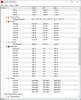
Well, with CPB turned OFF in BIOS, my B450 AORUS PRO WIFI rig, with Ryzen R5 3600, in HWMonitor runng all night,
75W Package Power, 83C, 49.3A Current. (I made a screenshot of this, but it might be a chore to post.)

HWMRyzen3600RX5600XT.png

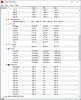
I remember seeing on the 1600 rig, the "Current" as measured by HWMonitor, was like 97A. (Not overclocked.) (Don't have a screenshot of this yet, will look into it.)

HWM_Ryzen_1600_RX5600XT.png

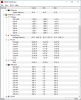
My Asus B450-F ROG STRIX board, with a Ryzen R5 3600, is showing 85C, 90W Package Power (CPB not turned off on this rig, it's on 240mm AIO WC, and clocked nearly 4Ghz), and Current is listed as 32.25A.

HWM_AsusB450_Ryzen_3600_RX5700_GTX1660ti.png

Part of the reason that I don't have SS of those rigs, is that I don't have anywhere to sit down in front of them, to use them, and I am very overweight, and it hurts to stand up for more than a few minutes in front of them, just to configure them, nevermind log into the forum.

Edit: But to be sure, that does answer your question, there's your screenshot of a not-really-overclocked (not cores, at least, they are stock, although I am running XMP @ 3600 and FLCK @ 1800 to match) Package Power exceeding 88W.

I'll see if I can get a SS of the "Current" on the 1600 rig showing 97.3A. That might be anomalous, and maybe indicate VRM damage? I know more current == more heat.
 
Last edited:

VirtualLarry

No Lifer
Aug 25, 2001
56,587
10,225
126
Thread title has been modified.

Can anyone comment as to the "normal" value ranges for "Current" for the Ryzen R5 3600 CPU, as well as the Ryzen R5 1600 CPU, as measured by HWMonitor (Freeware, if you care to download it and check yours, go to www.cpuid.com ).
 

blckgrffn

Diamond Member
May 1, 2003
9,687
4,348
136
www.teamjuchems.com
@VirtualLarry - new title is great.

I am not out to antagonize you, and I don't want to push you into doing things you are physically comfortable doing. I don't know that anything is there to be gained.

On the software side for these mining rigs and others in the future, have you every used Anydesk? We use it extensively at our little company, it is free, and it works great (in my experience). Not having to get up to access multiple PCs in our case saves time - and that saves money.

What are the error logs when you get your reboots? There might be information there. Does software like MSI Afterburner log details? I think it might and you might be able to get an overnight log and see if there are any tell tail physical signs that emerge that better address the issue.

Lastly - you know that mining rigs are many times either full open air or extensively water cooled, right? At higher temps efficiency can drop, leading to higher temps and more power usage. Since you measure profitability on a razors edge in hash rate vs your power bill, running hotboxing your compute is costing you money. But I mean, you're running PrimeGrid so you are sending mixed signals there ;)
 

VirtualLarry

No Lifer
Aug 25, 2001
56,587
10,225
126
I'll look into AnyDesk soon. As far as mining AND PrimeGrid, well, PrimeGrid gets the CPU time, mining gets the GPU-compute time. It works out OK. Normally I'm mining on both CPU and GPU, and that's actually less intensive a load than PrimeGrid.

As far as power-consumption goes, I've watched BitsBeTrippin YT vids on "tuning" the RX 5600XT, and they were able to get them to amazing clocks and low power, but when I tried adjusting things, my hashrates went to like 0.0, or 0.97MH/sec. (*Even rebooting didn't fix that, had to re-install drivers.) Weird too, that these refurbs, had 33MH/sec with the 12Gbit/sec BIOS, but only 37-37MH/sec with the 14Gbit/sec BIOS.

Other cards featured in YT vids, like the MSI Gaming MX recently discounted @ Newegg, "New", for almost as low as I paid for these triple-fan Gigabyte refurbs, which were also rated fairly well on YT as far as coolers and build-quality goes (non-REFURB), were 40MH/sec out of the box.

So, IMHO, these refurb Gigabyte triple-fan RX 5600XT cards that I ended up with, have "issues".

BTW, my electric bill is included in my rent, and I have electric heat, so mining in the colder months is effectively free, as long as I can do so safely.
 
Last edited:

VirtualLarry

No Lifer
Aug 25, 2001
56,587
10,225
126
So, the Ryzen 3600 w/RX 5600XT shut off again. Temps on CPU, I thought had stabilized under 80C.

I tried it for a short period running JUST the CPU (12 threads) on PrimeGrid. Temps quickly rose on CPU to 77C, and kind of hovered there.

I was going to leave it like that, then I remembered the "fine tune" settings for the RX 5600XT that I had seen in a video. Set the right-most clock and voltage, to 1350Mhz and 850mV. I did, and also set Power Limit to -20%. It showed 82-85W in Wattman, mining.

Unfortunately, with the CPU taking 77-80W, and the RX 5600XT taking 85W, and the GTX 1650 4GB D5 (not running MSI AB, so stock), in theory taking 75W. Well, it shut down again.

Also, my lights in my apt., have been blinking, corresponding with my battery-backups "clicking over" temporarily.

I'm wondering what the condition is of the wiring in the walls in this place. Although, we're on 20A circuits.

Edit: I powered the Ryzen 3600 w/RX 5600XT rig up again. This time, I wired it into the "Battery" outlets of the UPS again. I started doing PrimeGrid, 12 threads on CPU, and mining on the RX 5600XT and GTX 1650 4GB D5 card. I set Wattman to -20% Power Limit, as well as 1350Mhz and 850mV on the third (right-most) fine-tune setting for the RX 5600XT.

GPU usage in Wattman reports 78-80W right now.

UPS reports a total load (including the up-to-100W 40" TV) of 390W at the wall.

Edit: My "main" rig with the Asus B450-F ROG STRIX, Ryzen R5 3600, and RX 5700 reference / GTX 1660 ti Gaming X, is drawing 427W at the wall (measured by a K-A-W, and 493W load as measured by the UPS (same model as other UPS, an APC 1350VA / 810W PureSine consumer unit), which leads me to believe that the 40" TV takes 65-70W. Probably a little less, as the difference in wattage between the K-A-W and the UPS, includes not just the 40" TV, but also my Microtik 4-port 10GbE-T switch, and another 1Gbit/sec 8-port switch, and a USB3.0/2.0 hub.

So going by that, assuming 50W for the 40" TV, that means that the B450 AORUS PRO WIFI rig, with the Ryzen R5 3600 and RX 5600XT, is actually drawing 340W at the wall, so probably maybe roughly 300W DC? (85W + ? for RX 5600XT GPU, 80W for CPU, 50W for mobo, 75W for GTX 1650 GPU?)

If that rig crashes again, or the UPS alarm goes off, then I'm going to assume that something in that PC (PSU, GPU(s), or mobo), or that electrical outlet, is just straight-up defective at this point.
 
Last edited:

DrMrLordX

Lifer
Apr 27, 2000
23,111
13,215
136
Expect the unexpected when using it, on both Intel and AMD platforms.

That's why I never enable XMP. It can change voltage settings other than vDIMM in ways that are difficult to detect. Sometimes it changes things not exposed through the UEFI to the end user.

FWIW, neither rig has rebooted or crashed, after going into BIOS, setting "Core Performance Boost" to "Disabled" (After setting XMP), and then in Windows, setting Wattman on the RX 5600XT to -20% Power Limit. So far, so good.

We're still talking about your R5 1600, no? Was that what you had screenshotted? Because I saw 3.6 GHz with CPB disabled and that's a head-scratcher. Should be 3.2 GHz.
 

VirtualLarry

No Lifer
Aug 25, 2001
56,587
10,225
126
We're still talking about your R5 1600, no? Was that what you had screenshotted? Because I saw 3.6 GHz with CPB disabled and that's a head-scratcher. Should be 3.2 GHz.
No, I posted screenshots of all three rigs. That screenshow that showed 3.6Ghz, was the B450 AORUS PRO WIFI, with the Ryzen 3600 CPU, and the RX 5600XT.

The screenshot for the 1600, should have shown 3.2Ghz (3199Mhz) for all six cores. I don't have anything overclocked.
 

DrMrLordX

Lifer
Apr 27, 2000
23,111
13,215
136
No, I posted screenshots of all three rigs. That screenshow that showed 3.6Ghz, was the B450 AORUS PRO WIFI, with the Ryzen 3600 CPU, and the RX 5600XT.

The screenshot for the 1600, should have shown 3.2Ghz (3199Mhz) for all six cores. I don't have anything overclocked.

Oh okay, sorry. Looking back at your CPU settings, it looks like 3.2 GHz @ 1.087v is actually doing okay, even if the temp is surprisingly high for those settings. I don't know that you're going to do much better with additional hand-tuning (in your case, using offsets since the board doesn't support static voltage).
 

biodoc

Diamond Member
Dec 29, 2005
6,346
2,243
136
@VirtualLarry , your Zen 1600 has been flagged by PrimeGrid for generating errors during the competition along with many other users computers. Check your tasks that are flagged by a red WARNING! symbol. If you mouse over this symbol you'll see a pop which says something like "Errors occurred and were corrected during this calculation. Your computer is not operating correctly. This is a hardware problem which you should fix."

I would take the 1600 out of the race and start testing the hardware for errors. Checking the RAM with memtest would be a good start.
 

VirtualLarry

No Lifer
Aug 25, 2001
56,587
10,225
126
I would take the 1600 out of the race and start testing the hardware for errors. Checking the RAM with memtest would be a good start.
That's rather unfortunate, but...
1) I thought that I had read, that this current PrimeGrid challenge was running a new LLR2 application,
2) I assume that the red warning, which has occurred on both WUs that failed validation, as well as WUs that succeeded validation, is indicative of a WHEA subsystem error during that WU task's process execution?
3) That 1600 is an OG "bugged" Zen1 CPU, from the first production batches. I don't know what I can do, other than phone up AMD and try to RMA it, but it might be out of warranty, and I don't have the box anymore.

I don't recall having this issue before, but like I said, "new LLR2 app", might be teasing out some latent bugs, especially from my "bugged" OG 1600 chip.

If you would prefer that I remove that host from the race, I will.

Edit:
This mentions Faulty Zen 1 CPUs, and to look in BIOS, and disable "OpCache". I'll look for that in my 1600 rig's BIOS. Maybe I can disable it, and mitigate the bug.

Edit: I just realized that during this process, I had flashed the BIOS to F50; this means that I should re-validate my DRAM, I suppose, as a matter of course.

Edit: Found and Disabled OpCache Control.
 
Last edited:

Velgen

Junior Member
Feb 14, 2013
18
9
81
Well, for the record, even with dual GPUs, they are triple-fan, with one of the biggest/best coolers (from a RX 5700XT OC Gigabyte triple-fan model), they were reporting only temps of around 67C. If the problem were solely case cooling, wouldn't the GPU temps keep getting higher and higher too?

I think (and so far, knock on wood, seems to be solved) the primary problem is that:
1) AMD Ryzen CPUs have PPT set higher than TDP
2) Their thermal-throttling mechanism sucks
3) mobos enable Core Performance Boost (to be fair, that's basically required for Turbo clocks, but those turbo clocks are apparently NOT where the TDP is rated), and potentially overvolt, and thanks to Gigabyte (supplier of both mobos, and both RX 5600XT cards, as well as both GTX 1650 4GB D5 cards), the mobo BIOS on at least one of those boards, doesn't even allow manual vcore adjustment (without delving into P-states, which I personally consider arcane).

Just because the GPUs are running fine doesn't necessarily mean there isn't a case issue you could still have an issue with the hot air recirculating up in the top of the case causing the CPU to run a bit hotter than it would if there was no recirculation going on. With the stock cooler I would not be surprised if there was a pocket of hot air in the top of the case that was getting recirculated some. Do not believe the underlying issue is heat, but it's certainly not helping anything. Oh and that pocket of heat could be causing the VRMs and such to be running hotter which doesn't exactly help with stability. On a X370 board I wouldn't worry about it too much especially with a stock cooler because it's probably getting more airflow than some badly configured AIO setups lol.

1. Pretty much industry standard I feel which is sad
2. Their thermal throttling mechanism is fine
3. Once again this appears to be standard for both sides when it comes to boosting CPUs above specs which honestly should not be the case. Also I still can't believe there isn't a way to manually control the voltage on an X370 board even if it is a low end board, but I haven't had a Gigabyte board in a bit so I can't be sure. Still though I feel like something is being overlooked because X370, even if it is a basic board, are the high end chipset intended for overclocking/tweaking it should be there somewhere.

The CPU temps you posted seem about where I would expect to land with a stock cooler on that kind of workload which is well higher than I would like, but should be stable enough. Which makes me think after reading the other posts the main underlying issue lies elsewhere next step may be to try a different PSU or testing the CPU in another known good system. Pretty much so far nothing has narrowed it down whether the PSU, mobo, GPU, or CPU have any kind of underlying issues. Heat is most likely ruled out as the underlying issue causing this, but now it has moved to electrical and there are a lot of variables here from the sounds of it electrically. You've got a questionable UPS, a questionable PSU, what sounds like potentially questionable power from the wall with brownouts, and then the motherboard power delivery. Could even be separate problems for each rig there are so many variables it just needs to be thinned down to as few variables as possible.
 
  • Like
Reactions: blckgrffn

Captante

Lifer
Oct 20, 2003
30,354
10,880
136
WTH is this supposed to mean? I'm not overclocking. CPUs aren't tires. I was running it at stock, I expected it not to "blow out" (using a tire analogy), but it was, repeatedly.


I have to agree with the posts saying that something is wrong with your setup.

My 3600 ran at stock and (up to 3.9 on all cores) using the box-cooler for a couple weeks while I was waiting for the Corsair AIO I wanted to go on sale.

I ran Furmark windowed at 800x600 AND the CPU burner with 24 threads for 12 hours straight @ 3.9 on all cores for burn-in and never throttled at all.

Case is effectively cooled with very good airflow over the VRM's and averages only 1-2 degrees above ambient temps which may explain it.
 

Hans Gruber

Platinum Member
Dec 23, 2006
2,534
1,363
136
When you have an unstable system. You need to give it a few days or even a week at complete stock settings. You can call it the ghost in the machine syndrome. Get rid of any OC's and any custom optimizations. Get rid of any UPS and start from scratch. The difference between server CPU's and consumer CPU's. Sever CPU's have golden silicon and are designed to be run under full or heavy load 24x7. The trade off is they run at much lower frequency (mhz) than consumer grade CPU's.

Larry is trying to run a server grade setup using consumer level CPU's while trying to tweak each of his systems. The secret is to no OC and increase the voltage for added stability. Even then I think mining is a waste of time, energy and money. Whatever makes you happy, I guess.
 

VirtualLarry

No Lifer
Aug 25, 2001
56,587
10,225
126
For anyone that dares... download BOINC, sign up for PrimeGrid, select the "challenge project" (PPS-DIV), and see how many of your "stable" rigs go crying home.
 

VirtualLarry

No Lifer
Aug 25, 2001
56,587
10,225
126
My poor tortured rigs. Either this new LLR2 PrimeGrid workload (on PPS-DIV project), is SO heavy (apparently, someone heading up the project had to disable CPB and PBO on his Zen2 rig to keep it from crashing on these loads too), or something in one or both of my secondary rigs is toasted. Probably the PSUs, maybe these GPUs.

Even disabling CPB, Package Power under 80W, on a DeepCool Gammax 400 (CPU temp 67C, without mining on the GPU(s)), the battery backup is clicking every few minutes.

Either that, or my wiring is shot inside the walls, and that outlet is just NO BUENO to use anymore for anything approaching 400W of usage.

Even when I was mining the last few days, with the RX 5600XT set to 1350Mhz and 850mV (GPU temps not a problem), wattage according to Wattman maxing at 85W, and then the GTX 1650 4G D5 card running at 75W on PCI-E power (but temps on that card, while mining on both cards, reported as 80C, which seems a bit high for the "bottom card" in the stack).

The APC UPS reported 390W of load, WITH my 40" TV included, which is rated at up to 100W, but realistically, is probably taking closer to 50W. So maybe 350W load at the wall for the PC, or 300W DC, more or less.

How is that too much for a 650W 80Plus Gold PSU, or a 810W-rated UPS (even if I only get a few minutes runtime at that load)?

Something is definitely SHOT here, I guess I'll look into RMA'ing the UPS or replacing the battery, and replacing the PSU next month.
 

coercitiv

Diamond Member
Jan 24, 2014
7,447
17,751
136
I'm very close to reporting this thread for PC component cruelty.

Are there any forum rules against hardware torture, or are we supposed to just stand and watch as their coils whine in despair?!
 
Last edited: