• We’re currently investigating an issue related to the forum theme and styling that is impacting page layout and visual formatting. The problem has been identified, and we are actively working on a resolution. There is no impact to user data or functionality, this is strictly a front-end display issue. We’ll post an update once the fix has been deployed. Thanks for your patience while we get this sorted.

Question What do these terms mean in BIOS? Should I open it? Should I leave it closed?

roynany

Member
What do these terms mean in BIOS? Should I open it? Should I leave it closed?

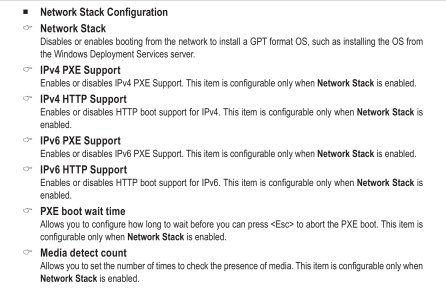
Network Stack ?

IPv4 PXE Support ?

IPv4 HTTP Support ?

IPv6 PXE Support ?

IPv6 HTTP Support ?

PXE boot wait time ?

Media detect count ?
 

Attachments

  • 11.jpg
    11.jpg
    552 KB · Views: 10
What do these terms mean in BIOS? Should I open it? Should I leave it closed?

Network Stack ?

IPv4 PXE Support ?

IPv4 HTTP Support ?

IPv6 PXE Support ?

IPv6 HTTP Support ?

PXE boot wait time ?

Media detect count ?
Unless you have a server that you want to boot from over the network, you don't need to do anything with any of those settings. If you wanted, you could disable the network stack, but you don't even have to do that.
 
Unless you plan on booting over a network, in which case you probably should already know what those terms mean, disable the network stack and the remaining items become irrelevant.
 
Google doesn't explain anything
whether to open these elements in the board or not?
And why?

If it can be opened or closed, do you need a reason?
Google doesn't explain anything
A websearch should return something. At least from Wikipedia.
Granted "PXE" is ambiguous abbreviation. Here it means https://en.wikipedia.org/wiki/Preboot_Execution_Environment
Actually, most of these are in the short "Network booting" paragraph: https://en.wikipedia.org/wiki/UEFI#Network_booting

When machine powers on, the UEFI could connect to server and load OS from server, rather than from local drives. The PXE and HTTP boot are two ways to do it.
Since you probably wont do that, you don't want to waste time during boot for the unnecessary step.
 
What about these terms specifically made you ask about them? BIOS usually has tons of indecipherable terms.
Probably if it would speed up any integrated ethernet connection is my guess. But I wouldn't have know what those options were for either.
I do know they won't speed up my connection.
 
Back
Top