What did you learn today?

Page 4 - Seeking answers? Join the AnandTech community: where nearly half-a-million members share solutions and discuss the latest tech.

Kaido

Elite Member & Kitchen Overlord
Feb 14, 2004
52,370
7,631
136
That there's some people you just can't reason with.

This took me a really, REALLY long time to not only learn but to internalize, lol. I now approach all conversations with a silent pretext:

* Is this person seeking answers, or an argument?
 

bba-tcg

Golden Member
Apr 8, 2010
1,087
670
136
thecomputerguylbb.com
This took me a really, REALLY long time to not only learn but to internalize, lol. I now approach all conversations with a silent pretext:

* Is this person seeking answers, or an argument?
Indeed. I think some people just want to try to flex. For whomever or for whatever reason. I should know this, but have to relearn it from time to time.

But I have learned to walk away, so it's all good in the end.
 
  • Like
Reactions: cytg111

cytg111

Lifer
Mar 17, 2008
26,837
16,109
136
Some people have an unbreachable ego and/or lacks the plasticity to even contemplate an issue from a different angle. Just walk away.
 
  • Like
Reactions: bba-tcg

Greenman

Lifer
Oct 15, 1999
22,483
6,565
136
Today I learned that the blades on a small remote controlled helicopter are surprisingly sharp, and verified that facial wounds do indeed bleed excessively.
 
  • Haha
Reactions: Red Squirrel

jmagg

Platinum Member
Nov 21, 2001
2,304
497
136
Today I learned that the blades on a small remote controlled helicopter are surprisingly sharp, and verified that facial wounds do indeed bleed excessively.
Could be related to leaving a 5 lb hammer on top of an 8 ft ladder
 

Kaido

Elite Member & Kitchen Overlord
Feb 14, 2004
52,370
7,631
136
Download the ISO here:


Download RUFUS here:


You'll need an 8gb+ USB tick you can wipe:

1. Use Rufus to burn the ISO to USB with the settings below
2. Boot up to the stick
3. Chose the option to use the old installer after boot & delete ALL of the partitions, then install to the one single drive partition

View attachment 129592


View attachment 129591

Windows 11 fresh install: (updated instructions)

1. Full Windows 11 25H2
2. Legacy version (no TPM v2, Secure Boot, or 4GB cap required) for slightly older computers
3. Tiny11 script now 25H2-compatible (for really old computers, as long as they're 64-bit)


Kaido

Elite Member & Kitchen Overlord
Feb 14, 2004
52,370
7,631
136
I've converted over to Tailscale:


Short version:

1. This is essentially private mesh VPN
2. Uses your favorite login (Gmail etc.) as MFA security
3. Easy, ultra-secure RDP for anywhere! Just install Tailscale on both computers & voila! No crazy networking or security issues!

Sample use cases:

1. Access RDP anywhere! You don't need Chrome Remote Desktop, Rust, Teamviewer, etc.
2. Your home IP acts as the VPN host for your phone, laptop, etc. Transfer files, stream PLEX, have complete protection on public networks, access your US IP outside of the country, etc.
3. Use a travel router as a wireless client to create a private wireless network at a hotel (supports captive portals!) or AirBNB for all of your devices

View attachment 134504


Private RDP: (full stack freebie setup)

1. Tailscale for RDP (use Parsec! for hi-speed remote desktop!)
2. DUO login for OS
3. Cloudflare Zero Trust (web RDP etc.)

Bonus security:

4. Bitlocker & Bitlocker-to-go
5. Malwarebytes
6. Local account sign-in with separate admin account & backup admin account
7. Backup stack (CDP, imaging, offsite, ex. Macrium & Backblaze B2)

So TIL how easy private VPN & secure RDP is these days!!

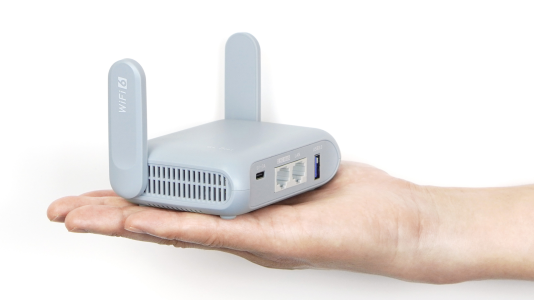
For hotel travel, the $93 MT-3000 travel router is pretty cool: (USB-C-powered OpenWRT-based pocket router)


1768024868770.png

I've turned this into a project called "Spiffy Router":

1768024826427.png

Setup:

1. Join Hotel Network (wired or wireless) from the travel router (all of your devices connect to the travel router's wireless network)

2. Sign in to the Hotel Network & activate the router's Captive Portal auto-renewal feature so you only have to sign into ONE device for Wi-Fi (see bonus options below)

3. Create a HOME and GUEST network

4. Route the HOME network to Tailscale with Exit Nodes to wherever you want (house, private VPS, NordVPN, etc.). That way 100% of your Hotel traffic for ALL devices is encrypted simply by being on the HOME SSID!

Bonus options: (it's programmable, just ask ChatGPT to write the scripts!)

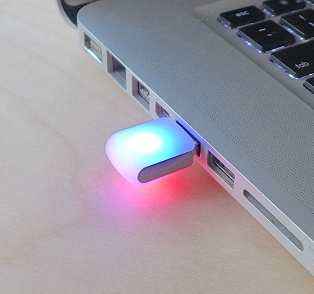
1. It can use a programmable USB LED (blink(1) mk3 USB RGB LED) for status updates:

🟢 Solid green → Internet OK via Tailscale
🔵 Solid blue → Hotel WAN OK (no VPN)
🟡 Blinking yellow → Captive portal required
🟣 Purple → LTE failover active
🔴 Solid red → No WAN
🟠 Orange pulse → Awaiting device approval

Note: There are more powerful travel routers available, like the Slate 7, but they use more power (important if you use a battery - see below) & the screen can't be custom-programmed for alerts like the RGB USB can.

1768025481013.png

2. Create a Captive Portal Watchdog script that:

a. Lets the travel router login to the hotel wifi as the gateway device to share on your private SSID
b. Reconnects to keep the connection going for your whole stay
c. Checks an HTTP probe (neverssl.com) & HTTPS probe (https://1.1.1.1) to verify access
d. Pings you if you need to manually reconnect the hotel's Captive Portal (ex. Email-to-SMS or Telegram alert) & changes the USB LED color

3. Create a Quarantine page:

a. Rather than adding all of your devices to Tailscale (and some can't, like a Nintendo Switch), you can use it as a wireless VPN gateway back to your house
a1. This makes it a router-based (MT-3000) full-tunnel (all devices get piped to your house) gateway
a2. This is "hub & spoke" (house is the central hub, MT-3000 at the hotel is the spoke) site-to-site (hotel to house) routing

b. You can buy another MT-3000 to do this at home! Just plug it into a LAN port. The Tailscale roles are:
b1. Subnet router (this lets you access your home network)
b2. Exit node (this lets you use your home Internet)

c. The catch is that ANY device you allow on your travel router's HOME SSID can now see & use your house's network. So:
c1. Add a GUEST SSID for anyone & anything else you don't want funneling home
c2. Create a Quarantine page that requires approval on the MT-3000

4. Add WAN failover:

a. If you NEED to be up even if the hotel wi-fi borks, you can add a second WAN source to the MT-3000 as failover via Wireless Or Ethernet:
a1. Phone hotspot
a2. Mobile hotspot (Verzon, AT&T, T-Mobile) via Ethernet or Wireless
a3. Portable Starlink Roam

5. Add better hotel wi-fi:

a. If the hotel wireless connection is spotty, you can add an external antenna via Ethernet to grab a better sigbnal:
a1. 5ghz Ubiquiti NanoStation AC l Loco
a2. 2.4hz Ubiquiti NanoStation Loco M2

6. Add battery support:

a. Runs of USB-C, so any battery bank will do. Nice for power outages & traveling (can keep MT-300- in your bag at the airport)
b. I use a 300w Anker Prime Power Bank (TSA-approved 26,250mAh USB-C battery), which has a spiffy magnetic wireless charging base. The MT-3000 gets 10 hours under heavy use & 20 hours under light use.
c. You can create a hot-swap battery setup using a mini USB-C UPS, that way you can swap portable battery to battery, battery to AC, or AC to battery without losing connection

7. Add better local wireless networking:

a. You can extend the local wireless network using a WAP hotspot

b. You can also build a local mesh network! This is a VERY nice trick if you need a larger & faster Wi-Fi bubble (ex. multiple hotel rooms for family or coworkers)
b1. Setup a mesh network with a controller (ex. TPlink & Omada controller)
b2. TPlinks are neat because (1) they can use a controller anywhere (ex. remotely at home or on a VPS using Tailscale) & can also operate locally (sans connection!) after the initial pairing

8. Get a hi-wattage GaN charger:

a. Gallium Nitride (GaN) transistor batteries & chargers are tiny. You can get a 65w GaN charger that is smaller than an old 30w Silicon charger.
b. A hi-wattage, multi-port model is nice because you can charge & power your laptop (they make USB-C adapters for most laptops), your phone, tablet, portable gaming devices, power bank batteries, and networking devices (ex. 12v Mesh WAP Hotspot). There are various 12V barrel adapters (look up "Universal USB-C to DC Barrel PD trigger cable). 16' 240w USB-cables are $13 on Amazon with right-angle tips if needed!
c. Be wary of cheap knockoffs. A 500w GaN Charger for $50 is definitely NOT 500w & might catch on fire lol (should be ~$200 for that much actual safe power).
d. FWIW, Anker Prime Power Banks have pass-through power so you can charge from them while they charger. The fastest wireless base right now is 150w (~an hour to full charge or faster with dual-input USB-C chargers, which at 250w does a 50% charge in 13 minutes). They're not meant to be used as a mini UPS long-term, but they are nice for traveling!

This is a real gem of a device!! I use these for:

1. Business & personal secure travel routers
2. Home Tailscale VPN endpoints (be secure anywhere & access your stuff anywhere!)
3. OOBA business gateways (ex. 5G backup access points to get to a jump box or Bastion box inside a business network)

Fabulously easy technology for under a hundred beans!
 
Last edited:

Kaido

Elite Member & Kitchen Overlord
Feb 14, 2004
52,370
7,631
136
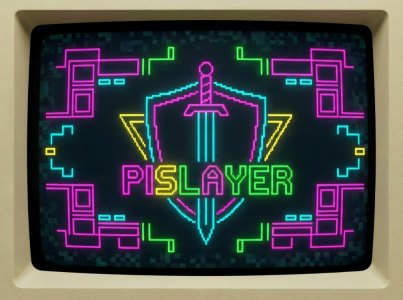
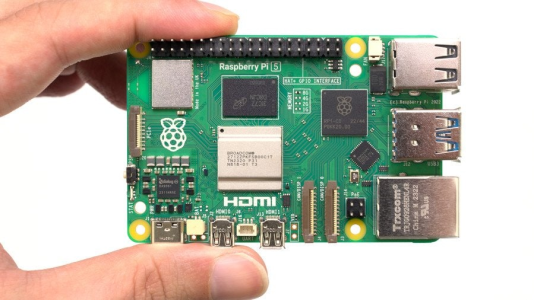
My hobby lately has been building Raspberry Pi 5-based multi-function routers for family, friends, and business usage. They are itty-bitty! I call the project "PiSlayer":

1768017352381.png

I did a deep-dive into Tailscale last year & then started seeing all of the possibilities that a Pi 5 could offer, so I've been cobbling together what I've learned into a tiny powerhouse!

Functions include: (just use ChatGPT to script it all!)

1. Powerful router with custom networking (isolated IoT VLAN's, NordVPN, private VPS endpoints, etc.)
2. Tailscale integration for easy private VPN & instant remote support for people's computers
3. Mesh wireless networking
4. Network camera recording
5. File server & downloader
6. Media server (music, movies, emulators, etc.)
7. Print server with Airprint
8. Backup server
9. PXE server for network ISO booting
10. Built-in device backup system with uptime monitoring & alerts
11. UPS support
12. Home Assistant smarthome system
1768017081967.png

Hardware setup:

The board itself starts at ~$100 USD & then gets built out from there based on the desired feature set (spare parts, storage drives, etc.)

1. 8GB Raspberry Pi 5
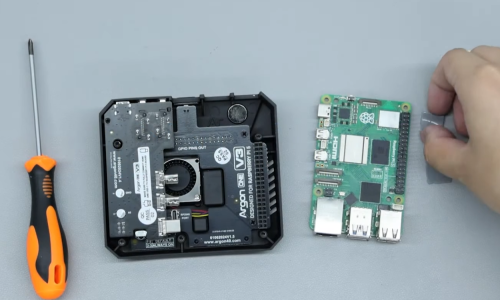
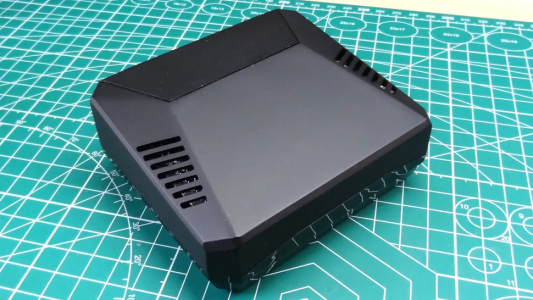
2. Fan-cooled case with NVMe support & auto-reboot after power loss feature (I like this one as standard or this one for dual NVMe drives)
3. 45w PiSwitch USB-C power supply (requires 5V x 5A power; they are pretty picky about power & need at least an official 27w 5x5 wall wart)
4. MicroSD card for OS (32gb+)
5. USB stick for OS reinstall & backup/restore
6. NVMe SSD (optional, for storage)
7. USB HDD (optional, for storage & data backup; hardware RAID USB drives exist FYI)
8. UPS (USB or Network)
9. USB Ethernet (onboard ETH for LAN, USB for WAN)
10. Network switch (optional; managed or unmanaged; PoE or non-PoE, up to 2.5GbE via USB3, or offload LAN routing to a 10GbE switch)
11. Wireless Access Points (optional; mesh WAP's start at $60 these days)
12. Cameras (optional)
13. Smarthome equipment (various devices)
1768011316064.png

OpenWRT hosts the following:

1. WAN
2. LAN
3. VLAN
4. SSID
5. Firewall
8. SQM
9. VPN (ex. NordVPN)
10. Tailscale

Docker setup:

1. One Docker bridge (docker0)
2. No macvlan
3. No containers on WAN
4. No Dockerized VPNs
5. No Dockerized Tailscale

Docker containers: (adjust as desired)

1. Frigate
2. go2rtc
3. Jellyfin
4. Home Assistant
5. SMB file server with extra packages for browsing & downloading
6. Mesh wireless controller (ex. Omada)
7. AdGuard Home
8. Uptime Kuma
9. NetAlertX
10. OpenWISP

Sample VLAN setup:

1. Family → Full LAN
2. IoT → Internet + NVR only
3. Guest → Internet only (client isolation optional)
4. NordVPN → Dedicated exit with killswitch
1768021032178.png

1. Powerful router with custom networking (isolated IoT VLAN's, NordVPN, private VPS endpoints, etc.)

* OpenWRT host OS
* OpenWISP central manager (in Docker)
* Custom VLAN's
* Isolated VLAN's
* One-way VLAN's
* LAN-only VLAN's
* Individual client isolation
* Pipe VLAN's out to VPN's (ex. NordVPN)
* Integrate with Wireless SSID's
* Adguard Home & Pihole
* SQM & Cake (traffic cop so downloads don't tank your network lag, better than QoS)
* Multi-WAN load-balancing, auto-failover, and segregation per VLAN (great for residential fiber + say a cheap Mint Mobile 5G home router combo) & BGP/OSP
* Always-on VPN to work (Wireguard, OpenVPN, IPsec)

2. Tailscale integration for easy private VPN:

* Easy private worldwide mesh networking
* Use your house as a secure VPN on your laptop & phone anywhere on the planet
* Share your Netflix account to other houses under your IP
* Taildrop for any-devices file sharing (Airdrop for iPhone, Android, and Computers)
* Share & stream anything to anyone (ex. PLEX)
* Offsite backups
* Help people via screenshare (VNC, Parsec, etc.)
* Tailscale lives on host (not on Docker) with Exit Node & Subnet Router enabled

3. Mesh wireless networking:

* Add any hotspot you want
* Add wireless mesh network (wired or wireless backhaul)
* Docker support for TP-Link Omada & Ubiquiti Unifi docker controllers
* Use a private VPS cloud mesh controller (great for equipment at multiple sites)
* Extend your mesh to a vacation home, hotel, etc. with a traveler router)
* Add as much Ethernet networking as you want (unmanaged or managed, unpowered or PoE, etc.)
* Optionally add a USB 3 to 2.5GbE ETH adapter, buy a cheap used 10G SFP+ Core Switch, add Fiber, etc.

4. Network camera recording:

* Frigate NVR (optionally add a USB Coral for AI detection)
* go2rtc (camera stream manager, easy to use with REOlink & other cameras)
* Wyze Bridge (if you use Wyze) can do 10 HD cameras (a full week = ~1TB data, so easy rolling storage on a standard 2TB NVMe)
* Works for laptop webcams & USB desktop webcams as security camears as well (setup Servy to run SplitCam & go2rtc as services under Windows)

5. File server & downloader:

* SMB file share
* FileBrowser Quantum (browser UI)
* qBittorrent (torrents)
* SABnzbd (usenet)
* Aria2 + AriaNG (direct link downloader)

6. Media server (music, movies, emulators, etc.)

* Jellyfin Server (clients for Web, Android, iOS, Roku, Fire TV, Apple TV, Smart TVs, etc. or run LibreELEC on a Pi)
* Network DVR for OTA & Cable (ex. SiliconDust HDHomeRun via Ethernet) or a USB TV Tuner
* Emulators (Batocera Pi 5 TV box)

7. Print server with Airprint:

* Print server (CUPS + Avahi (Bonjour) + PaperCut)
* Support for USB, ETH, and Wireless printers
* Central print management with data tracking
* Scan server (Scanservjs → Paperless-ngx)

8. Backup server:

* Macrium incremental images with PXE restore & vPro remote reloading
* Apple Time Machine (Window version)

9. PXE server for network ISO booting:

* iVentoy is a multi-ISO network boot disc
* Can run Memtest, DBAN/ShredOS, Macrium restore ISO, Windows 11 (Tiny, RUFUS no-TPM etc., full, Server 2025, etc.)

10. Built-in device backup system with uptime monitoring & alerts:

* MicroOS backup to bootable restore USB (Alpine RAM OS to generate MicroSD restore)
* NVMe data
* Uptime Kuma (and Grafana, if you want dashboards!)
* Alerts (SMS, email, Telegram, etc.)

12. UPS support:

* NUT for safe shutdowns
* USB & ETH connections
* PDU control (actual PDU's or Smart A/C plugs via Wi-Fi or Bluetooth)

13. Home Assistant smarthome system:

* Best snarthome system on the planet (and FREE!)
* Support for endless hardware, software, alerts, etc. & custom configurations
* Control your HVAC, lights, fans, door locks, blinds, music, timers, announcements, etc.

1768022693149.png
 
Last edited:
  • Like
Reactions: KMFJD and lxskllr

Kaido

Elite Member & Kitchen Overlord
Feb 14, 2004
52,370
7,631
136
That I can still change. I am proud of that.

I've migrated from "binary thinking" to more "dialectic thinking", which has definitely helped me to be more open-minded & more open to change:


In practice:

1. It helps me to detangle myself from emotional fixations (ex. "food morality", such as "fake sugars are terrible products" so therefore "diet sodas are actively bad for you"), which helps me bypass brain-off blanket statements & judgements. Everything has flaws & merits! (even if the merit is simply being a good warning to others, lol!)

2. It helps me to understand that most people are trying their best, even if THEIR best is misguided, wrong, weird, etc. That doesn't excuse bad behavior, but it does help me to see where they are coming from & why they do what they do.

3. It's helped to open me up to other perspectives in order to see things I couldn't see clearly before (or at all!). Case in point is the Health & Fitness forum from a decade or two ago...I thought ALL sugar was evil (but what about carbs from veggies??), didn't know what TDEE meant, and thought macros were just scripts I ran on my computer lol.

I think it's largely an energy issue, tbh! Considering new information can be downright exhausting & frustrating!
 

Kaido

Elite Member & Kitchen Overlord
Feb 14, 2004
52,370
7,631
136
PiSlayer progress:

1770087075268.png

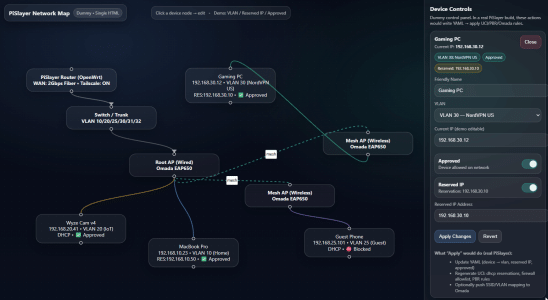
I've always thought that home routers were setup stupid, as far as the interface went. Networking is incredibly easy WITH the proper explanation & with a great GUI! So I redesigned one using a node-based HTML editor in ChatGPT. So what I learned was how to do HTML nodes:


The basic workflow is:

1. Build the Pi box (~5 minutes) & install the OS from a USB stick

2. Setup your groups. Out of the box:

a. Pre-made VLAN options
b. Randomly-addressed, collision-free 10.64.0.0/16 network neighborhood with support for 256 separate VLAN's
c. 1,022 devices per VLAN
d. Dedicated VLAN groups: (samples)

10.64.10.0/22 → Home
10.64.20.0/22 → IoT (isolated VLAN, 1-way access from Home VLAN)
10.64.30.0/22 → Guest (isolated VLAN, isolated guests)
10.64.40.0/22 → PXE (Ethernet on bench for ISO installs)
10.64.50.0/22 → NordVPN US (Wi-Fi & Ethernet VLAN & Tailscale exit profile)
10.64.60.0/22 → NordVPN UK (Wi-Fi & Ethernet VLAN & Tailscale exit profile)
10.64.70.0/22 → NordVPN NL (Wi-Fi & Ethernet VLAN & Tailscale exit profile)

3. The node-based editor is drag & drop:

a. VLAN's by color
b. Wireless backhaul has an animated bungee line for visibility
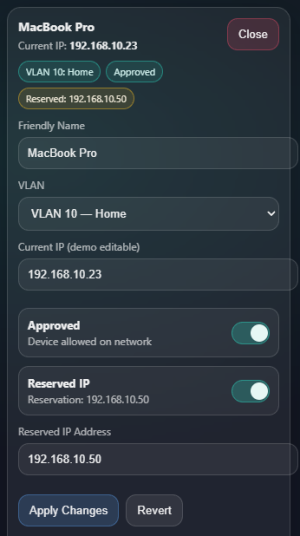
c. You can click on a node to approve a device to the VLAN, Reserve an IP, and give it a friendly name

This lives in Docker on the OpenWRT OS on the Pi. The container runs a Flask webpage that uses an API to talk to Luci (OpenWRT control page) & your choice of Wi-fi controller (Omada or Unifi). I prefer full manual control over my network:

a. Names I can read
b. VLAN approval
c. Reserved IP addresses

I think my first post here in 2004 after lurking was about setting up a Linksys router. Now I'm using A.I. to build enterprise-grade routers for a fraction of the cost, haha!

flow.gif

1770087465532.png

Getting more concise with the feature set as well:

 
Last edited:
  • Like
Reactions: lxskllr