Question What are your favorite USB flash drives?

Page 2 - Seeking answers? Join the AnandTech community: where nearly half-a-million members share solutions and discuss the latest tech.

mindless1

Diamond Member
Aug 11, 2001
8,778
1,771
136
TLDR; Just ignore this topic if you're not looking for or can contribute to the value leaders for modern USB flash drives. I have seen the same reviews anyone can pull up with a google search and they are lacking, to say the least.

SO, I got this Teamgroup C145, 128GB USB flash drive in the mail today for $11. I didn't expect much, love the GB:$ ratio, but it's poorly made (structurally weak) and slow, averaging about 16.5MB/s write speed.

I could go into detail about structurally weak but let's say I thought it felt very light, very thin plastic including the casing seams moving when I squeezed it, so not wanting to wonder about using it, I popped it open and saw a pretty fragile construction, then filled it with epoxy to eliminate the weakness so now it is extremely rugged. I do not want to bother doing this!

SO, what are your favorite lowest cost flash drives that are very sturdy, but more importantly, which current models do you deem worth the price increase for higher performance. I'll share a few observations I made, without owning some of these.

- Sandisk Ultra Fit and Ultra Flair, (and probably Loop, Luxe, Extreme Go, and others) are prone to overheating and slow down to sub-15MB/s on extended writes. Some people even have them stutter, and lockup from heat. Build quality is high, they're very sturdy.

- Samsung Bar Plus, this would be the only flash drive I ever buy if it were more than double the speed, has heat issues and slows down similar to, but not as bad as the Sandisk Ultras.


- Transcend Jetflash 910, seems to have performance rivaling a Sandisk Extreme Pro but at lower cost. I do have a Sandisk Extreme Pro and have no regrets buying it years ago but they are pricey, now over 4X the cost per GB in some sizes. Both of these are reasonably well built.

- Arcanite AK58, seems a pretty reasonable performance:price ratio. I don't have one of these, have no idea about build quality.

- Vansuny, ?? Seems like a generic is trying to make it into the big leagues unless the specs are just a lie. I have never bought *this* generic a flash drive before. https://www.amazon.com/gp/product/B08LGKDG1J

- Patriot Supersonic Rage 2 or Rage Elite (same thing internally?) used to be a value:performance leader but their prices did not drop with the last flash density increase like everyone else so they are more of a yesterday's choice. They are fairly sturdy.

- Corsair Voyager GTX, costs so much that it is a bit of a joke. No USB3 flash drive should cost over twice what the same capacity and higher performance SSD costs. I accept the rationale that performance at a small size is worth something but when it costs no more to make it, that is a hard pill to swallow. They are fairly sturdy.

- PNY Pro Elite, looks sturdy, specs (and benchmarks) look similar to the Patriot Supersonics and at simliar price points.


Have you found a hidden gem, a flash drive that performs beyond its pay grade and is sturdy? Please do not just tell me some benchmark score that involves the OS caching, any performance metric should be long enough (writes) that the cache is exhausted. For example if you write 40GB to it, what is the average speed at the end? Crystal diskmark, etc benchmark tools mean nothing to me compared to real world file performance with large sequential file reads and writes.
 
Last edited:

mindless1

Diamond Member
Aug 11, 2001
8,778
1,771
136
Prices for the non-junk USB flash drives seem to have risen in the past months (? tariffs!), but one of my still-favorites is on sale so I'll mention that, the Transcend ESD310C which amazon has as a limited time deal, 256GB for $32, or higher capacities are cheaper per GB but not part of the limited time deal.


Edit: Not recommended, mine died.
 
Last edited:

tcsenter

Lifer
Sep 7, 2001
18,949
575
126
This is one of the fastest non-SSD USB 3.0 flash drives I've owned, paid $15 (on sale I think) for it in 2015, according to order history. Mushkin Enhanced Ventura Plus 32GB


Can hit nearly 70MB/s write and 180MB/s reads. I just threw out some Kingston Data Travelers from the same era 2015~2017 that were terrible performers, I paid pretty much the same price for.

Seriously 10 years later, what are the good performing cheap non-SSD USB flash drives today?
 
Last edited:

tcsenter

Lifer
Sep 7, 2001
18,949
575
126
It like the NV flash memory industry for other than SSD be like "Moore's Law = 120 months"
 

mindless1

Diamond Member
Aug 11, 2001
8,778
1,771
136
Inflation and trumpflation tho'.

Back around 2014 I got a Sandisk Extreme CZ80 32GB for $20, which performed very well for it's era, would have been equivalent to $27 in today's money.

When I got the Transcend ESD310C 256GB this spring, it was $32, and is faster and 8X the capacity so if it hadn't risen in price since then, I'd feel like USB flash drives have made reasonable enough progress considering that if you want something too cheap today, you're getting QLC memory then that's slower and more limited write cycles too.
 
Last edited:

aigomorla

CPU, Cases&Cooling Mod PC Gaming Mod Elite Member
Super Moderator
Sep 28, 2005
21,096
3,609
126
something cheap thats strong and durable enough to get me from location A to B in IP65 conditions if needed, and has enough capacity to store whatever needs shuttling from A to B that's not done via internal network.

Or something that can take a beating in a hot car, and not wear out faster then my dog with her chew toys.

These are the only things i think i look at in flash drives, because everything else is sort of moot.

If i need ultra fast, i have a sandisk pro extreme typc C nvme drive, not to mention its also 4TB.
If i need to move more then 4TB, well, im happy with my 10GBE internally, as its also connected to a 96TB NAS, and has a bandwith of 1GB/S transfer if done A and B can support that bandwith.
 
  • Like
Reactions: tcsenter

tcsenter

Lifer
Sep 7, 2001
18,949
575
126
This is one of the fastest non-SSD USB 3.0 flash drives I've owned, paid $15 (on sale I think) for it in 2015, according to order history. Mushkin Enhanced Ventura Plus 32GB

According to the invoice I ordered two of them. Wondering where the other went. I think I might have gifted it to someone. I do that a lot and then don't remember where things went several years later. :D:p
 

tcsenter

Lifer
Sep 7, 2001
18,949
575
126
These are the only things i think i look at in flash drives, because everything else is sort of moot.

Same. 80 ~ 90 MB/s writes and 180MB ~ 200MB reads is fine by me. I don't even require the large capacities in my flash drives, up to 64GB is all I need. And doesn't get super hot like a few of the newer USB 3.1/3.2 flash drives I have. The Mushkin has aluminum shell/case and gets VERY warm but not HOT.
 

mindless1

Diamond Member
Aug 11, 2001
8,778
1,771
136
something cheap thats strong and durable enough to get me from location A to B in IP65 conditions if needed

That portion can be filled by any flash drive with a flimsy casing you can split open then epoxy pot it - covering the rear of the USB connector so the epoxy can't find it's way in.

It can also be had with the models barely larger than the USB connector and an encased slug integrated into that like some of the Sandisk et all, but at least the Sandisks tend to overheat (even if it doesn't feel particularly hot externally) and throttle speed if not lock up, and all with the tiny slug are pretty slow.
 

mindless1

Diamond Member
Aug 11, 2001
8,778
1,771
136
Same. 80 ~ 90 MB/s writes and 180MB ~ 200MB reads is fine by me.
Unless you're only writing semi-large files (dozens+ MB per file), most inexpensive flash drives will not sustain 80MB/s writes, unless their slowness is just masked by OS write caching. I keep windows write caching turned on for flash drives, because even in the event of a sudden power outage, I never have the only copy of data on that flash drive.

Edit: I just started a 4GB file write to a Sandisk Ultra Flair. It started at 25MB/s, 2/3rds of the way through it slowed to 20MB/s (file source being an SSD no less), then by the time it finished, kept dropping off and reconnecting to the USB hub. I formatted it, and now writing the same file it's getting a whopping 12MB/s. This is a drive that many owners report as hot running, though feeling it with my finger, it only feels a little warm.
 
Last edited:

00Logic

Junior Member
Oct 29, 2016
24
10
81
The SD Association's Formatter (the long format) is about as close as you can easily get to Secure Erase or TRIM type speed for both SD Cards and USB flash drives.
It also has an uncanny ability for fixing broken drives.
https://www.sdcard.org/downloads/formatter/

For older non UASP drives still using the BOT protocol and USB2 drives,
Check out:
MaximumTransferLength
USB-WriteCache V0.2
if you are not using the NTFS FS.
at the bottem of
https://www.uwe-sieber.de/drivetools_e.html
(Uwe Sieber is the writer of USB drivers for DOS and/or Win95 IIRC)
 
  • Like
Reactions: tcsenter

mindless1

Diamond Member
Aug 11, 2001
8,778
1,771
136
The SD Association's Formatter (the long format) is about as close as you can easily get to Secure Erase or TRIM type speed for both SD Cards and USB flash drives.
It also has an uncanny ability for fixing broken drives.
https://www.sdcard.org/downloads/formatter/
It's a shame that the SD Assoc's formatter doesn't support FAT32, which I often put on old/leftover flash drives (though old, are still >32GB) and make them bootable on systems with old bios' needs. Fortunately there's other utilities like Rufus to do that.
 

00Logic

Junior Member
Oct 29, 2016
24
10
81
It's a shame that the SD Assoc's formatter doesn't support FAT32, which I often put on old/leftover flash drives (though old, are still >32GB) and make them bootable on systems with old bios' needs. Fortunately there's other utilities like Rufus to do that.
Yep. It'd be great if you choose the FS and also the cluster size.

Do check out Uwe Sieber's stuff. It makes a big difference.
 

mindless1

Diamond Member
Aug 11, 2001
8,778
1,771
136
Now that I've seemingly PIMPED that Transcend ESD310C flash drive, IT DIED at under a year old. At least it was under warranty.

Windows notepad froze trying to save a few KB text file to it, unplugged and replugged it, saw the filesystem but no files were actually accessible. Then it disappeared on the USB-A.

Plugged it into a phone on the USB-C (using the USB-C port on the other end of the flash drive, not an A-to-C adapter), was able to get a little data off (not that it mattered, already had a copy of that data elsewhere but as a test...), then it disappeared to the phone too.

Plugged it back into a hub with the USB-A plug, windows saw an empty unformatted storage device, then it disappeared again. Never came back so no chance to even try that SD Assoc's formatter.
 
Last edited:

WelshBloke

Lifer
Jan 12, 2005
33,292
11,424
136
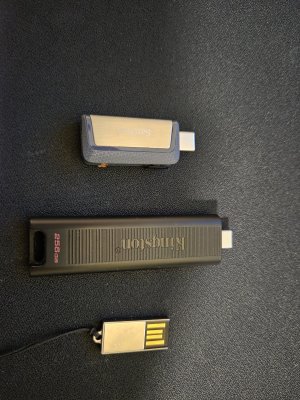
1000050804.jpg

Top one I like because it's USB C and A, fairly large, and fairly quick. It's also pretty durable and small.
The second one is really quick but it's a bit big and sticks out a lot from what you plug it into. It's easy to snag it and bend the port.
The bottom one is slow, old and indestructible!
 

mindless1

Diamond Member
Aug 11, 2001
8,778
1,771
136
^ I have that 3rd one (or something extremely similar looking) currently plugged into a generic mSD/USB reader/DAC module that I added to a tool brand radio for playing audio files. That's been it's permanent home for the last half dozen years or more.

Super Talent Pico_C 4GB, $16 on Newegg in 2008. One thing I remember about it is that the outer metal tray it sits in (the casing itself), is slightly wider than the standard for a USB port, so I had to literally take sandpaper to plane down the width of it by about 1/2mm to not worry about tearing up USB ports it was being plugged into. Turns out that the metal tray is chromed potmetal (zinc-something alloy?) so it just turns a mousy gray color by doing that.

Edit: Just found a benchmark I did at the time (2008), peak read 30MB/s, write 3.4MB/s. A real speed demon, but works fine for audio file playback.
 
Last edited:

WelshBloke

Lifer
Jan 12, 2005
33,292
11,424
136
^ I have that 3rd one (or something extremely similar looking) currently plugged into a generic mSD/USB reader/DAC module that I added to a tool brand radio for playing audio files. That's been it's permanent home for the last half dozen years or more.

Super Talent Pico_C 4GB, $16 on Newegg in 2008. One thing I remember about it is that the outer metal tray it sits in (the casing itself), is slightly wider than the standard for a USB port, so I had to literally take sandpaper to plane down the width of it by about 1/2mm to not worry about tearing up USB ports it was being plugged into. Turns out that the metal tray is chromed potmetal (zinc-something alloy?) so it just turns a mousy gray color by doing that.
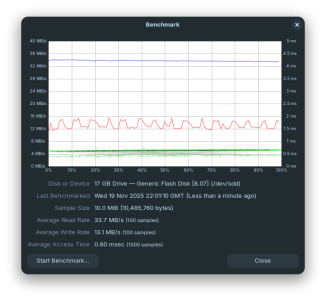
I mostly use it for BIOS flashes, its reporting itself as 17GB and theres no writing on the casing at all. Looks the same as the one you have though. Mine seems to fit the USB port fine but I only use it in my PC.
 

WelshBloke

Lifer
Jan 12, 2005
33,292
11,424
136
View attachment 134183

Top one I like because it's USB C and A, fairly large, and fairly quick. It's also pretty durable and small.
The second one is really quick but it's a bit big and sticks out a lot from what you plug it into. It's easy to snag it and bend the port.
The bottom one is slow, old and indestructible!
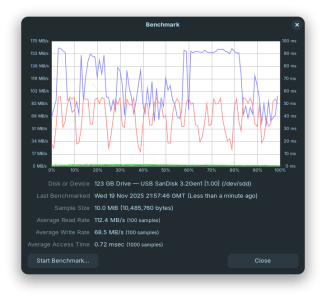
Top one...
Screenshot from 2025-11-19 21-58-21.png
Bottom one...
Screenshot from 2025-11-19 22-01-23.png

Can't find the middle one! Its significantly faster than the first one though!
 
  • Like
Reactions: tcsenter