• We’re currently investigating an issue related to the forum theme and styling that is impacting page layout and visual formatting. The problem has been identified, and we are actively working on a resolution. There is no impact to user data or functionality, this is strictly a front-end display issue. We’ll post an update once the fix has been deployed. Thanks for your patience while we get this sorted.

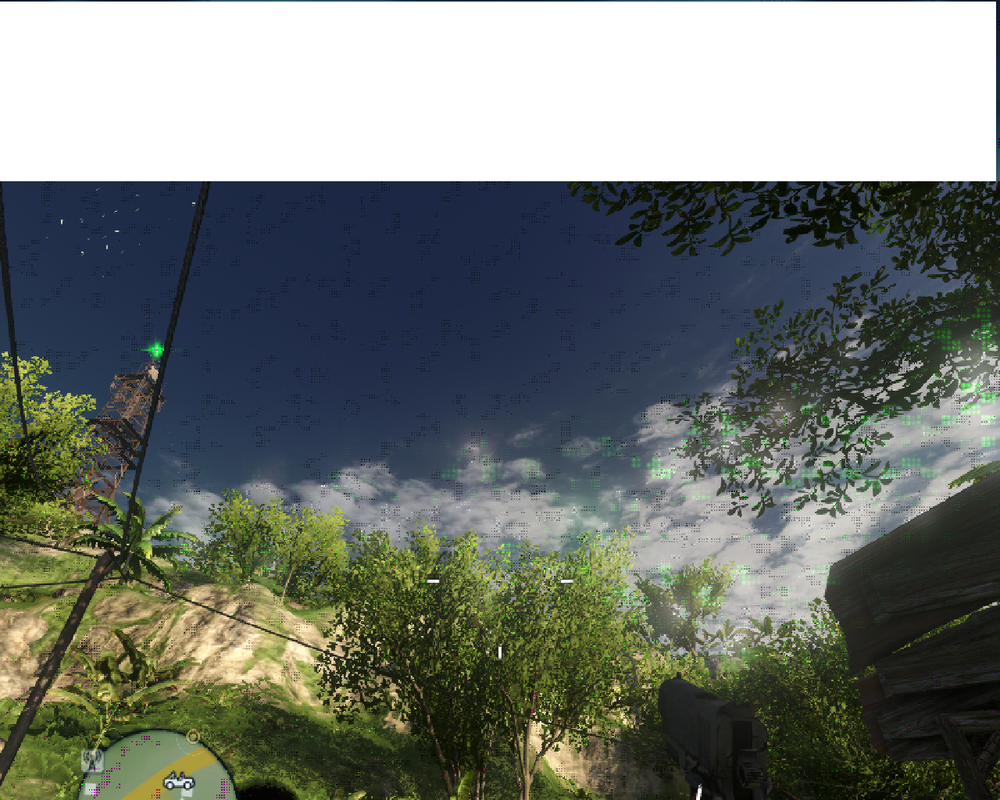
Weird graphics while playing games lately

Looks like its on its way out. 🙁 Time for a new one.

I would first try setting the video cards fan to 100% to rule out overheating, and try changing drivers.
 
I'm pretty sure it's not dying out on me. It's relatively new. I was thinking it might be like a DirectX issue or some thing. I'm running on Windows 7 64-bit OS too if that makes any bit of a difference.
 
I'm pretty sure it's not dying out on me. It's relatively new. I was thinking it might be like a DirectX issue or some thing. I'm running on Windows 7 64-bit OS too if that makes any bit of a difference.
Random splotches like that are usually a sign of faulty VRAM (i.e. a hardware fault), especially if it happens in multiple games.
 
Random splotches like that are usually a sign of faulty VRAM (i.e. a hardware fault), especially if it happens in multiple games.

This.

OP, you say it's fairly new, but that card hadn't been sold for about three years. Did you buy it used?
 
Well I've had it for under a year, I think I might need to open up my computer and take a look at it. I'll report back tomorrow morning.
 
@akka

This kind of display errors usually indicate faulty hardware, video ram being the main suspect.

Still, I've seen errors like that on one of my 5850s a while back and I got very sad. It turned out that one of AMD's CAPs had messed things up. Card still runs happily and can highly OC too.

In one more similar situation, my older 4850 started displaying artifacts and it turned out to be a faulty HDMI cable.

You can easily check if it's a cable issue, if you take a snapshot and go back and see it and scroll it around. If the artifacts are not there, then it's a cable issue. If the artifacts are still there, then there's a rendering problem caused either by faulty ram or bad software.

If the problem persists, you can try lowering the cards clocks in small steps, to see if it helps.

 
That is known as artifacting. I had that on my 5770 and I fixed it for a few months by pulling off the fans and re-pasting with some better grease. But eventually the problems came back and I just caved in and bought a 6870. Stunk because the 5770 played everything I needed and at good frames.
 
Back
Top