• We’re currently investigating an issue related to the forum theme and styling that is impacting page layout and visual formatting. The problem has been identified, and we are actively working on a resolution. There is no impact to user data or functionality, this is strictly a front-end display issue. We’ll post an update once the fix has been deployed. Thanks for your patience while we get this sorted.

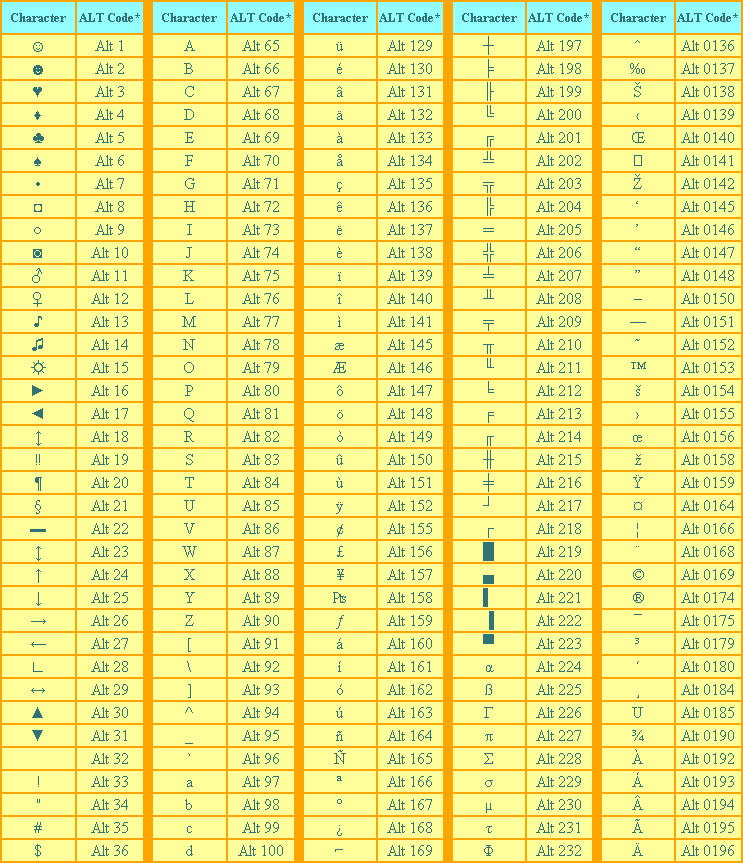
Useful alt codes to the zion mainframe

Page 2 - Seeking answers? Join the AnandTech community: where nearly half-a-million members share solutions and discuss the latest tech.
° Works! Pain in the ass because I have to press and hold FN and Alt then try to see the blue numbers on the keyboard.

Yeah we use the degrees symbol a lot here at work. I got a call one day of a user that couldn't get it to work. She was using the number row. Which is completely different than the numpad.
 
Alt 32 is good if you want to give something a blank name that normally wouldn't allow you to with just the spacebar e.g. Recycle Bin

bSzBUrW.jpg

Haha, clever!
 
ALTchrc-a.gif


the systems I'm on don't use unicode, so I just have the ASCII chart printed and pinned to my cubicle wall for quick reference.

I have the same sheet printed out, and use it fairly often. Almost everything is there... Not sure why the OP is listing things individually when you can just Google "alt code list"
 
Last edited:
I have the same sheet printed out, and use it fairly often. Almost everything is there... Not sure why the OP is listing things individually when you can just Google "alt code list"

Because the OPme was looking for a subset of the whole set so he/she/it (lol) doesn't have to go searching a larger set for the few symbols sheit (what? he is in there. lol moar) uses on message forums to get the message out that science has the right method to get the message that I'm sending. (ok now what the...?)
 
Alt 32 is good if you want to give something a blank name that normally wouldn't allow you to with just the spacebar e.g. Recycle Bin

bSzBUrW.jpg
Alt + 0160 works similarly for a lot of things too (non-breaking space). There was a time when few forums filtered for it and you could impersonate practically anyone. 😉
 
In addition to the usefulness of the alt key, (I use it a lot when I don't feel like using the equation editor, or if I'm typing some math equation on the forums and need a squared, e.g., x² + x³ (alt 0178 and alt 0179)

The thing that's really bugged me though - WHY??! WHY doesn't this work for the regular number row??? If you hold down the alt key and use the regular number row, nothing happens. Who came up with that as a standard. "Hey, we'll allow them to insert other characters using the alt button, but ONLY if they have a numeric keypad on their keyboard. God forbid we allow them to use either "2" on the keyboard; that might confuse them."

 
In addition to the usefulness of the alt key, (I use it a lot when I don't feel like using the equation editor, or if I'm typing some math equation on the forums and need a squared, e.g., x² + x³ (alt 0178 and alt 0179)

The thing that's really bugged me though - WHY??! WHY doesn't this work for the regular number row??? If you hold down the alt key and use the regular number row, nothing happens. Who came up with that as a standard. "Hey, we'll allow them to insert other characters using the alt button, but ONLY if they have a numeric keypad on their keyboard. God forbid we allow them to use either "2" on the keyboard; that might confuse them."

Because Alt is used to access UI/menu shortcuts and any function/command labeled with an underlined character regardless of your insertion point position or whether or not the text field has focus. It is never used for inserting characters in the same way that CTRL alone is never supposed to have a function (except for full-screen games and such, of course).
 
Last edited:
In addition to the usefulness of the alt key, (I use it a lot when I don't feel like using the equation editor, or if I'm typing some math equation on the forums and need a squared, e.g., x² + x³ (alt 0178 and alt 0179)

The thing that's really bugged me though - WHY??! WHY doesn't this work for the regular number row??? If you hold down the alt key and use the regular number row, nothing happens. Who came up with that as a standard. "Hey, we'll allow them to insert other characters using the alt button, but ONLY if they have a numeric keypad on their keyboard. God forbid we allow them to use either "2" on the keyboard; that might confuse them."

Thanks I added superscipts 2 and 3 to the OP. I think it would be useful if they made alt+number key on the top row a superscript and ctrl and number key on top row a subscript, so you could easily superscript or subscript any number quickly and easily. But I guess far too few folks have a use for silly things like math and science when they can just guess at how the universe works and delude themselves into believing they are right. So much easier than doing the hard work required to find out how nature actually does work.
 
In addition to the usefulness of the alt key, (I use it a lot when I don't feel like using the equation editor, or if I'm typing some math equation on the forums and need a squared, e.g., x² + x³ (alt 0178 and alt 0179)

The thing that's really bugged me though - WHY??! WHY doesn't this work for the regular number row??? If you hold down the alt key and use the regular number row, nothing happens. Who came up with that as a standard. "Hey, we'll allow them to insert other characters using the alt button, but ONLY if they have a numeric keypad on their keyboard. God forbid we allow them to use either "2" on the keyboard; that might confuse them."

I agree 100%

It really bugs me when I'm on a laptop w/out a numpad
 
Back
Top