• We’re currently investigating an issue related to the forum theme and styling that is impacting page layout and visual formatting. The problem has been identified, and we are actively working on a resolution. There is no impact to user data or functionality, this is strictly a front-end display issue. We’ll post an update once the fix has been deployed. Thanks for your patience while we get this sorted.

Question Use Intel Quick Sync along with NVIDIA gpu?

Jerethi

Member
Greetings,

I have an NVIDIA 1030 GT that, sadly, does not support NVENC encoding. I do, however, have an Intel processor that supports Quick Sync. Can I still use my NVIDIA GPU as my primary video card, but also still enable Quick Sync for applications that support hardware encoding?
 
I think that it is application-specific, but, for ex., I think that as long as you also have the Intel Integrated Graphics enabled in BIOS, and drivers loaded in Windows, that programs like Handbrake can utilize it, regardless if the Intel Integrated Graphics happens to be your primary / desktop Windows display output.
 
Yup, just be aware that the mobo has to be plugged into a monitor for the system to recognize the igpu otherwise you might not get any bios option and drivers won't install.
You do not need a second monitor as long as your main monitor has a second hdmi port and can switch between them you can use both at the same time the important thing is for the mobo hdmi to be connected to a monitor.
As long as you keep your nividia output the main display all games will launch from the nvidia card, and obs and other apps will allow you to choose qsv.
 
Can I still use my NVIDIA GPU as my primary video card, but also still enable Quick Sync for applications that support hardware encoding?
Yes, as @VirtualLarry already mentioned, you should make sure "IGD Multi-Monitor" is enabled in BIOS (it should be one of the options for the GPU configuration).

After that it will also depend on your software of choice, but take note that under Win 10 you can also force a certain software to use a specific card in the system. In Settings > System > Display > Graphics settings you can add a custom app entry and select which GPU will be presented to the software. On some occasions this may be a helpful option, although you should try via the software itself first.

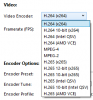
Here's a screenshot of available encoders under Handbrake once I enabled QuickSync support in the software preferences. (in BIOS the IGD-Multimon support option is enabled, and the video output is done via an AMD discrete graphics card, the same as your intended scenario with the Nvidia card)
enc.png

Notice how both Intel QSV and the AMD encoder are available.
 
Thanks to all, especially @coercitiv and @VirtualLarry for these responses.

I poked around in my BIOS and while I don't have the IGD Multi-Monitor setting per se, I was able to change a setting that enabled my integrated graphics. I think I'm all set.
 
Multiple GPU tech hasn’t really arrived yet. Your dedicated and integrated graphics are probably different brands… and the only way to use multiple brand GPUs for the same game is Directx 12 but it has to be used by the developer. Only game I know of doing this right now is Ashes of the Singularity. That game has a lot going on so it can use multiple graphics cards efficiently, but we’re still a ways away from seeing most games being able to use this well.
 
Back
Top