• We’re currently investigating an issue related to the forum theme and styling that is impacting page layout and visual formatting. The problem has been identified, and we are actively working on a resolution. There is no impact to user data or functionality, this is strictly a front-end display issue. We’ll post an update once the fix has been deployed. Thanks for your patience while we get this sorted.

Question Upgrade RAM/add SSD or buy Mini PC: $300-$500 budget

forsciguy123

Junior Member
Hi all,

I’m trying to decide whether it’s worth putting about $300–$400 into upgrading my current desktop, or if I should just spend up to $500 on a newer mini PC. My main question is:
  • Would I see a noticeable improvement in speed/performance from upgrading my current PC’s SSD and RAM?
  • Or would it make more sense to just move on to a newer system?
Here are my current specs (bought a CyberPowerPC on Amazon for about $1000 in July 2017):
  • System:
    • AMD Ryzen 7 1700 3.0GHz Eight-Core
    • AMD B350 Chipset
    • 16GB DDR4 SDRAM (supports up to 64GB)
    • 2TB HDD
    • Windows 10 Home 64-bit
  • Graphics: AMD Radeon RX 580 4GB (1x HDMI, 1x DisplayPort)
I was specifically thinking about:
  • Adding an SSD
  • Increasing RAM beyond the current 16GB
  • (If so, would you mind listing specific components that would be compatible)
But I’m not sure if that’s really worth, or if my money would be better spent toward something newer (like a budget mini PC).

Other info:
  • Sadly, just used for work and not gaming anymore.
  • Price: up to $500, prefer $300-400
  • Country: US
  • No brand preference
Would appreciate any thoughts or advice from those who’ve done similar upgrades.

Thanks!
 
SSDs and DDR4 are not expensive, it will cost less to upgarde, and it probably be faster then any of the bellow $599 Mini.


😎
 
The upgrade to an SSD alone would dramatically increase the speed if you are using a spinner!!! More RAM could also help. Additionally you could replace the CPU with a newer model. There are still CPUs available for the AM4 platform, both new and used. You might need a BIOS update, but it is certainly something worth considering. And would be much better than a mini IMO.
 
Thanks for the responses; it sounds like an SSD and RAM are the way to go. If I search newegg for DDR4 SDRAM, is there anything else I need to be worried about as far as being compatible with my PC? Anything other specs I should look for?
Thanks for your help!
 
Thanks for the responses; it sounds like an SSD and RAM are the way to go. If I search newegg for DDR4 SDRAM, is there anything else I need to be worried about as far as being compatible with my PC? Anything other specs I should look for?
Thanks for your help!
Look for a 32GB kit, 2x16 rather than adding 2 more sticks. Early Ryzen had some trouble running 4 sticks of RAM. Also, unless you plan to upgrade the CPU 3200MHz is probably the ceiling for speed. You could check the motherboard's QVL to see if they have some kits they have tested.

Something like this would likely work well: https://www.newegg.com/silicon-powe...ck-gray/p/N82E16820301459?Item=9SIBDGPJ9V7180

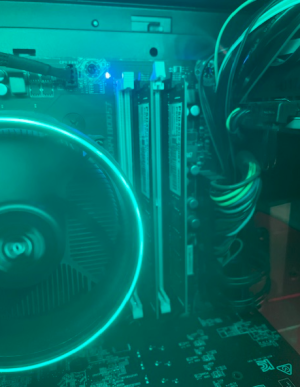
Actually, since you bought a pre-built it might only have 1 stick of RAM. Can you check? Take a picture of the current RAM and share it here.
 
Sorry for the delay, I had to get home from work to check. Looks like it is 2x8. So if I get the Silicon Power 32GB (2 x 16GB) DDR4 3200, AMD Ryzen 5 5500, and an SSD I should see a decent improvement in speed and all of those components will work with the rest of my old components? It looks like I have an MSI B350M BAZOOKA motherboard, can someone recommend an ssd that will work with that?

Thanks again for the help!

1758232687342.png
 
Make sure to flash the latest BIOS for your motherboard before swapping processors. In fact, MSI's site says latest beta BIOS for that CPU.
 
Thanks! I will look into how to flash the BIOS and the SSD.

Not to go down the rabbit hole, but would it be worth it to spend ~75-100 for a new motherboard that can take advantage of the SSD and perhaps faster RAM? Or is that not worth the extra money and effort, for what it will get me.

(note: The last computer I built was 15 years ago🙂)
 
Thanks! I will look into how to flash the BIOS and the SSD.

Not to go down the rabbit hole, but would it be worth it to spend ~75-100 for a new motherboard that can take advantage of the SSD and perhaps faster RAM? Or is that not worth the extra money and effort, for what it will get me.

(note: The last computer I built was 15 years ago🙂)
At that point you would be better to move on from AM4 and go to AM5 since you would be buying a new CPU/RAM/Motherboard. You would still see a bump in performance, just not as big of a bump getting off of the HDD and upgrading to 32GB of RAM. But one thing you could gain when doing this is that AM5 has an integrated GPU so you wouldn't have to use the RX580 which could save you some money on your power bill, unless you need more than a couple of monitor outputs.

For about $535 you could get the 7600X, 32GB DDR5 6000-CL30, Motherboard, 2TB NVME drive. If you live near a microcenter you could probably save some more since they have bundles.


Edit: if you go with the 7600 it comes with a cooler which would save you $30 and it uses a little bit less power.


And here's a quick performance comparison for the 3 CPUs.

 
Thanks! I will look into how to flash the BIOS and the SSD.

Not to go down the rabbit hole, but would it be worth it to spend ~75-100 for a new motherboard that can take advantage of the SSD and perhaps faster RAM? Or is that not worth the extra money and effort, for what it will get me.

(note: The last computer I built was 15 years ago🙂)
The SSD alone will greatly enhance perceived performance.

More RAM could help, but only if your usage patterns are causing heavy swap file usage.

For a work PC, I'd lean against the CPU upgrade unless you know you need more processing power.

In isolation, each component is quite affordable but once you're upgrading several things together, the value proposition changes. My strategy here would be to spend as little as possible; and then replace the PC in a couple years.

Note that you might need to do something about Windows 10, but you have about a year if you sign up for extended updates.
 
Hmmm...ok, maybe I will start with the SSD In2Photos recommended and see if that improves performance enough and go from there.

Thanks for all of the help!
 
Back
Top