
-
We’re currently investigating an issue related to the forum theme and styling that is impacting page layout and visual formatting. The problem has been identified, and we are actively working on a resolution. There is no impact to user data or functionality, this is strictly a front-end display issue. We’ll post an update once the fix has been deployed. Thanks for your patience while we get this sorted.
You are using an out of date browser. It may not display this or other websites correctly.
You should upgrade or use an alternative browser.
You should upgrade or use an alternative browser.
Info Ubiquiti Wifi-6 Long Range AP now has RGB
Page 3 - Seeking answers? Join the AnandTech community: where nearly half-a-million members share solutions and discuss the latest tech.

DaaQ
Platinum Member
And PM me the link to that please !! 🙂

And PM me the link to that please !! 🙂
You need to be in the early access program .

Dream Machine Pro SE – Ubiquiti Inc.
 store.ui.com
And its already sold out completely... i have no idea when they will get more in.
I am just debating if i should get one for the office now, and replace the old edgerouterx i have to this guy.
I always wished my UDMPro had PoE.
This guy would make it hella easy for deployment.
Me also, this does not have POE 48v to run the wifi6 LR AP, nor configurable to run the 24v Nanobeam AC gen2 correct?
This has POE. You would need nothing else... which is why i want one.... well if you were going to add more cameras/AP you would need a another POE SWitch.
The 24v nanobeam... i am not too sure... i do not know if ub's 24v can run on 48v.
DaaQ
Platinum Member
Just purchased the 48v injector and the 1g spf adapter, hopefully that will work. the 10G spf was a no go. Wouldn't work with my modem or maybe ERX only works with 1G SPF. IDK yet.You need to be in the early access program .
Dream Machine Pro SE – Ubiquiti Inc.
And its already sold out completely... i have no idea when they will get more in.
I am just debating if i should get one for the office now, and replace the old edgerouterx i have to this guy.
I always wished my UDMPro had PoE.
This guy would make it hella easy for deployment.
This has POE. You would need nothing else... which is why i want one.... well if you were going to add more cameras/AP you would need a another POE SWitch.
The 24v nanobeam... i am not too sure... i do not know if ub's 24v can run on 48v.

ch33zw1z
Lifer
@aigomorla @DaaQ - the new version does look notably better for only $100 more:
1. PoE
2. 128GB storage instead of 32GB
3. Dunno if CPU is that much better, would have to dive deeper.
IMO, the only place its lacking is the 2.5Gbps port is only on the WAN, no LAN ports. For that price, throwing 4x2.5 ports (or even 8), would make this a no brainer. But, with ISP's breaking the 1gig barrier now ....I guess it makes sense
Edit: in my use case, I would need a cable modem with a 2.5gbe port going out to this device, but Comcast tops out around 1.2gbps right now iirc.
Fwiw, I get .1gbps (100mbps down) from Comcast, it's what I can afford in my area. Criminals!
1. PoE
2. 128GB storage instead of 32GB
3. Dunno if CPU is that much better, would have to dive deeper.
IMO, the only place its lacking is the 2.5Gbps port is only on the WAN, no LAN ports. For that price, throwing 4x2.5 ports (or even 8), would make this a no brainer. But, with ISP's breaking the 1gig barrier now ....I guess it makes sense
Edit: in my use case, I would need a cable modem with a 2.5gbe port going out to this device, but Comcast tops out around 1.2gbps right now iirc.
Fwiw, I get .1gbps (100mbps down) from Comcast, it's what I can afford in my area. Criminals!
Last edited:
This new UDMP SE brought tears to my eyes. I've had my UDMP for about a month, and while it's been great so far, if I would have known about the UDMP SE, I would have waited.
same.. but i hear the UDM's all suffer from sharing a single 1GB backbone to the CPU.
The switch side has its own traffic but once you get WAN into it, it shares the traffic from the switch, which is why most guys who get UDMP's connect it to a switch with a SPF+.
Here is the gist of it:
But i am seeing good speed on my WAN. :T

That's me downloading a game off steam.

Muadib
Lifer
I heard that too, and I'm not using those ports because of it. I have the USW Pro Poe switch, which I believe you have the same. I have it connected to the UDMP though the 10Gbps port. What are you using to test your WAN port? I'd like to be able to test the link between my switch and the UDMP, but don't know how.same.. but i hear the UDM's all suffer from sharing a single 1GB backbone to the CPU.
The switch side has its own traffic but once you get WAN into it, it shares the traffic from the switch, which is why most guys who get UDMP's connect it to a switch with a SPF+.
Here is the gist of it:
But i am seeing good speed on my WAN. :T
View attachment 47643
That's me downloading a game off steam.
DaaQ
Platinum Member
My modem does have a 2.5g port coming off it. Network only supports 1g for now, but google Mediacom's 10G smart home. It is operational near the Quad cities region.@aigomorla @DaaQ - the new version does look notably better for only $100 more:
1. PoE
2. 128GB storage instead of 32GB
3. Dunno if CPU is that much better, would have to dive deeper.
IMO, the only place its lacking is the 2.5Gbps port is only on the WAN, no LAN ports. For that price, throwing 4x2.5 ports (or even 8), would make this a no brainer. But, with ISP's breaking the 1gig barrier now ....I guess it makes sense
Edit: in my use case, I would need a cable modem with a 2.5gbe port going out to this device, but Comcast tops out around 1.2gbps right now iirc.
Fwiw, I get .1gbps (100mbps down) from Comcast, it's what I can afford in my area. Criminals!
ch33zw1z
Lifer
I heard that too, and I'm not using those ports because of it. I have the USW Pro Poe switch, which I believe you have the same. I have it connected to the UDMP though the 10Gbps port. What are you using to test your WAN port? I'd like to be able to test the link between my switch and the UDMP, but don't know how.
Testing the 10gbe link between the switches would probably work best with a 10gbe client on each side and using iperf to measure. Dunno if that's feasible for you, but that's what I would aim for.
ch33zw1z
Lifer
My modem does have a 2.5g port coming off it. Network only supports 1g for now, but google Mediacom's 10G smart home. It is operational near the Quad cities region.
That's cool tho, it's good some areas are advancing like that. TIL what the quad cities region is 😉
Muadib
Lifer
Sadly it's not feasible, because the UDMP only has one 10gbe SFP+ port.Testing the 10gbe link between the switches would probably work best with a 10gbe client on each side and using iperf to measure. Dunno if that's feasible for you, but that's what I would aim for.
ch33zw1z
Lifer
Sadly it's not feasible, because the UDMP only has one 10gbe SFP+ port.
Ah yes, silly me 😀. I'm making coffee rn lol
Muadib
Lifer
😀 I'm on my way to do the same.Ah yes, silly me 😀. I'm making coffee rn lol
DaaQ
Platinum Member
Des Moines, Moline and 2 others IDKThat's cool tho, it's good some areas are advancing like that. TIL what the quad cities region is 😉
DaaQ
Platinum Member
Ch33zw1z I may need your help again.That's cool tho, it's good some areas are advancing like that. TIL what the quad cities region is 😉
Long story short, I'm gonna need to add camera, to the house and would like to at wife's work. Her work will probably have to use cellular, like a MiFi or similar from Verizon.
I need proof of son's crazy soon to be second ex wife or her family around our property or her work. This is second time he has left this particular girl who can't have her own children, and CPS has been called on us due to the sheriff's deputies having to get our grand daughters from their step mother.
DaaQ
Platinum Member
Have you had any issues with the wifi dropping out and reconnecting? I found on my two wifi6 mobile devices they have an option for randomized MAC address, changing to the devices MAC helped, but I am still getting drop outs.Well so far the Wifi6 unit works great.
It seems to have fairly good range on top.
The only thing i can test with it is my note 20 ultra tho, as i do not have many wifi devices which uses wifi6 protocol yet.
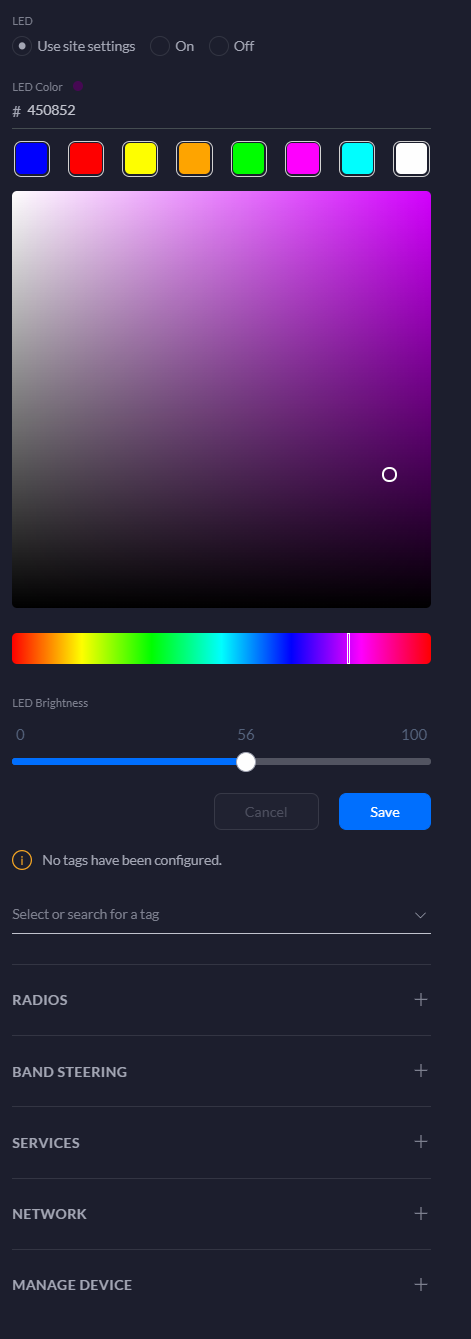
The RGB is kinda growing on me honestly. I can change it a deep purple color, avoid blue because 21 century blue light - bad light, and red means it has error, and white is booting, so i avoid those colors in general.
As for do i recommend it, yes for sure, but its pricey at 179 dollars. I do not know about the lite version, if someone gets it fill me in.
IDK if I haveit configured wrong or the TX power too high ect, any advice?
ch33zw1z
Lifer
Have you had any issues with the wifi dropping out and reconnecting? I found on my two wifi6 mobile devices they have an option for randomized MAC address, changing to the devices MAC helped, but I am still getting drop outs.
IDK if I haveit configured wrong or the TX power too high ect, any advice?
I have the UAP-AC-LR, which started giving me drop outs after a code upgrade a couple months ago.
I wanna say 5.43.36.
Anyways I upgrade to .37 which still did it
I'm at .38 now and it seems better.
Anyways, if you're not at the latest code, go to it. I think this is for yours
DaaQ
Platinum Member
I think it has to do with the wifi 6 and the band steering, we got new phones with AX capability, and I had it set to prefer 5g, and wifes phones is the one with drop outs.I have the UAP-AC-LR, which started giving me drop outs after a code upgrade a couple months ago.
I wanna say 5.43.36.
Anyways I upgrade to .37 which still did it
I'm at .38 now and it seems better.
Anyways, if you're not at the latest code, go to it. I think this is for yours
I found some weird setting in the phones, use randomized MAC address, Changed both ours to device MAC, and that worked for mine.
I just shut off band steering altogether on the UAP-6-LR so far hasn't done a reconnect.
Phones are Motorola Edge Plus BTW.
If I'm not mistaken 2.4 will also run AX or wifi6.
Also doesn't help I had to do a factory reset on edgerouter so I have some tweaking to do still.
ch33zw1z
Lifer
I think it has to do with the wifi 6 and the band steering, we got new phones with AX capability, and I had it set to prefer 5g, and wifes phones is the one with drop outs.
I found some weird setting in the phones, use randomized MAC address, Changed both ours to device MAC, and that worked for mine.
I just shut off band steering altogether on the UAP-6-LR so far hasn't done a reconnect.
Phones are Motorola Edge Plus BTW.
If I'm not mistaken 2.4 will also run AX or wifi6.
Also doesn't help I had to do a factory reset on edgerouter so I have some tweaking to do still.
Cool if it's only one client. My problem was a few phones. Since the firmware messed up mine (seemingly), I took no steps in tweaking configuration and waited for a fix to roll in.
Also, I'm not a big fan of the random Mac thing, although I get the idea behind it.
Uhoh, factory reset of the ER-X is always fun lol. How you had a backup config 😉

sdifox
No Lifer
update....
The WIFI6 LR no longer have RGB... sad...
I got a new unit for the office, and it does not have RGB.
Probably need to buy a cloud key 😎
Probably need to buy a cloud key 😎
lmao... u forget im running a UDM PRO ... soon to be upgraded to the SE version with 2.5gb ports, as i am on the wait list.
But yeah on the website they removed the mention of RGB.... the RGB fad is gone... and i am sad... it was nice to have, as blue light is bad light for night time and bed rooms.
Muadib
Lifer
update....
The WIFI6 LR no longer have RGB... sad...
I got a new unit for the office, and it does not have RGB.
Does it have the classic blue ring? I’d be good with that.
I’ve recently had 4 cameras and the doorbell installed. You would like the cameras as they have a blue light going around the lens when it sees motion.
They aren’t RGB though.
TRENDING THREADS
-
 Discussion Zen 5 Speculation (EPYC Turin and Strix Point/Granite Ridge - Ryzen 9000)
- Started by DisEnchantment
- Replies: 25K
-
Discussion Intel Meteor, Arrow, Lunar & Panther Lakes + WCL Discussion Threads
- Started by Tigerick
- Replies: 25K
-
 Discussion Intel current and future Lakes & Rapids thread
- Started by TheF34RChannel
- Replies: 24K
-

-
