

Two disc drive letters, one disc drive.

Carfax83

Diamond Member
Nov 1, 2010
6,841
1,536
136
OK, this is weird. When I first installed Windows 7 on my computer, I only had two drives total. (C:) for my hardrive, and (D:) for my disc drive.

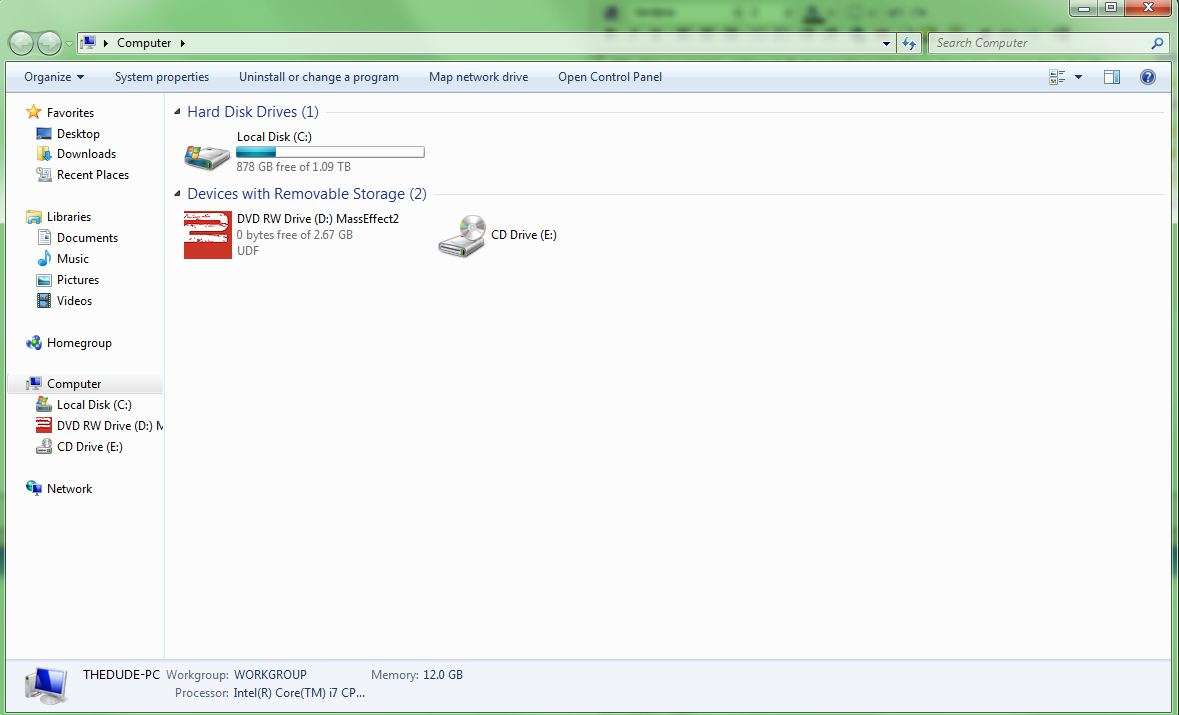
However, somewhere a long the line, I somehow managed to pick up an (E:) drive, although I do not have a second disc drive.. As far as I can tell, the (E:) drive serves no function whatsoever, and is "just there."

Here's a pic:
mycomputers.jpg


So how can I have two disc drives, when I only have one?
 

Carfax83

Diamond Member
Nov 1, 2010
6,841
1,536
136
It's probably one of your devices plugged in that has ability for storage.

That was a good suggestion. When you told me that, I wondered if it might have been my keyboard, since it has USB ports on it. But I disconnected the power source for the keyboard, and the (E:) was still there.
 

JimmiG

Platinum Member
Feb 24, 2005
2,024
112
106
Might be a virtual optical drive from something like Daemon Tools.

Try to look it up under Disk Managemet and Device Manager.
 

Charlie98

Diamond Member
Nov 6, 2011
6,298
64
91
My SanDisk Cruizer USB thumb drives all show up as two drives when running, never figured out why. It's a moot point, it does not affect performance or operation.

On my new build, everything plugged into the USB shows up as a storage drive of some sort, including the mouse and my wireless antenna, even if it's '0GB available.'
 

C1

Platinum Member
Feb 21, 2008
2,419
126
106
What are its properties (right click in "My Computer")? I would inspect the registry to try to find out more what is going on. You might be able to delete it in the registry if it is a phantom.

In general, I dont like things like that (which I dont understand) lurking about. It might create issues at some point in the future in other areas/applications (eg, installing optical writing software that tries to configure to a non-existent piece of hardware).
 

Carfax83

Diamond Member
Nov 1, 2010
6,841
1,536
136
Might be a virtual optical drive from something like Daemon Tools.

Try to look it up under Disk Managemet and Device Manager.

OK, I solved it. It was a virtual optical drive, from a program called Ultra ISO that I only used once long ago. I still had it installed on my computer, and after uninstalling it, the E drive is gone.

Thanks guys. :thumbsup:
