• We’re currently investigating an issue related to the forum theme and styling that is impacting page layout and visual formatting. The problem has been identified, and we are actively working on a resolution. There is no impact to user data or functionality, this is strictly a front-end display issue. We’ll post an update once the fix has been deployed. Thanks for your patience while we get this sorted.

Question The new Ccleaner

MadScientist

Platinum Member
I have been using Ccleaner for years only to clean out junk and temp files. They have a new version out. Has anyone used its Duplicate File cleaner? My PC is running ok.
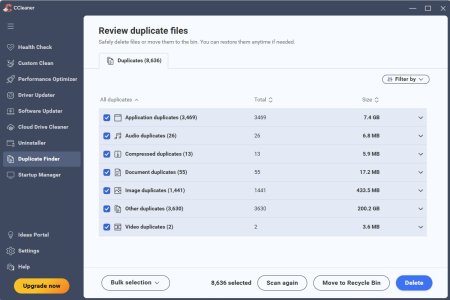
I have a 240gb C drive and a 1TB D drive. Here's what it came up with when it scanned both drives. That's a bunch of files. Is it safe to delete them or not?
Screenshot 2025-11-16 152210.jpg
 
Go to the CCleaner community forums. This new version is destroying people's PC's. Including deleteing or disabling programs.

Not what you are looking for, but here is my advice:

Uninstall 7, then reinstall v6.39, the latest “safe” version, but DO NOT run the program.

First create a new rule in Windows Defender Firewall. Block C: program files\CCleaner\CCleaner.exe. Create a second rule to block C: program files\CClener\CCleaner64.exe. Also delete CCUpdate.exe in the same folder.

Disable CCleaner in Windows task scheduler too. If you just block automatic updates in the program, it will force an update after 1 year.

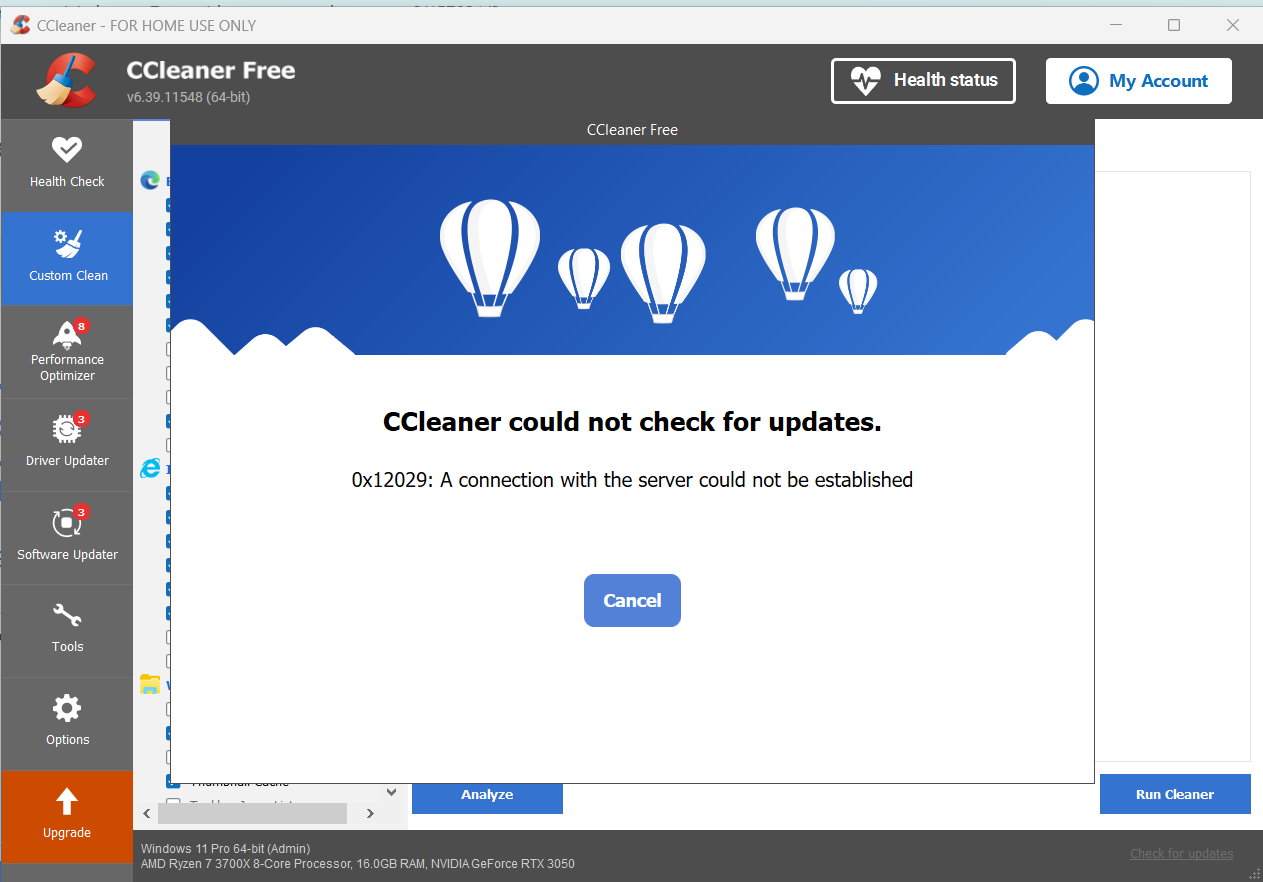
Then you will get this, even if you try to check for updates:

Untitled - 1

Then enjoy the program that you could actually trust at one time...
 
I would just uninstall CCleaner entirely, because it's a waste of space and resources that does more harm than good.
I just use it to clean cookies, because it allows you to keep those you want.
Otherwise, many sites think you are on a different PC, make you jump through 2 party authentication, answer security questions, forums log you out etc. if you clear all cookies manually.
Until now, I've never seen any harm to any PC, in decades of use on 100's of PC's. Do you have an example?
 
I just use it to clean cookies, because it allows you to keep those you want.
Otherwise, many sites think you are on a different PC, make you jump through 2 party authentication, answer security questions, forums log you out etc. if you clear all cookies manually.
That sounds like the result of "cleaning cookies" rather than the solution...?

Until now, I've never seen any harm to any PC, in decades of use on 100's of PC's. Do you have an example?

The most basic example is recommending the clearing of the browser cache. It's there for a reason, and by clearing it in 99% of circumstances one is actually harming browsing performance by forcing the browser to re-load content from the net that it could have loaded from the cache.

The clearing of app-related recent histories is also functionally harmful and from a performance context it's utterly pointless. Admittedly one way that CCleaner distinguishes itself from the million-and-one apps out there that claim to speed up your computer and all they need is your credit card number is that CCleaner (to my knowledge anyway) doesn't explicitly claim that its features improve performance, but it doesn't need to because that's what the layman believes it does by implication.

The fact that there's a "driver updater" when those can very obviously harm the functionality of a PC (and I've seen AVG's driver updater do it twice). But obviously Piriform - the king of "we'll improve the performance of your PC, we just need your credit card number" scam - very carefully vetted every single driver they recommend for every single PC configuration, right?
 
That sounds like the result of "cleaning cookies" rather than the solution...?


The most basic example is recommending the clearing of the browser cache. It's there for a reason, and by clearing it in 99% of circumstances one is actually harming browsing performance by forcing the browser to re-load content from the net that it could have loaded from the cache.

The clearing of app-related recent histories is also functionally harmful and from a performance context it's utterly pointless. Admittedly one way that CCleaner distinguishes itself from the million-and-one apps out there that claim to speed up your computer and all they need is your credit card number is that CCleaner (to my knowledge anyway) doesn't explicitly claim that its features improve performance, but it doesn't need to because that's what the layman believes it does by implication.

The fact that there's a "driver updater" when those can very obviously harm the functionality of a PC (and I've seen AVG's driver updater do it twice). But obviously Piriform - the king of "we'll improve the performance of your PC, we just need your credit card number" scam - very carefully vetted every single driver they recommend for every single PC configuration, right?
I don't use any of the paid features. App and driver updates don't work on the free version.
Clearing cookies is for privacy. And you can easily set it so that is all it cleans.
If your browsing slows down from removing cookies. maybe you need to get off of dial-up.

So no example of real harm?
 
If something makes something slower, it is harming its performance, no?
Since it doesn't do that anyways, no.

I consider harm when a PC stops working correctly, or at all. Not a page taking .00002 seconds longer to load (if that's even true these days).
 
Since it doesn't do that anyways, no.

I consider harm when a PC stops working correctly, or at all. Not a page taking .00002 seconds longer to load (if that's even true these days).

Ok, since you think you can load stuff up from the Internet as fast / faster than from your SSD, I think it's best we stop here. Believe what you want to believe.
 
Last edited:
AFAIK Firefox was the only browser left to offer that kind of granularity on cookie management but they also got rid of that feature some years ago.
Ah. I thought that I remembered it. I just set it to delete everything when I close it. Firefox remembers my passwords anyway so I'd rather have it cleaning everything out and then just logging me in again!
 
Ah. I thought that I remembered it. I just set it to delete everything when I close it. Firefox remembers my passwords anyway so I'd rather have it cleaning everything out and then just logging me in again!
I used to have Firefox clear non-whitelist cookies on exit, but since they got rid of that and since GDPR came and and so the cookie prompts appeared on pretty much every single site, I didn't see the point in trying to ice-skate uphill; I just set the regular sites I use to only store required cookies and nothing else, then I don't see the prompts any more (or rarely at any rate). I occasionally clear out some cookies manually these days in Firefox, mainly with websites that I have no regular interest in and if they store a lot (relatively speaking) of site data locally.
 
Can't you just set your browser to delete cookies and have it white list some sites to keep log ins?
I use an addon for that. Cookieautodelete. I have it set to delete all non whitelisted cookies on tab close. I of course also block all third party cookies, cause **Redact** third party cookies.

Please don't swear in the technical forums - Moderator Ken g6
 
Last edited by a moderator:
If I am understanding correctly, Edge allows what you want.
Set "Allow sites to save and read cookie data" to off, add those sites you want to the "Allowed to save cookies list".
There is also a "Not allowed to save or read cookies" list, as well as a "Clear all cookies when you close Edge" list that allows you to clear only for those on the list, rather than all.
Won't these accomplish what you are trying to do?
 
Go to the CCleaner community forums. This new version is destroying people's PC's. Including deleteing or disabling programs.

Not what you are looking for, but here is my advice:

Uninstall 7, then reinstall v6.39, the latest “safe” version, but DO NOT run the program.

First create a new rule in Windows Defender Firewall. Block C: program files\CCleaner\CCleaner.exe. Create a second rule to block C: program files\CClener\CCleaner64.exe. Also delete CCUpdate.exe in the same folder.

Disable CCleaner in Windows task scheduler too. If you just block automatic updates in the program, it will force an update after 1 year.

Then you will get this, even if you try to check for updates:

Untitled - 1

Then enjoy the program that you could actually trust at one time...
Thanks, used Revo Uninstaller Free to uninstall v7, installed v6.39. Followed yours and these instructions: How to Roll Back from v7 to v6.39
 
I'm using 6.11
I never used that function.
I don't update - both w10 and w11 have been out for years - any "upgrades" are unnecessary ( IMO )

I use "reg clean" and "cookie clean" with a couple of " custom file deletes" from folders that accumulate "logs files".

If you chose to use that function - I would do a system image beforehand
( it's easier than a system restore )
 
I have an old version I still use, 5.something. At this point I don't install new versions of anything that is working as I need it. Too many programs are breaking features or becoming intrusive.
.
 
Back
Top