• We’re currently investigating an issue related to the forum theme and styling that is impacting page layout and visual formatting. The problem has been identified, and we are actively working on a resolution. There is no impact to user data or functionality, this is strictly a front-end display issue. We’ll post an update once the fix has been deployed. Thanks for your patience while we get this sorted.

Question Take the "Is your Windows Install Corrupt?" challenge!

I swear every Windows PC that comes my way, if I run health scan on component store /scanhealth or system file check integrity check /scannow, at least one comes back dirty. Even my own PC recently, after a fresh/clean install of W10 22H2 using latest install bits over the weekend, applying all the outstanding updates available, had both component store and system file corruption (repairable)!

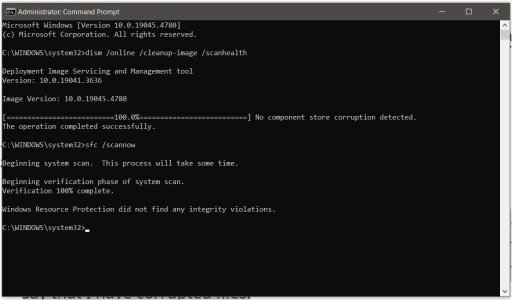
Unless you've run these very recently, try it and see! From the administrator command prompt, run:

dism /online /cleanup-image /scanhealth

If reports component store corruption, repair it by replacing /scanhealth with /restorehealth in that command and run.

Next run:

sfc /scannow

Sfc should invoke repair on its own.
 
I've never found any errors with the first comand.

Untitled - 1.jpg

As far as SFC, they are not usually corrupted files.
sfc /scannow will almost always find "corrupted" files.
But in fact these files are fine. They may be altered a bit or have another date then expected because a process used it and then saved it, or a windows update changed the original file. But they are fine and not corrupt.
 
I normally just cut to the chase and go straight to 'restorehealth', which even on brand new installs it says it's repaired/restored stuff.

sfc normally finds something to complain about too, then after two or three consecutive runs (between reboots) it calms down.

IMO this is very much like the fact that Win10/11 even on a perfectly functioning, brand-new Windows install has tonnes of errors/warnings in the event log, whereas older versions of Windows were clean.
 
IMO this is very much like the fact that Win10/11 even on a perfectly functioning, brand-new Windows install has tonnes of errors/warnings in the event log, whereas older versions of Windows were clean.

DCOM and that blasted recurring problem that Microsoft has with resolving metadata requests from MS servers. i.e. Device Setup Manager. Grrrr.....
 
Last edited:
Sound wasn't working correctly on a Ryzen laptop (used for browsing and school work). Those commands plus a reboot fixed the audio so they are not totally useless.
 
@igor_kavinski Probably the reboot fixed it.

---

I've done two clean installs of Win11 recently on two machines, and as a result of this thread I ran sfc on both: cbs.log claimed that bthmodem.sys was corrupt and was repaired.
 
Back
Top