
• We’re currently investigating an issue related to the forum theme and styling that is impacting page layout and visual formatting. The problem has been identified, and we are actively working on a resolution. There is no impact to user data or functionality, this is strictly a front-end display issue. We’ll post an update once the fix has been deployed. Thanks for your patience while we get this sorted.

Question Stopping 'sign in with your Google account' prompt

Is anyone figured out a way to stop these infernal "Use your Google Account to sign in to..." pop-up that can not only appear like 10 times during a browsing session but has actually blocked or interfered with other content located in the same area?
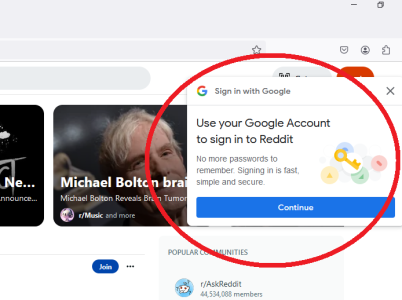
Untitled.png


Where is this functionality happening and no way to disable this? GRRRRR!!!
 
Try this?

~Go to myaccount.google.com, navigate to Security > See All Connections, then click the gear icon. Disable the toggle next to "Google account Sign-in Prompts" to remove sign-in prompts from websites.
 
The youtube comments in the video shared in this recent topic seems to align with what KMFJD suggested.


It is seriously annoying. I've been tempted to create some sort of custom rule in noscript or ublock origin to block the darn thing. When I go to fanatical dot com there are 3 different things that come up on their site blocking viewing of their site and one of them is this google prompt. I can't use the workaround because I don't keep cookies from session to session and the only time I log into google is google docs for a brief to edit my digital movie list.

Possible ublock origin solution. https://stackoverflow.com/questions...gn-in-with-google-iframes-using-ublock-origin

Edit: From the link above this works for me with ublock origin.

||accounts.google.com/gsi/iframe
 
Last edited:
I mean, it's gotta be in the webpage coding because it happens in ALL browsers on a fresh install of Windows with virgin browser profile, nothing imported or synced, and never signed into any Google account or affiliated sites. e.g. You Tube. I wonder how much that costs Google annually to induce the whole dam internet to insert that code into their website
 
Last edited:
Using browser FF, I installed the extension "block site" to get rid of this damm annoying and privacy invader.

Google "do no evil" is using this pop up to harvest your data - thus they are an unwanted pest. Apply Google be gone with "block site" extension.

If one has to use Google, then simply unblock the URL.
 
Back
Top