
• We’re currently investigating an issue related to the forum theme and styling that is impacting page layout and visual formatting. The problem has been identified, and we are actively working on a resolution. There is no impact to user data or functionality, this is strictly a front-end display issue. We’ll post an update once the fix has been deployed. Thanks for your patience while we get this sorted.

Stardock's Start Menu Replacement

N4g4rok

Senior member
Anyone else who missed their start menu going into windows 8 should to check this thing out.

It's called Start8, and it's addressed most of my issues so far with not having a start menu. The UI itself has a couple quirks, like the separators not extending all the way across the menu, but everything else is working so far.
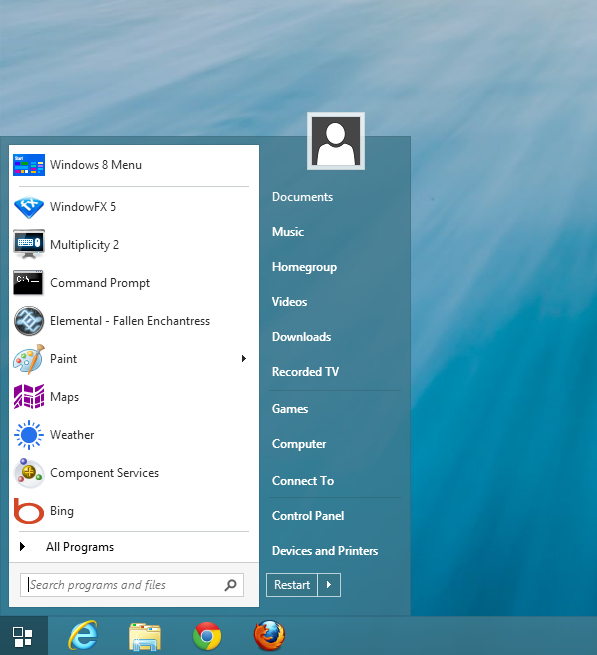
taskbar_1_full.png
 
Not to thread crap but there's another option that's very similar to Start8. StartIsBack which I think started out as a hobby but the dev is going to start charging for it soon. It's free for now with a 30 day trial.

I'm using it now and it's pretty much just like Windows 7 was. I haven't had any problems switching back to the new UI but really, there's no need since it feels like it's more in the background instead of the foreground like before.
 
I've used Classic Shell since day one of W7. I don't know about these other ones, particularly in W8, but CS works with the Windows Classic theme (2000-ish).
 
I've been using Start8 since the first beta came out. Start8 works extremely well as a Start Menu replacement, as it also has quite a few customization options to make Windows 8 a much more capable multi-tasking OS.

Without any of these Start Menu replacements, I would have just stuck with Windows 7, as I currently don't have any touch-capable Windows devices to take advantage of Windows 8's ModernUI.
 
Start 8 is well worth $4.99. It at least makes Win 8 useable. Not one of those big tile boxes is of any use to me - they do not launch any programs of use to me. Start 8 saved the day.
 
I'm really liking Start8 so far. I especially like being able to disable hot corners while at the desktop and get back to Metro by pressing the right Win button.
 
Found this posted somewhere; haven't tried yet.
Let us know if it works:

Make Windows 8 look like Windows 7

Right-click on the lower left corner > Click on the yellow File Explorer icon > View > Options > View TAB > SELECT: Show hidden files, folders, and drives and UNCHECK: Hide extensions for known file types > OK > Now go to Computer > C Drive > Windows > Right click on empty space > New > Text document > name the file NoMetro > Open it in Notepad and enter the following:
[Shell]
Command=2
IconFile=Explorer.exe,3
[Taskbar]
Command=ToggleDesktop

File > Save > Rename the file's extension to .scf so the file is now called NoMetro.scf (even if .scf extension is not visible)

Right-click on the lower left corner > Run > control schedtasks

Task Scheduler Library > Create Task… (upper right) > Name: NoMetro > Triggers TAB > New… > Drop down menu > At log on > OK >

Actions TAB > New... > Browse to C\Windows\NoMetro.scf you created above (even if .scf extension is not visible) > Open > OK > OK

Restart.

Note: some menu items can appear with Windows Key + X.
 
Last edited:
StartIsBack brings all the greatness of the 7 start orb back.

Start8's got that too, if that one doesn't end up working out for you.

I've been playing with it some more, still under 1MB of RAM, but there have been a couple freak-outs that i can't quite explain. I've yet to update windows, so i'll see if ti goes away then.
 
Not to thread crap but there's another option that's very similar to Start8. StartIsBack which I think started out as a hobby but the dev is going to start charging for it soon. It's free for now with a 30 day trial.

I'm using it now and it's pretty much just like Windows 7 was. I haven't had any problems switching back to the new UI but really, there's no need since it feels like it's more in the background instead of the foreground like before.


This program is in Beta 4 now and better than ever. There's an active community for it on MSFN.org, and the developer has been extremely responsive to testers. I would recommend at least trying this program before shelling out for the others. I am most impressed by the devs efforts.
 
I have Start8 and I like it a lot. Especially how instead of the old start orb it is using the new flag design, plus the square edges to better match the rest of the desktop UI.

I had to go into the registry to alter the border padding though, which I think they made even thicker than 7's default was!
 
Back
Top