• We’re currently investigating an issue related to the forum theme and styling that is impacting page layout and visual formatting. The problem has been identified, and we are actively working on a resolution. There is no impact to user data or functionality, this is strictly a front-end display issue. We’ll post an update once the fix has been deployed. Thanks for your patience while we get this sorted.

Stacked Monitors Worth It?

Elfear

Diamond Member
So I decided to splurge a little when Microcenter dropped the price of the Samsung CHG90 since it checks most of the boxes I want (Adaptive Sync, 144Hz, strobing, high contract ratio, ultrawide, etc.). I've been gaming on a 40" 4k Phillips monitor and now I'm debating mounting it above the Samsung so I can have the best of both worlds (144Hz for fast-paced shooters and 4k for more graphically-immersive games). My plan is to lower the Samsung as low as it will go and angle it up slightly and then mount the Phillips on a height-adjustable arm right above the Samsung and angled down slightly.

Anyone used stacked monitors for gaming? My worry is it will irritate my neck and may not be worth the hassle.
 
I have my 2 monitors in a stacked configuration, works great. Im only doing it with a 24" and a 25" though. Not sure id do it with ones of your size.
 
Not for gaming, but I do use a stacked config at work 🙂

upload_2017-4-3_20-27-52-png.21070
 
I have two identical 27" 4K "stacked" on top of each other. They're mounted on Vesa arm. Bottom one is angled ever so slightly up and sits just an inch above the desk surface - just enough to put a webcam below. The top one is angled down. I'll be honest, this works much better for me personally than any other configuration, however even though I typically sit reclined, I still find it a bit inconvenient to look at the top monitor. It just sits a bit too high. I primarily use my bottom monitor, obviously, the top one just holds auxiliary information such as desktop icons, steam friends, msi afterburner, various command prompts, task manager, etc. Occasionally, I'll put a movie on the top monitor while I do something on my main monitor, and it works pretty well for that too. You need to try it yourself, whether it works for you or not will depend on your typical usage patterns, your height, your sitting position, the size of your monitors, etc. Try it and see if it works, if not, you can always go back.
 
That CHG90 is one eye-catching display - very cool. The closest I have come to a stacked display setup is having my laptop in front of my monitor (not blocking it). Other than that, I've also had side-by-side displays and don't really like the experience.

Have you considered having the 4K display on a articulating arm so that you can just pull it down or out in front of the CHG90 when you want to use it? Something like this?

 
Eye level on my setup is about near the top of the viewable area of the lower row of monitors,
which is why the top row is tilted downwards.

Extremely useful for my work (CAD / physical design)
 
I have two identical 27" 4K "stacked" on top of each other. They're mounted on Vesa arm. Bottom one is angled ever so slightly up and sits just an inch above the desk surface - just enough to put a webcam below. The top one is angled down. I'll be honest, this works much better for me personally than any other configuration, however even though I typically sit reclined, I still find it a bit inconvenient to look at the top monitor. It just sits a bit too high. I primarily use my bottom monitor, obviously, the top one just holds auxiliary information such as desktop icons, steam friends, msi afterburner, various command prompts, task manager, etc. Occasionally, I'll put a movie on the top monitor while I do something on my main monitor, and it works pretty well for that too. You need to try it yourself, whether it works for you or not will depend on your typical usage patterns, your height, your sitting position, the size of your monitors, etc. Try it and see if it works, if not, you can always go back.

Finding the top monitor to be a bit inconvenient is what I'm worried about. No sense buying an articulating monitor stand and mounting the 4k Phillips on it if I never end up using it for gaming.

That CHG90 is one eye-catching display - very cool. The closest I have come to a stacked display setup is having my laptop in front of my monitor (not blocking it). Other than that, I've also had side-by-side displays and don't really like the experience.

Have you considered having the 4K display on a articulating arm so that you can just pull it down or out in front of the CHG90 when you want to use it? Something like this?

Hmm. Hadn't thought of that option. Maybe something like this mounted to the side of the Samsung monitor that would allow me to pull the Phillips over in from of the other monitor to game on. I'll have to find a stand with enough range of motion to try that.
 
My eye level is pretty much the top of the bezel on the lower display and lower bezel of top display. So i have my lower angled slightly up and top angled slightly down.
 
Finding the top monitor to be a bit inconvenient is what I'm worried about. No sense buying an articulating monitor stand and mounting the 4k Phillips on it if I never end up using it for gaming.
Yeah, I mostly use it for auxiliary info, anything that doesn't fit on the main bottom monitor and that I still need to use from time to time. I don't think I would want to game regularly on the top monitor. And my monitors are 27 inchers. It's going to be even more difficult with a 40" monitor like yours. Get a head support for your chair if you can - that's probably be the most ergonomic position that might work - if you recline and rest your head on the headrest while you game on the top monitor.
 
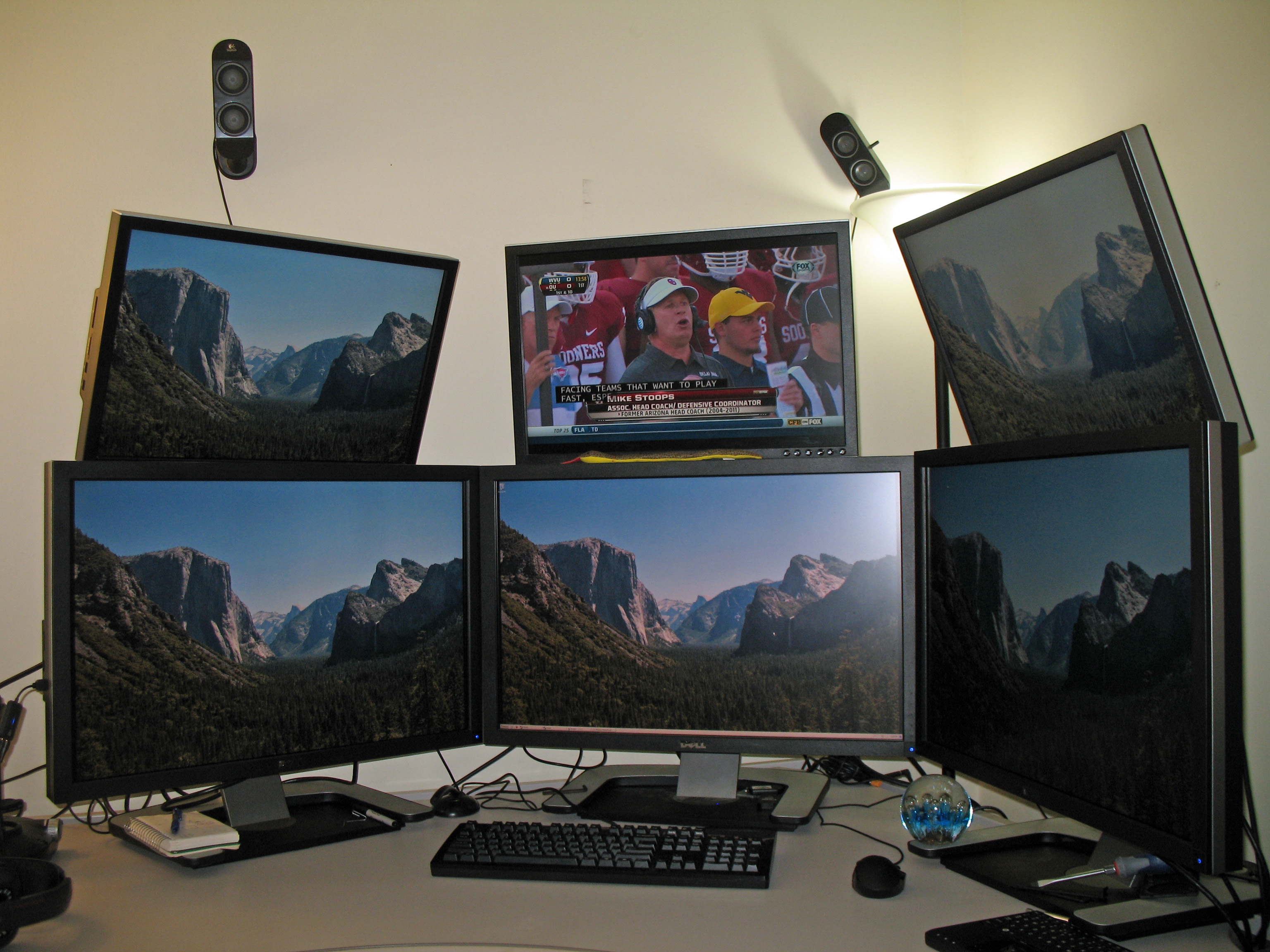
I've done it. I didn't really enjoy it except in Eve. I just really hate the bezels getting in the way. For doing productivity and such, it's great. Here's the setup I was using:

2x3monitors.jpg
 
I've done it. I didn't really enjoy it except in Eve. I just really hate the bezels getting in the way. For doing productivity and such, it's great. Here's the setup I was using:
Curious how did you mount those? Obviously with VESA somehow, but what mounts did you use for top monitors?
 
Back
Top