• We’re currently investigating an issue related to the forum theme and styling that is impacting page layout and visual formatting. The problem has been identified, and we are actively working on a resolution. There is no impact to user data or functionality, this is strictly a front-end display issue. We’ll post an update once the fix has been deployed. Thanks for your patience while we get this sorted.

Question Someone is upgrading their storage servers.

Page 4 - Seeking answers? Join the AnandTech community: where nearly half-a-million members share solutions and discuss the latest tech.
Not from GoHardDrive, but I bought three 3TB HGST Ultrastar 7K4000 drives back in 2020 from Amazon. They were listed under Amazon Renewed brand and came with a 5yr warrenty. The power on count was 1 for each drive and the run time was 15, 23, and 22 hours. All three are still running as steam drives in my kids computers. So, I would say for not mission critical data used enterpise drives are great.
No seller is going to take the time and effort(ie money) to wipe the SMART data and then sneakily run the drive for random small number of hours to hide their deception. You got lucky and got new drives.
 
I checked two of the second batch of drives and they do have more hours and more data read/write on them which backs up my assumption that the lower use drives are shipped first. That would make sense. But the drives still only have about half of their capacity written/read, so not much used.
 
HC520 12TB is down to $75 each:

You're evil.
461XQgm.gif
 
Yes, so far no SMART warning, or any other issues. Working well in my server's SAS cage. And if there are issues later, GoHDD offers 5 year warranty of their own.
 
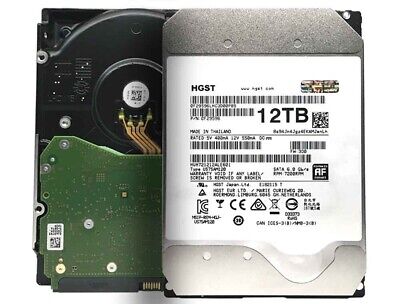
Those of you that bought some of these 12TB HGST drives what kind of temps do you see? The 2 drives I bought are about 5-9C higher than the rest of the drives in my setup (WD Red 3&4TB plus 1-3TB Toshiba). Right now one of the drives is being cleared to get added to the array and it's at 49C. Obviously it will be higher than the other drives as they have no activity, but even the parity drive right now is 46C when the other drives are 37-40C.

BTW both drives I bought had a little over 4 years on them, with about 40 power cycles each.
 
Expected coz they must have at least 7 platters. And the Helium inside is doing its best to reduce the fluid friction. Maybe these could be set to a lower RPM with some utility if that will make you feel better? I remember my Seagate drives (10GB and later 30GB) would easily hit 60C and would barely remain below 55C even with a huge fan blowing over them in the summer (ambient of +40C).
 
Expected coz they must have at least 7 platters. And the Helium inside is doing its best to reduce the fluid friction. Maybe these could be set to a lower RPM with some utility if that will make you feel better? I remember my Seagate drives (10GB and later 30GB) would easily hit 60C and would barely remain below 55C even with a huge fan blowing over them in the summer (ambient of +40C).
Anyone, is there such a utility available?
 
Anyone, is there such a utility available?
As far as I know, it can't be done without modifying the drive or the firmware (or both). And, if the drive is designed to work at 7200RPM (such as these enterprise drives), it would likely be a lot more complicated than just changing the max rotational speed.

You are better off just using the drives as they are designed and having a good and regular data backup process in place.
 
Why the concern for the higher temp? It's in spec, is it not? Those drives will last 10+ years. If they fail, it won't be due to the temps. They are built like tanks. Always back up your data and sleep good at night. I had an HGST enterprise drive start to show problems in 2021 when I was building a new main rig. It still hadn't failed. I had three of those drives in my previous main rig. When I researched how long I had been using them, I figured out that they were over 10 years old running 24/7. That's good enough for me and bought three new replacement drives. And all my drives in my server are HGST/WD enterprise drives (8TB-10TB He). All EIGHT of them. Running 24/7 since 2021. All my data is backed up.
 
Anyone, is there such a utility available?
I looked and seems there is: https://linuxconfig.org/how-to-reduce-hard-drive-s-acoustic-noise-level

Code:
# hdparm -M 128 /dev/sdX

/dev/sda:
 setting acoustic management to 128
 acoustic      = 128 (128=quiet ... 254=fast)

Lowest noise level would hopefully keep the drives cooler but also make them slower at seeking.

Using hdparm for tuning: https://www.linux-magazine.com/Online/Features/Tune-Your-Hard-Disk-with-hdparm

Win64 version: http://disablehddapm.blogspot.com/p/blog-page.html

Will need to run at every startup with admin permissions.

If you don't trust the above URL, here's the Win32 version: https://github.com/srctfux/hdparm/releases/tag/6.9
 
Why the concern for the higher temp? It's in spec, is it not? Those drives will last 10+ years. If they fail, it won't be due to the temps. They are built like tanks. Always back up your data and sleep good at night. I had an HGST enterprise drive start to show problems in 2021 when I was building a new main rig. It still hadn't failed. I had three of those drives in my previous main rig. When I researched how long I had been using them, I figured out that they were over 10 years old running 24/7. That's good enough for me and bought three new replacement drives. And all my drives in my server are HGST/WD enterprise drives (8TB-10TB He). All EIGHT of them. Running 24/7 since 2021. All my data is backed up.
As I stated in my post the drives are roughly 10C higher than my other drives. It's not that I'm concerned, I just asked if others saw similar differences or temps with their drives.
 
Back
Top