
loolookachoo
Junior Member
I'm not the most savvy when it comes to networking so I apologize if I'm unclear at any point.
My current network setup shares an internet connection between my home and office and I seem to have issues only when trying to upload or attach files to the internet from the Home Network.
Some information that I hope is relevant:
- Uploading to the internet (ex. Gmail attachments) from any device connected to the Office Network works perfectly fine.
- I can upload and download large files from my PC connected to the Home Network to the Network HDD just fine. Network HDD is just a normal external SSD plugged in and configured on the Tenda Router located in the office.
- I can upload smaller files (ie. less than 1Mb) to the internet from my devices connected to the Home Network, but sometimes I need to retry a few times before it works. Files any larger than that always fail to upload.
- I don't notice any issues doing other activities from my Home Network (ex. downloading, streaming, online gaming, checking ip cameras).
For reference, here's a rough diagram of the current setup:
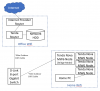
I honestly do not know where to begin troubleshooting this issue and any help would be greatly appreciated. Thanks in advance!
My current network setup shares an internet connection between my home and office and I seem to have issues only when trying to upload or attach files to the internet from the Home Network.
Some information that I hope is relevant:
- Uploading to the internet (ex. Gmail attachments) from any device connected to the Office Network works perfectly fine.
- I can upload and download large files from my PC connected to the Home Network to the Network HDD just fine. Network HDD is just a normal external SSD plugged in and configured on the Tenda Router located in the office.
- I can upload smaller files (ie. less than 1Mb) to the internet from my devices connected to the Home Network, but sometimes I need to retry a few times before it works. Files any larger than that always fail to upload.
- I don't notice any issues doing other activities from my Home Network (ex. downloading, streaming, online gaming, checking ip cameras).
For reference, here's a rough diagram of the current setup:
I honestly do not know where to begin troubleshooting this issue and any help would be greatly appreciated. Thanks in advance!


