


- Aug 26, 2014
- 1,792
- 508
- 136
I'm running my old Q9450 at a decent overclock (3.2GHz, up from 2.66). It's supremely stable, and has been so for quite a while - I actually run stably at higher frequencies now than I could a couple of years ago, without changing anything with regards to cooling or other factors. The CPU is OCd through the motherboard's "CPU Level up" function, which as far as I can tell has changed the FSB speed and little else (CPU-Z reports core voltage at 1.238V, and reading around I've found that stock voltage should be 1.3V).
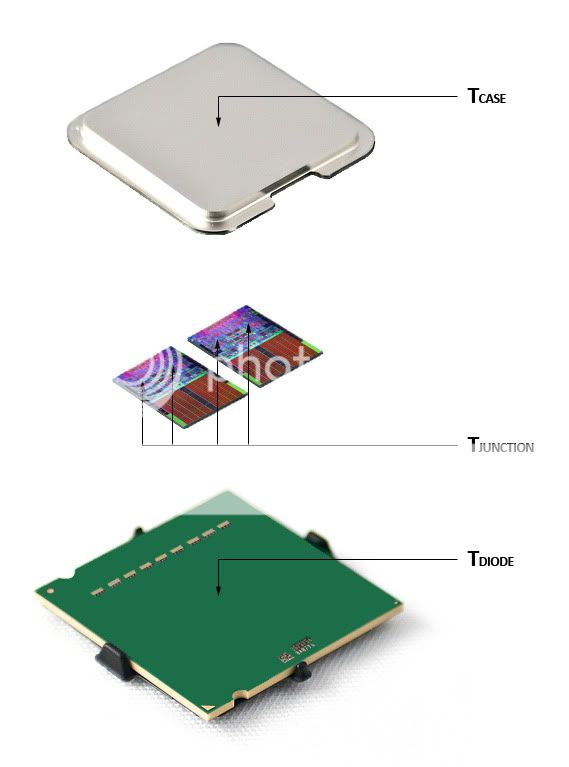
The thing is, temperatures seem a bit high. I use Pulseway to remotely monitor temperatures and loads on this computer as well as my file server/HTPC, and it reports cores 0 and 1 at ~58 degrees C at idle, cores 2 and 3 at ~65 degrees. Running any kind of stress test, this doesn't increase more than a few degrees - cores 0 and 1 might reach 65, while 3 and 4 stop at 68-69. I haven't really thought about this before now, as those temperatures don't strike me as very high, at least not under load (even if the uneven temps lead me to think the TIM might be unevenly distributed). So I got a bit of a shock when I looked at the ark.intel.com listing for the CPU and saw its tCASE listed as just 71.4 degrees. Now I know that core temperature and tCASE are not the same, but that's still a bit frightening. Checking with Asus's "AI Suite" (motherboard software), idle temps are around 35-40 degrees, which matches reviews from when the CPU was released. So, am I simply seeing a large but normal gap between core and heatspreader temperature, or might there be something wrong here?
The thing is, temperatures seem a bit high. I use Pulseway to remotely monitor temperatures and loads on this computer as well as my file server/HTPC, and it reports cores 0 and 1 at ~58 degrees C at idle, cores 2 and 3 at ~65 degrees. Running any kind of stress test, this doesn't increase more than a few degrees - cores 0 and 1 might reach 65, while 3 and 4 stop at 68-69. I haven't really thought about this before now, as those temperatures don't strike me as very high, at least not under load (even if the uneven temps lead me to think the TIM might be unevenly distributed). So I got a bit of a shock when I looked at the ark.intel.com listing for the CPU and saw its tCASE listed as just 71.4 degrees. Now I know that core temperature and tCASE are not the same, but that's still a bit frightening. Checking with Asus's "AI Suite" (motherboard software), idle temps are around 35-40 degrees, which matches reviews from when the CPU was released. So, am I simply seeing a large but normal gap between core and heatspreader temperature, or might there be something wrong here?
Last edited:





 Facebook
 Twitter