• We’re currently investigating an issue related to the forum theme and styling that is impacting page layout and visual formatting. The problem has been identified, and we are actively working on a resolution. There is no impact to user data or functionality, this is strictly a front-end display issue. We’ll post an update once the fix has been deployed. Thanks for your patience while we get this sorted.

Single switch for multiple cables (floppy).

mauro

Junior Member
I'm into retro computing and looking for a way to switch the active floppy with a simple on-off switch in the front of the case. I know very little about electronics and need help to find out what is the name of this kind of switch. Look:

FYehmch.png


The floppy ribbon cable has 34 cables, I can handle that (just couldn't draw it all). But I need to know how to switch them all on and off with just the flip of a single switch (all at the same time).

By way, the computer has 3 drives:

_5 1/4
_3 1/2
_Virtual floppy drive

The motherboard can support up to 2 floppy drives.

I want to select either the 3 1/2 drive or the Virtual floppy drive (GOTEK) with the switch.

I'd appreciate any input!
 
Otherwise you will need a double throw 34 pole switch which does not seem like it would be an easy find, but who knows.
 
Otherwise you will need a double throw 34 pole switch which does not seem like it would be an easy find, but who knows.
Yeah, I'd be surprised if anything like that existed in retail at all. Not to mention I imagine it would be freakin' huge. I suppose you could program a microcontroller to do the job, but finding one with 3x34 pins (plus whatever is needed for power and control) sounds like wishful thinking. You could stick 34 double throw switches into a couple of 5.25" bays and rig up something to flip them all at once?

Tl;dr: this sounds impossible. Just switching the power seems like the best solution, if that works.
 
Thank you so much for the answers. I agree, I was thinking in disabling the power to a drive altogether. In this case, a 3 pole switch would be appropriate (ground, +5v, +12v). I haven't tried it yet, so I don't know if it will work or not. It probably will work.

The important pins/cables of the ribbon-cable are probably 10. Do you agree on this?

PIN 10 Motor Enable A
PIN 14 Drive Select A
PIN 18 Direction (Stepper Motor)
PIN 20 Step Pulse
PIN 22 Write Data
PIN 24 Write Enable
PIN 26 Track 0
PIN 28 Write Protect
PIN 30 Read Data
PIN 32 Select Head 1

The rest seem to be Ground, not used, or related to the B drive.

I need to know this because if switching power on-off works, I still need to make this 3 floppy ribbon cable, and the less cables to solder, the better.
 
Find an old Centronics mechanical switch-box, build some adapter cables, profit?
You are right on the money. I'll see what I can do to find something alike.

Still, I need to know which pins/cables from the 34 would be redundant, and which would be essential/necessary to switch between two "A" floppy drives.
 
Larry's printer switch gave me another idea. Seems like "Zip" drives would connect via the parallel port back in the day. Maybe you can connect one of your drives that way? Or maybe get a USB floppy and a card that lets your old computer have USB?
 
I can't imagine going back to a 486. Computers have improved so much in nearly every way (except software bloat) since then.

Is that thing so old you need to manually select your HD sectors/cyl/ect.?

Pick your own interrupts ect. (like SET BLASTER=A220 I5 D1 H5 P330 E620 T6)?

BTW If a system has at least 512MB of RAM (maybe 256) I find Puppy Linux to be a huge speed boost since it will run entirely in RAM which is awesome.
 
Last edited:
I can't imagine going back to a 486. Computers have improved some much in nearly every way (except software bloat) since then.

Is that thing so old you need to manually select your HD sectors/cyl/ect.?

Pick your own interrupts ect. (like SET BLASTER=A220 I5 D1 H5 P330 E620 T6)?

BTW If a system has at least 512MB of RAM (maybe 256) I find Puppy Linux to be a huge speed boost since it will run entirely in RAM which is awesome.
I would assume the whole point of this is a combination of the fun of making an old computer work, and using old software/playing old games on their native platforms without troublesome emulation.
 
I can't imagine going back to a 486. Computers have improved some much in nearly every way (except software bloat) since then.

Is that thing so old you need to manually select your HD sectors/cyl/ect.?

Pick your own interrupts ect. (like SET BLASTER=A220 I5 D1 H5 P330 E620 T6)?

BTW If a system has at least 512MB of RAM (maybe 256) I find Puppy Linux to be a huge speed boost since it will run entirely in RAM which is awesome.

I already have a main computer with lots of ram and latest Debian GNU/Linux, etc. The point of this, as Valantar stated, is to play games, explore the system, delve into the depths of MS-DOS. It's far more fun than using DOSBox or any other software alike. This is the real deal, the hardware.
 
I am confused. why do you need a real floppy cable for a virtual floppy?
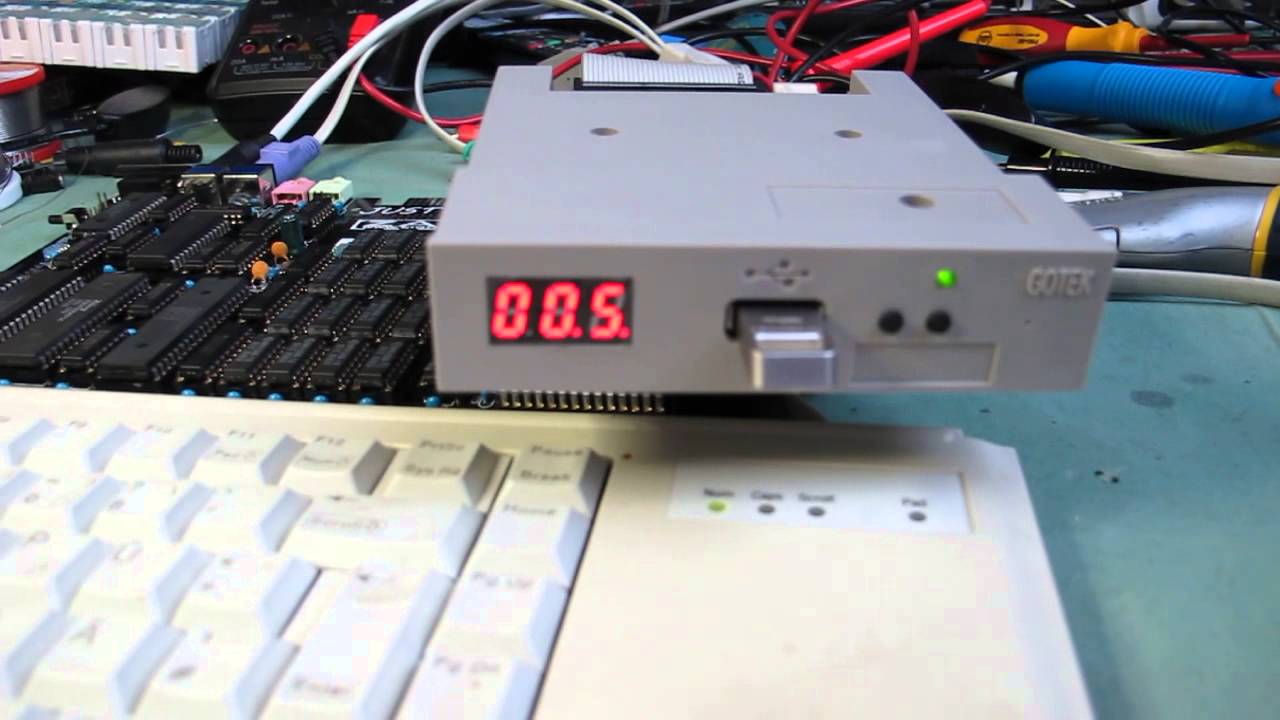
For convenience I also like to use a virtual (hardware) floppy drive. You can use these things directly with an old PC motherboard, musical instrument, sequencer, etc. They emulate a physical floppy drive. You write the floppy images to a flash drive with your main contemporary PC, and then you plug it in the floppy emulator. It looks like this:
maxresdefault.jpg
 
Can anyone confirm if the above mentioned pins are all that are needed for a drive to work? I'll get cracking this weekend probably.
 
One would suppose that a single ground wire of sufficient gauge would so the trick, but that could depend on the internals of the device to be connected - does it have a single ground plane that everything connects to internally, or would you need to connect the ground wire to several pins? I suppose the easiest way to find this out is to use a sacrificial floppy cable and gradually cut ground wires and see if the device still works.
 
For convenience I also like to use a virtual (hardware) floppy drive. You can use these things directly with an old PC motherboard, musical instrument, sequencer, etc. They emulate a physical floppy drive. You write the floppy images to a flash drive with your main contemporary PC, and then you plug it in the floppy emulator. It looks like this:
maxresdefault.jpg

Ah, a hardware floppy emulator. Interesting.
 
One would suppose that a single ground wire of sufficient gauge would so the trick, but that could depend on the internals of the device to be connected - does it have a single ground plane that everything connects to internally, or would you need to connect the ground wire to several pins? I suppose the easiest way to find this out is to use a sacrificial floppy cable and gradually cut ground wires and see if the device still works.
What a drag...
 
All sorts of companies used to make switch boxes that could switch DB25 signals. I recently threw one away. But to my knowledge nobody made 40 pin switchers. With how cheap old surplus machines are today, you would be better off simply obtaining multiple PCs and connecting the PCs to a network and accessing all your drives using remote desktop.
 
All sorts of companies used to make switch boxes that could switch DB25 signals. I recently threw one away. But to my knowledge nobody made 40 pin switchers. With how cheap old surplus machines are today, you would be better off simply obtaining multiple PCs and connecting the PCs to a network and accessing all your drives using remote desktop.
Remote desktop? On a 486? In DOS?
 
We recently installed MS-DOS on an old P4 system and it was so fun... Well not really. DOS is evidently not compatible with modern partitioning software so we were stuck using fdisk. The resulting partition was only 2G of FAT16 space which is as large as it could evidently handle. DOS is evidently not NTFS aware so the NTFS hard drives were invisible. It was a cool experiment if for no other reason just to remember how much of a pain all that DOS stuff was. My 25 year old coworker was a little amazed at how the same hardware could appear so drastically different depending on which software/OS the machine is running. We really like Puppy linux because it is so feature rich and yet so small at the same time. The small size is important because it runs completely in RAM which makes it fast as lightning. One good thing about DOS is that it is very small so it boots instantly even without a fancy SSD.
 
Well it doesnt need to be a 486. That's the point. You can get all manner of used PCs for practically free. There is no reason to use either a 486 or DOS.
I do believe you're entirely missing the point of what the OP is trying to do here.
 
Just a heads up, but I hope you don't plan to switch the drives while the computer is on. Floppy drives are not hot swappable.
 
Just a heads up, but I hope you don't plan to switch the drives while the computer is on. Floppy drives are not hot swappable.

Correct! They could be turned OFF but not ON. I have a floppy in my system for use in reading old disks, but that is a rare event. What I do in the meantime is DISABLE the flppy drive and also the floppy CONTROLLER in Device Manager. That way they don't use power or slow the system down. If necessary, it is easy to ENABLE.
 
Back
Top