• We’re currently investigating an issue related to the forum theme and styling that is impacting page layout and visual formatting. The problem has been identified, and we are actively working on a resolution. There is no impact to user data or functionality, this is strictly a front-end display issue. We’ll post an update once the fix has been deployed. Thanks for your patience while we get this sorted.

Question Silly adapter question.

So I just picked up a new graphics card and I want to hook up my older Viewsonic card to continue to use it as the second monitor. The screen only has DVI and vga ports, and of course newer cards do not.

Doing some research I think the only thing I need is a DVI-DP cable? I think that's what I'm finding but was just making sure there wasn't something I'm missing here. I'm assuming it'll be best to save the card's hdmi port for something better.
 
So I just picked up a new graphics card and I want to hook up my older Viewsonic card to continue to use it as the second monitor. The screen only has DVI and vga ports, and of course newer cards do not.

Doing some research I think the only thing I need is a DVI-DP cable? I think that's what I'm finding but was just making sure there wasn't something I'm missing here. I'm assuming it'll be best to save the card's hdmi port for something better.

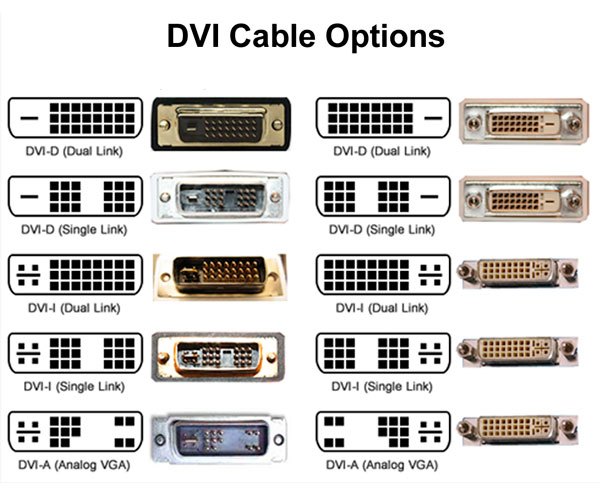
Just went through this for my grandson. Wanted to use an old Dell CRT monitor with a newer PC. MONITOR JUST HAS THE USUAL VGA cord, video card has HDMI and DVI inputs. "No problem," sez I..."I have DVI adapters."
That's when I found out there are several different DVI ports...and the adapters I had were wrong.

DVI-CONNECTOR-TYPE.jpg


I bought him a new monitor at Staples.
 
I bought him a new monitor at Staples.
That's the easy way out.

I've seen some crazy attempts to make a chain of 5-6 different adapters to make something work before. Today though the new monitor is probably cheaper than piecing things together legacy tech. The easiest would have been a DMI <> HDMI converter though or BMI <> VGA / DP or something more common with the cables you have on hand.

 
That's when I found out there are several different DVI ports...and the adapters I had were wrong.
A dual-link DVI-I cable (or adapter) will fit any DVI port. It is essentially downward compatible. I purchased a DP to DVI cable and it worked fine with an old monitor.
 
A dual-link DVI-I cable (or adapter) will fit any DVI port. It is essentially downward compatible. I purchased a DP to DVI cable and it worked fine with an old monitor.

Dual link DVI-D should fit...DVI-I has 4 pins surrounding the larger flat pin.
(see the pic above)
 
Back
Top