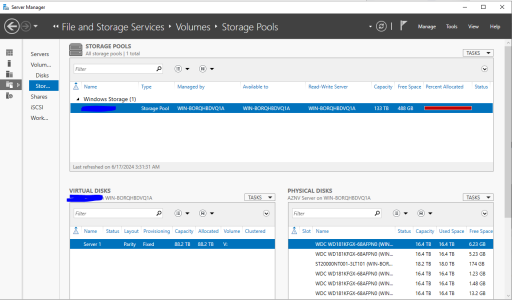
Hey guys, so I added some more storage to my NAS as I'm running out of space. This is a fixed party virtual disk in a 133TB pool (images below).
I did all the necessary steps to increase the size including optimizing the pool to spread the available disk space. Everything seems to be fine.
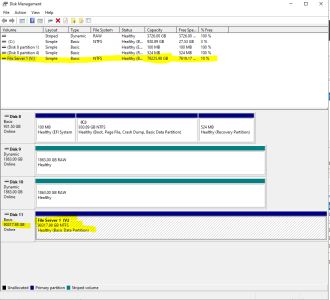
The last part I had to do was to go to Disk Management to extend the volume size to the max. When I did that, I get a "Incorrect parameter" error. However, Disk Management is showing the new max capacity in the blue bar at the bottom, however it's not showing the correct size in the details pane on top, nor anywhere else even in Explorer or disk info. The total capacity was previously 77.3TB, and the new capacity should be 88.2TB.
I've done this a few times in the past, and never had a problem, until now.
I'm totally stumped! Any ideas, guys? The drive in question is drive "V".
I did all the necessary steps to increase the size including optimizing the pool to spread the available disk space. Everything seems to be fine.
The last part I had to do was to go to Disk Management to extend the volume size to the max. When I did that, I get a "Incorrect parameter" error. However, Disk Management is showing the new max capacity in the blue bar at the bottom, however it's not showing the correct size in the details pane on top, nor anywhere else even in Explorer or disk info. The total capacity was previously 77.3TB, and the new capacity should be 88.2TB.
I've done this a few times in the past, and never had a problem, until now.
I'm totally stumped! Any ideas, guys? The drive in question is drive "V".