Hey guys, someone brought a hard drive to me. Her house got robbed a few days ago. She has an outdoor security camera system run from a regular desktop, 4 cameras attached to it. When she tried to view the footage from the night before the Pc started powering off everytime she moved the mouse and would restart on it's own.
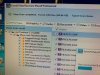
So she doesn't know if the pc was working at all before then or when it started malfunctioning. She took the HDD out and brought it to me to attempt data recovery which I am now doing. I am seeing a "Lost Partition" showing in EASEUS data recovery software which is not showing like a regular C drive setup in a Windows OS as can be seen in the attached pic.
So what I would like to know please:
1] Are those file types showing the video footage of the camera? If yes, which file type exactly?
2] Assuming those are the correct files, how would she be able to view those files?
So she doesn't know if the pc was working at all before then or when it started malfunctioning. She took the HDD out and brought it to me to attempt data recovery which I am now doing. I am seeing a "Lost Partition" showing in EASEUS data recovery software which is not showing like a regular C drive setup in a Windows OS as can be seen in the attached pic.
So what I would like to know please:
1] Are those file types showing the video footage of the camera? If yes, which file type exactly?
2] Assuming those are the correct files, how would she be able to view those files?