• We’re currently investigating an issue related to the forum theme and styling that is impacting page layout and visual formatting. The problem has been identified, and we are actively working on a resolution. There is no impact to user data or functionality, this is strictly a front-end display issue. We’ll post an update once the fix has been deployed. Thanks for your patience while we get this sorted.

Question Samsung 860 EVO 38c (100F) Temperature okay?

EpicSurvivor

Golden Member
So I just noticed my Samsung 860 EVO 1TB is running at 38c or 100F I was wondering if this was normal and if other users with similar drive can share their temps. That's the main OS drive, the secondary storage 860 EVO 1TB drive is running at 33c or 91F which is 5 degrees cooler.
EDIT: C is OS Drive F is the Storage drive.

Appreciate any input I can get.
Thanks

forum.JPG
 
Get the temperatures from Samsung Magician app to make sure they are being read correctly.

My 850 EVO in my laptop is usually between 28C - 34C. Slightly higher temps on the newer 860 EVO wouldn't be surprising (or something to worry about).
 
Do you have one of them installed behind the motherboard (like is common with many cases anymore)?

If so, that would explain the temperature difference between the two as not much airflow gets back in that area.

55.jpg
 
Do you have one of them installed behind the motherboard (like is common with many cases anymore)?

If so, that would explain the temperature difference between the two as not much airflow gets back in that area.
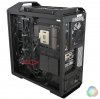
No but very interesting you mention that I had no idea you could mount 2 SSD's on the back like that lol really cool! This case has the option to add HDD bay at the front bottom of the case as a matter of fact one of my front 140mm Intake fans is blowing air directly at it as you can kinda see on the picture.

I honestly have 1 explanation why one Drive might be warmer than the other. I think the drive is warmer because its the main OS/Boot drive and is constantly under use. That one was bought new November 2019 the other one that is cooler I just got today in the mail from Newegg. Just an idea. Oh and both SSD's are practically next to each other maybe you can see it on the picture.

126316835_10159064158566979_7911638775812347353_o (1).jpg
 
No but very interesting you mention that I had no idea you could mount 2 SSD's on the back like that lol really cool! This case has the option to add HDD bay at the front bottom of the case as a matter of fact one of my front 140mm Intake fans is blowing air directly at it as you can kinda see on the picture.

I honestly have 1 explanation why one Drive might be warmer than the other. I think the drive is warmer because its the main OS/Boot drive and is constantly under use. That one was bought new November 2019 the other one that is cooler I just got today in the mail from Newegg. Just an idea. Oh and both SSD's are practically next to each other maybe you can see it on the picture.

View attachment 34378
Yeah, if your OS drive is writing/reading a lot of data, it will run warmer.

Not to mention, the drives on top of each other like that, would likely cause one of them to be a little warmer since heat rises.

But your temps aren't anywhere high enough to worry about it.
 
Yeah, if your OS drive is writing/reading a lot of data, it will run warmer.

Not to mention, the drives on top of each other like that, would likely cause one of them to be a little warmer since heat rises.

But your temps aren't anywhere high enough to worry about it.
Okay fair enough appreciate the help. Gonna rest easy for now.
 
Back
Top