• We’re currently investigating an issue related to the forum theme and styling that is impacting page layout and visual formatting. The problem has been identified, and we are actively working on a resolution. There is no impact to user data or functionality, this is strictly a front-end display issue. We’ll post an update once the fix has been deployed. Thanks for your patience while we get this sorted.

Resume in Word or PDF format?

Page 2 - Seeking answers? Join the AnandTech community: where nearly half-a-million members share solutions and discuss the latest tech.

When sending your resume, what format do you send it in?

  • Word

  • Pdf


Results are only viewable after voting.
I keep both but I greatly prefer PDF. With PDF I'm assured as to how it will look and I don't have to worry about version problems or compatibility (as ridiculous as that may sound I have had some weird things happen when going between OpenOffice and Word via doc).
 
depends on your definition of standard.

Interfacing with it programatically is ridiculously over-complicated compared to most standard formats.

Oh. I just build my resume in Pages or Word then hit Print then click pdf.
I prefer PDF because I know when the receiving end opens the file it will look just like it does on my screen.
Probably something having to do with .PDF being an Open standard vs .Doc/x not.
 
Oh. I just build my resume in Pages or Word then hit Print then click pdf.
I prefer PDF because I know when the receiving end opens the file it will look just like it does on my screen.
Probably something having to do with .PDF being an Open standard vs .Doc/x not.

the poster above was referring to having the resumes indexed to be searchable. Its not as bad nowadays as Adobe has gotten a little better publishing the specs of PDF, but it used to be next to impossible to index them. If you are a staffing agency, your option was to spend a month developing some insane peice of code that could extract text from PDF's and would likely break on the next release, or just have people send it in Word, which was easily indexable, and usally backwards compatible. (PDF isn't open, its proprietary Adobe)
 
When you say send are you talking about e-mail??

In that case I just cut and paste it into the email.

Also, if your resume is so complicated that you need to send it in PDF form to keep the formating then you should change it.
Ideally you should be able to cut and paste you resume from PDF into text and print it out and still have it looking good. If it doesn't then you should fix it.

I've been to interviews and seen my nice clean one page resume printed out over 3 pages with messed up formating because their software was a different version than mine. Better off to not take any risks and keep it simple and clean.
 
Unless they specify which format they prefer, I usually send everything in both .doc and .pdf...and I generally send the .doc files in Office 2003 format since a lot of companies still haven't moved to Office 2007 or later.
 
Unless they specify which format they prefer, I usually send everything in both .doc and .pdf...and I generally send the .doc files in Office 2003 format since a lot of companies still haven't moved to Office 2007 or later.

Excellent point.

MotionMan
 
Both, unless they specifically ask for only one format.

KT

This.

PLUS... make sure you have an appropriately formatted "PLAIN TEXT" version as well. Some recruiting/company websites only allow you to paste your plain text version into a web form field instead of uploading it.
 
PDF is more universal, I'd stick with that. With .doc there's always the slight problem that they may be using another version of MS Office, which could cause formatting errors among other things. Slim odds, but no such issues with the pdf.
 
This.

PLUS... make sure you have an appropriately formatted "PLAIN TEXT" version as well. Some recruiting/company websites only allow you to paste your plain text version into a web form field instead of uploading it.

Yep, this as well. Had to do this for the first time a couple of months ago.

KT
 
I have both, but many use scripts to pull info from so they want the word doc.

Is there any way to use something like 0pt font or a non-displaying comment in the .doc file that contains all sorts of awesome things just to mess with their system?
 
Is there any way to use something like 0pt font or a non-displaying comment in the .doc file that contains all sorts of awesome things just to mess with their system?

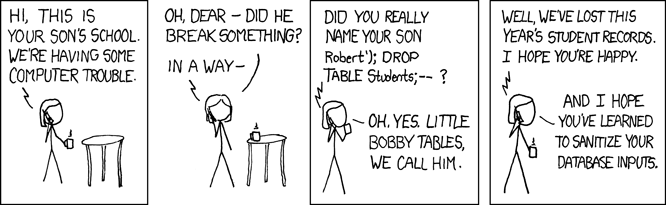
List your name as Bobby'); DROP TABLE Resumes;


exploits_of_a_mom.png
 
Is there any way to use something like 0pt font or a non-displaying comment in the .doc file that contains all sorts of awesome things just to mess with their system?

You can fill your resume with keywords so it actually gets through the parser and maybe gets read by a human being.
 
Back
Top
